Your Own Reports and JSON
The process context graph is a default: we decided what goes in it, so you do not have to do anything to get it. Anything beyond it is yours. A project can hold any number of reports, each carrying any number of JSON files, with names and shapes of your choosing - and your agent reaches them exactly the way it reaches the default graph.
There are two ways to make one:
- With a script. You, or your own agent, write a short Python script that reads the log in the project and writes a report. No AI is involved.
- In plain words. Describe the report in your own words, name the JSON files you want, and the AI writes the report and the files.
Either way the result is the same thing: a published report on the Reports screen, carrying JSON files of your own naming, beside the default graph and not inside it. Both examples below were run on the same real purchase-to-pay project, of 1.6 million events, and the files shown are the ones they produced. How your agent gets its tool and its key is on Connect Your Own Agent and Get the Process Context Graph.
The one rule: give your JSON a name of your own
A JSON file that says "schema": "mindzie.process-context-graph" is held to our definition when its report is published, and a file that does not have the shape stops the report from publishing. A file with any other schema name, or none, is never checked against ours - its shape is whatever you decide.
So an extension does not borrow our name, and it does not add fields to the default graph. Put what you add in a file of its own, under a name of your own - the example below uses partner.invoice-timing - and, where it helps, refer to the default graph's ids (act:clear-invoice, an edge's id, a decision's id) so the two join up.
With a script
The question: in the item category "3-way match, invoice before GR", does the invoice really come before the goods receipt? This script asks the log, and writes a report carrying two JSON files of its own naming. mzreport.json_download_link(name, document) writes the link a JSON file travels in - any name, any JSON, as many files as the report needs.
"""Invoice timing against the goods receipt - our own report, carrying our own JSON files."""
import sys
from pathlib import Path

import mindzie_engine as me
import mzreport
from mzlog import open_project
from mzreport import write_report

# A job run passes the path it wants as sys.argv[1]; mz run passes nothing.
OUT = Path(sys.argv[1]) if len(sys.argv) > 1 else Path("preview.html")
print("writing report to %s" % OUT)

SQL = """
WITH per_case AS (
    SELECT case_id,
           min(CASE WHEN activity = 'Record Goods Receipt' THEN timestamp END) AS goods_receipt,
           min(CASE WHEN activity = 'Record Invoice Receipt' THEN timestamp END) AS invoice,
           max("Item Category") AS category
    FROM events GROUP BY case_id)
SELECT category,
       CASE WHEN goods_receipt IS NULL OR invoice IS NULL THEN 'not both recorded'
            WHEN invoice < goods_receipt THEN 'invoice before goods receipt'
            ELSE 'invoice after goods receipt' END AS timing,
       count(*) AS cases,
       round(median(date_diff('day', goods_receipt, invoice)), 1) AS median_days_receipt_to_invoice
FROM per_case GROUP BY 1, 2 ORDER BY 1, 2
"""

project = open_project()
with project.log.session() as log:
    frame = log.query(SQL)

rows = []
for record in frame.to_dict("records"):
    days = record["median_days_receipt_to_invoice"]
    rows.append({"category": record["category"], "timing": record["timing"],
                 "cases": int(record["cases"]),
                 "median_days_receipt_to_invoice": None if days != days else float(days)})

before_gr = [row for row in rows if row["category"] == "3-way match, invoice before GR"]
both = [row for row in before_gr if row["timing"] != "not both recorded"]
after_anyway = sum(row["cases"] for row in both if row["timing"] == "invoice after goods receipt")
total_both = sum(row["cases"] for row in both)
kpis = {
    "schema": "partner.invoice-timing-kpis",
    "schema_version": "1",
    "category": "3-way match, invoice before GR",
    "cases_with_both_recorded": total_both,
    "invoice_after_goods_receipt_anyway": after_anyway,
    "share_after_anyway": round(after_anyway / total_both, 4) if total_both else None,
}

sections = [
    me.heading("Invoice timing against the goods receipt"),
    me.kpis([
        me.kpi("Cases with both recorded", "{:,}".format(total_both),
               sub="category: 3-way match, invoice before GR"),
        me.kpi("Invoice came after anyway", "{:,}".format(after_anyway),
               sub="{:.0%} of them".format(kpis["share_after_anyway"] or 0)),
    ]),
    me.chart_bar(frame, x="timing", y="cases",
                 title="How invoices really fall against the goods receipt"),
    me.prose("This report is our own analysis, not one of the shipped cards. It carries two "
             "JSON files of our own naming for any program to fetch: "
             + mzreport.json_download_link("invoice-timing.json",
                                           {"schema": "partner.invoice-timing",
                                            "schema_version": "1", "rows": rows})
             + " and "
             + mzreport.json_download_link("invoice-timing-kpis.json", kpis)
             + "."),
]
write_report(OUT, meta={"title": "Invoice timing against the goods receipt"}, sections=sections)
print("wrote %s" % OUT.name)
The column names in the query are this log's own; mz log schema says what your log's columns are called, and mz log activities what its steps are called. Then:
mz run invoice_timing.py
mz jobs create --name "Invoice timing against the goods receipt"
mz jobs put-file --slug invoice-timing-against-the-goods-receipt --name invoice_timing.py --file invoice_timing.py
mz jobs run --slug invoice-timing-against-the-goods-receipt
mz jobs status --slug invoice-timing-against-the-goods-receipt
mz jobs outputs --slug invoice-timing-against-the-goods-receipt
mz jobs publish --slug invoice-timing-against-the-goods-receipt --run-id r0001 --output invoice_timing.html --name "Invoice timing against the goods receipt"
mz runruns the script once in the project and shows any error in full - get it to run clean there first. It writes a preview; the job run is the one that counts.mz jobs createanswers the job's slug, which the other commands take.mz jobs runruns it as a job. It took under 10 seconds.mz jobs outputsnames the run and the report it wrote, andmz jobs publishputs that report on the Reports screen.
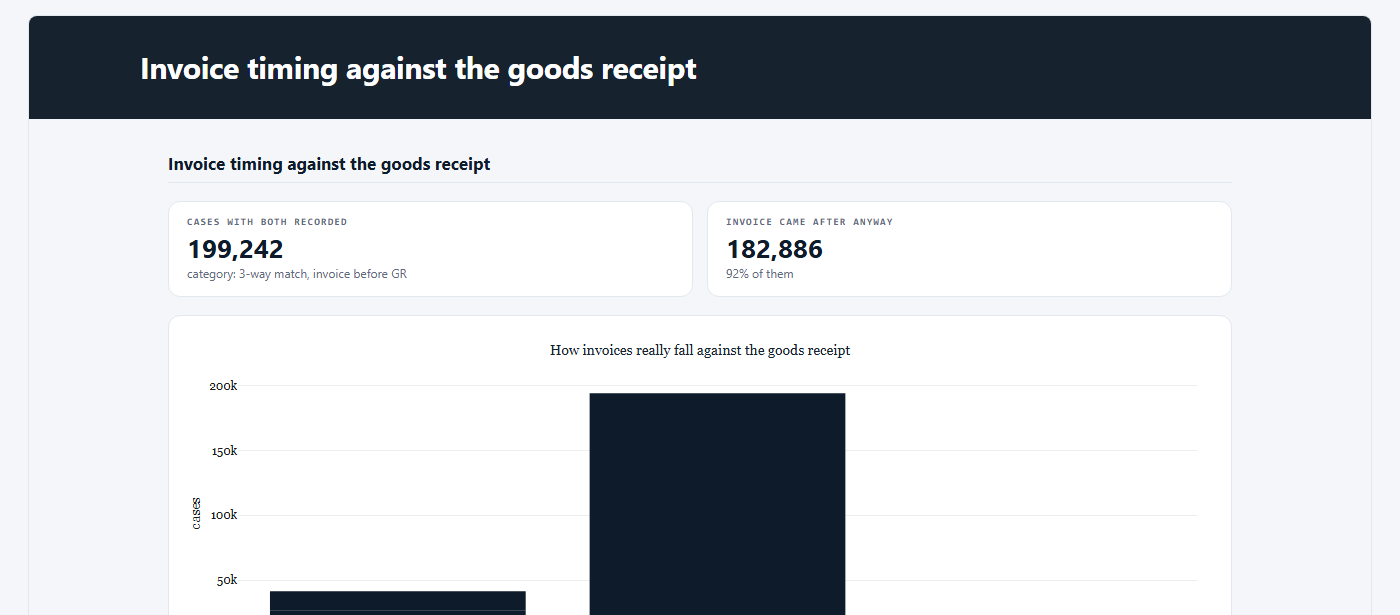
The report carries two files, and mz reports attachments --slug invoice-timing-against-the-goods-receipt lists them:
| Name | Bytes | Schema |
|---|---|---|
invoice-timing.json |
1,254 | partner.invoice-timing 1 |
invoice-timing-kpis.json |
236 | partner.invoice-timing-kpis 1 |
mz reports attachment --slug invoice-timing-against-the-goods-receipt --name invoice-timing-kpis.json returns the second one - and the answer to the question is no: in 92 percent of those items the invoice was recorded after the goods receipt.
{
  "schema": "partner.invoice-timing-kpis",
  "schema_version": "1",
  "category": "3-way match, invoice before GR",
  "cases_with_both_recorded": 199242,
  "invoice_after_goods_receipt_anyway": 182886,
  "share_after_anyway": 0.9179
}
In plain words
No script: your agent describes the report in its own words and names the files it wants. This is the brief that was sent, word for word:
mz jobs create-agent --name "Payment blocks - where they are set and removed" --brief "Find where payment blocks are set and removed in this purchase-to-pay process: how many cases get a payment block, at which step it is set, how long it stays before it is removed, and which item categories and vendors are most affected. Keep it short. At the end of the report, attach two JSON files for a program to read, using mzreport.json_download_link inside a prose section: 'payment-blocks-summary.json' holding the headline numbers (cases blocked, share of all cases, median days blocked) and 'payment-blocks-by-category.json' holding one row per item category with cases blocked and median days blocked."
mz jobs run --slug payment-blocks-where-they-are-set-and-removed
mz jobs status --slug payment-blocks-where-they-are-set-and-removed
This is an AI job: it uses your project's AI credits. It took 8 minutes, and the report published itself when the run was done, carrying exactly the two files it was asked for. A person can ask for the same report on the project's Reports screen, in the box under the cards (see Reports).
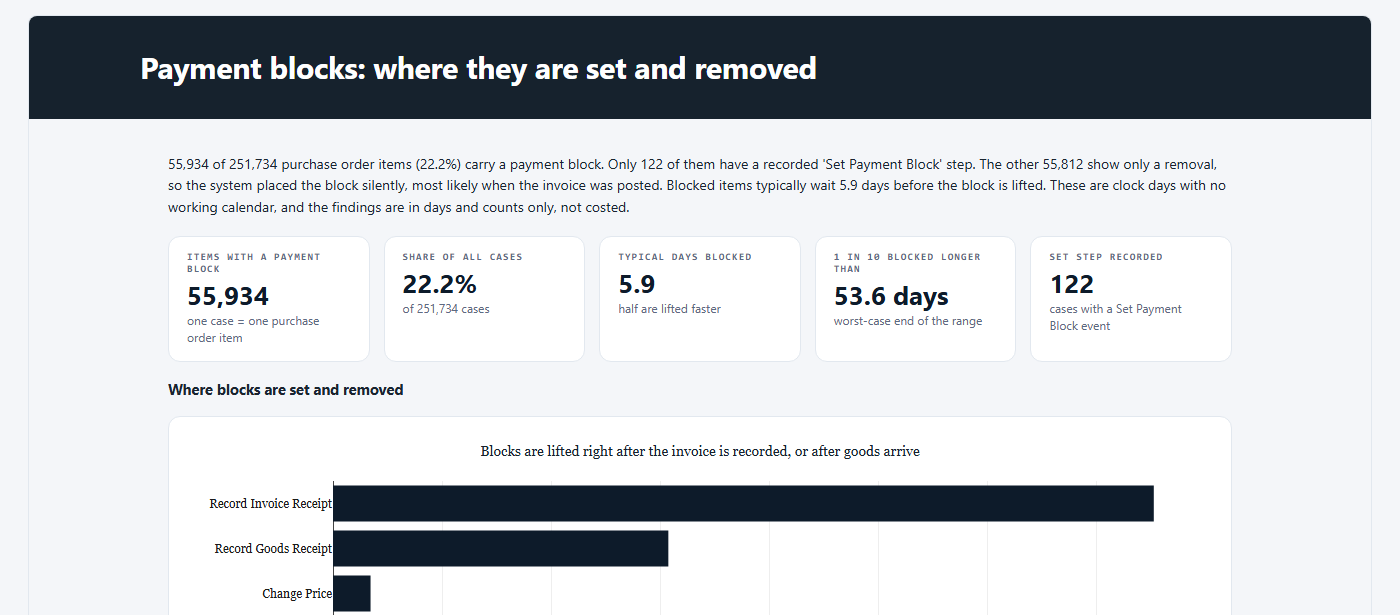
payment-blocks-summary.json, as mz reports attachment returned it:
{
  "basis": "Cases with at least one Set Payment Block or Remove Payment Block event; one case is one purchase order item. Days are clock days.",
  "cases_total": 251734,
  "cases_blocked": 55934,
  "share_of_all_cases_percent": 22.22,
  "median_days_blocked": 5.92,
  "median_days_blocked_basis": "block start is the recorded Set Payment Block, or the last Record Invoice Receipt before the removal when no set was recorded",
  "cases_with_recorded_set": 122,
  "median_days_blocked_recorded_set_only": 15.01,
  "cases_with_recorded_set_and_removal": 13
}
The AI chose the shape of these files, and they name no schema. If your program needs a fixed shape, describe it in the brief - the fields, their names, and a "schema" name of your own - or use a script, where the shape is exactly what you write.
Reaching your reports and JSON
The same four commands reach the default graph, your own reports, and anything anybody else in the project published:
| Command | What it returns |
|---|---|
mz reports list |
Every published report, newest first: its name, version, when and by whom it was published, and the JSON files it carries |
mz reports read --slug <slug> |
One report's HTML, whole, and its record |
mz reports attachments --slug <slug> |
The JSON files one report carries, each with its size and the schema it names |
mz reports attachment --slug <slug> --name <file> |
One JSON file, as data, without the report around it |
A report's <slug> is in mz reports list. mz reports read, mz reports attachments and mz reports attachment take --version to read an earlier version of a report; every version keeps its own files. To save a file, send the answer to it: mz reports attachment --slug <slug> --name <file> > <file> (on Windows, in Command Prompt).
A name the report does not carry is refused, naming the ones it does. A file that is not valid JSON is refused rather than handed over as text, and the refusal says the report has to be published again with a valid file.
mz <group> --help gives the exact options of every command.
Jobs run one at a time
A project runs one job at a time. A script job started while the Process Context Graph card is running waits until the card has finished - on a large log, that can be most of an hour - and only then takes its few seconds.
Next
- Connect Your Own Agent and Get the Process Context Graph - the tool, the key, and every step to the graph.
- Getting the Process Context Graph - the default, and how to fetch it in one call.
- The Cube's Toolbox - what a script like the one above can call.