あなた自身のレポートとJSON
プロセスコンテキストグラフはデフォルトです:内容は私たちが決めているため、取得のために何かをする必要はありません。それ以外のものはあなたのものです。プロジェクトは任意の数のレポートを保持でき、それぞれが任意の数のJSONファイルを名前や形状を自由に付けて持つことができ、あなたのエージェントはデフォルトのグラフにアクセスするのとまったく同じ方法でそれらにアクセスします。
レポートの作成方法は2つあります:
- スクリプトを使う。 あなた自身やあなたのエージェントが、プロジェクト内のログを読み込み、レポートを書く短いPythonスクリプトを書きます。AIは関与しません。
- 平易な言葉で。 レポートを自分の言葉で説明し、欲しいJSONファイルの名前を指定すると、AIがレポートとファイルを作成します。
いずれの場合も結果は同じ:レポート画面に公開されたレポートで、その横にデフォルトグラフではなくあなた自身の命名したJSONファイルが並びます。以下の両例は同じ1.6百万イベントの購入から支払いまでの実プロジェクトで実行され、表示されているファイルは作成されたものです。エージェントがそのツールとキーを取得する方法は自分のエージェントを接続するをご覧ください。
1つのルール:JSONには必ずあなた自身の名前を付けること
"schema": "mindzie.process-context-graph"というJSONファイルは、レポートが公開される際に私たちの定義に従います。形状が異なる場合、そのレポートは公開されません。一方、他のスキーマ名あるいはスキーマ名なしの場合は私たちの定義と照合されず、形状はあなたが自由に決められます。
したがって、拡張は私たちの名前を借りず、デフォルトグラフのフィールドを追加しません。追加するものは自分自身の名前で別ファイルとして用意し、以下の例では partner.invoice-timing を使っています。可能な場合はデフォルトグラフのID(act:clear-invoice、エッジのID、決定のIDなど)を参照して両者がつながるようにしてください。
スクリプトで
質問:アイテムカテゴリ「3-way match, invoice before GR」では、請求書は本当に物品受領より前に来るのか?このスクリプトはログに問い合わせ、2つのJSONファイルを自分で命名して持つレポートを作成します。mzreport.json_download_link(name, document)はJSONファイルのリンクを作成します。任意の名前、任意のJSONを何ファイルでもレポートに含めることができます。
"""Invoice timing against the goods receipt - our own report, carrying our own JSON files."""
import sys
from pathlib import Path

import mindzie_engine as me
import mzreport
from mzlog import open_project
from mzreport import write_report

# A job run passes the path it wants as sys.argv[1]; mz run passes nothing.
OUT = Path(sys.argv[1]) if len(sys.argv) > 1 else Path("preview.html")
print("writing report to %s" % OUT)

SQL = """
WITH per_case AS (
    SELECT case_id,
           min(CASE WHEN activity = 'Record Goods Receipt' THEN timestamp END) AS goods_receipt,
           min(CASE WHEN activity = 'Record Invoice Receipt' THEN timestamp END) AS invoice,
           max("Item Category") AS category
    FROM events GROUP BY case_id)
SELECT category,
       CASE WHEN goods_receipt IS NULL OR invoice IS NULL THEN 'not both recorded'
            WHEN invoice < goods_receipt THEN 'invoice before goods receipt'
            ELSE 'invoice after goods receipt' END AS timing,
       count(*) AS cases,
       round(median(date_diff('day', goods_receipt, invoice)), 1) AS median_days_receipt_to_invoice
FROM per_case GROUP BY 1, 2 ORDER BY 1, 2
"""

project = open_project()
with project.log.session() as log:
    frame = log.query(SQL)

rows = []
for record in frame.to_dict("records"):
    days = record["median_days_receipt_to_invoice"]
    rows.append({"category": record["category"], "timing": record["timing"],
                 "cases": int(record["cases"]),
                 "median_days_receipt_to_invoice": None if days != days else float(days)})

before_gr = [row for row in rows if row["category"] == "3-way match, invoice before GR"]
both = [row for row in before_gr if row["timing"] != "not both recorded"]
after_anyway = sum(row["cases"] for row in both if row["timing"] == "invoice after goods receipt")
total_both = sum(row["cases"] for row in both)
kpis = {
    "schema": "partner.invoice-timing-kpis",
    "schema_version": "1",
    "category": "3-way match, invoice before GR",
    "cases_with_both_recorded": total_both,
    "invoice_after_goods_receipt_anyway": after_anyway,
    "share_after_anyway": round(after_anyway / total_both, 4) if total_both else None,
}

sections = [
    me.heading("Invoice timing against the goods receipt"),
    me.kpis([
        me.kpi("Cases with both recorded", "{:,}".format(total_both),
               sub="category: 3-way match, invoice before GR"),
        me.kpi("Invoice came after anyway", "{:,}".format(after_anyway),
               sub="{:.0%} of them".format(kpis["share_after_anyway"] or 0)),
    ]),
    me.chart_bar(frame, x="timing", y="cases",
                 title="How invoices really fall against the goods receipt"),
    me.prose("This report is our own analysis, not one of the shipped cards. It carries two "
             "JSON files of our own naming for any program to fetch: "
             + mzreport.json_download_link("invoice-timing.json",
                                           {"schema": "partner.invoice-timing",
                                            "schema_version": "1", "rows": rows})
             + " and "
             + mzreport.json_download_link("invoice-timing-kpis.json", kpis)
             + "."),
]
write_report(OUT, meta={"title": "Invoice timing against the goods receipt"}, sections=sections)
print("wrote %s" % OUT.name)
クエリのカラム名はこのログ固有のものです。mz log schemaでログのカラム名を、mz log activitiesでステップ名を確認してください。続いて:
mz run invoice_timing.py
mz jobs create --name "Invoice timing against the goods receipt"
mz jobs put-file --slug invoice-timing-against-the-goods-receipt --name invoice_timing.py --file invoice_timing.py
mz jobs run --slug invoice-timing-against-the-goods-receipt
mz jobs status --slug invoice-timing-against-the-goods-receipt
mz jobs outputs --slug invoice-timing-against-the-goods-receipt
mz jobs publish --slug invoice-timing-against-the-goods-receipt --run-id r0001 --output invoice_timing.html --name "Invoice timing against the goods receipt"
mz runはスクリプトを一度プロジェクト内で実行し、完全なエラーを表示します。まずきれいに動くようにしてください。プレビューを書きますが、実際に評価されるのはジョブ実行です。mz jobs createはジョブのスラッグを返し、他のコマンドがそれを使います。mz jobs runはジョブを実行します。10秒未満で終わりました。mz jobs outputsはその実行と書かれたレポートの名前を表示し、mz jobs publishはレポートをReports画面に公開します。
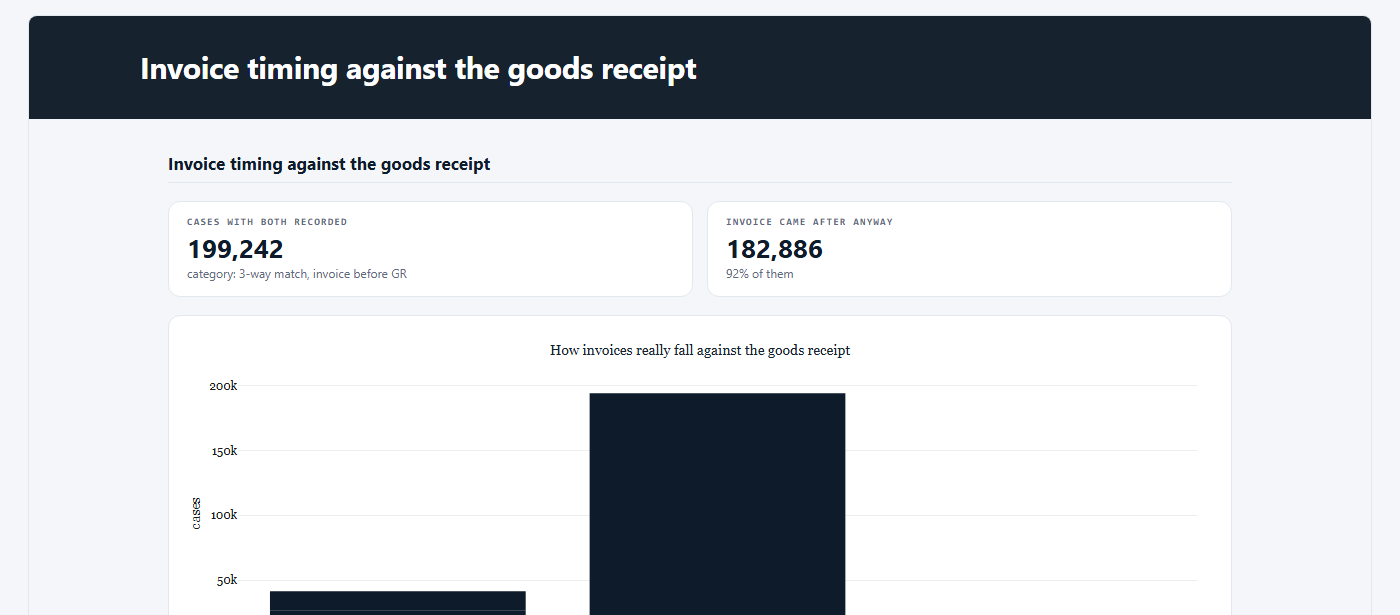
レポートは2つのファイルを含み、mz reports attachments --slug invoice-timing-against-the-goods-receiptで一覧します:
| 名前 | バイト数 | スキーマ |
|---|---|---|
invoice-timing.json |
1,254 | partner.invoice-timing 1 |
invoice-timing-kpis.json |
236 | partner.invoice-timing-kpis 1 |
mz reports attachment --slug invoice-timing-against-the-goods-receipt --name invoice-timing-kpis.jsonで後者を取得できます。そして質問の答えはノーです:これらの品目の92%で請求書は物品受領後に記録されています。
{
  "schema": "partner.invoice-timing-kpis",
  "schema_version": "1",
  "category": "3-way match, invoice before GR",
  "cases_with_both_recorded": 199242,
  "invoice_after_goods_receipt_anyway": 182886,
  "share_after_anyway": 0.9179
}
平易な言葉で
スクリプトなし:あなたのエージェントが自分の言葉でレポートを説明し、必要なファイル名を付けます。以下が文字通り送られたブリーフです:
mz jobs create-agent --name "Payment blocks - where they are set and removed" --brief "Find where payment blocks are set and removed in this purchase-to-pay process: how many cases get a payment block, at which step it is set, how long it stays before it is removed, and which item categories and vendors are most affected. Keep it short. At the end of the report, attach two JSON files for a program to read, using mzreport.json_download_link inside a prose section: 'payment-blocks-summary.json' holding the headline numbers (cases blocked, share of all cases, median days blocked) and 'payment-blocks-by-category.json' holding one row per item category with cases blocked and median days blocked."
mz jobs run --slug payment-blocks-where-they-are-set-and-removed
mz jobs status --slug payment-blocks-where-they-are-set-and-removed
これはAIジョブで、プロジェクトのAIクレジットを使用します。8分かかり、実行終了時に要求通りの2ファイルを載せて自動的にレポートが公開されました。プロジェクトのReports画面のカード下のボックスでも同じレポートを要求できます(Reports参照)。
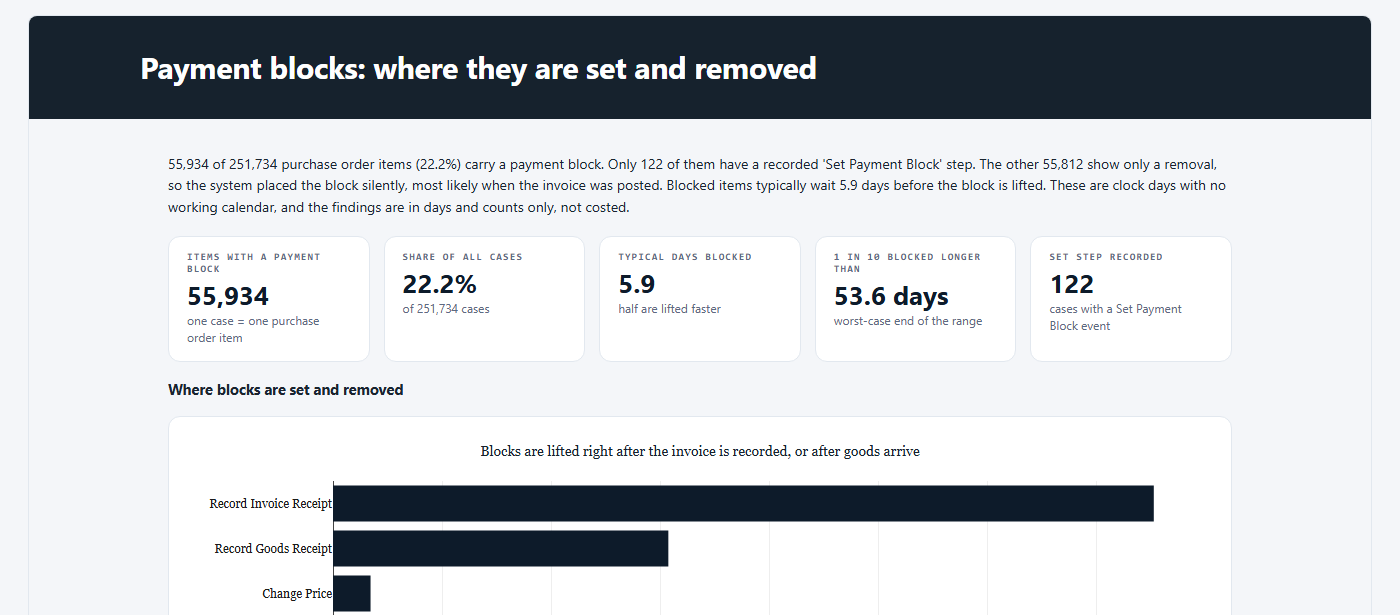
payment-blocks-summary.json を mz reports attachment で得た内容:
{
  "basis": "Cases with at least one Set Payment Block or Remove Payment Block event; one case is one purchase order item. Days are clock days.",
  "cases_total": 251734,
  "cases_blocked": 55934,
  "share_of_all_cases_percent": 22.22,
  "median_days_blocked": 5.92,
  "median_days_blocked_basis": "block start is the recorded Set Payment Block, or the last Record Invoice Receipt before the removal when no set was recorded",
  "cases_with_recorded_set": 122,
  "median_days_blocked_recorded_set_only": 15.01,
  "cases_with_recorded_set_and_removal": 13
}
AIがファイルの形状を決め、スキーマ名は付けていません。もしプログラム側で固定された形が必要ならば、ブリーフでフィールドや名前、「schema」名を自分で指定するか、あるいはスクリプトで形状を厳密に書いてください。
あなたのレポートとJSONへのアクセス
同じ4つのコマンドで、デフォルトグラフ、あなたのレポート、プロジェクト内の誰かが公開したものすべてにアクセスできます:
| コマンド | 戻り値 |
|---|---|
mz reports list |
公開されたすべてのレポート(最新順)、名前、バージョン、公開日時・公開者、含むJSONファイル |
mz reports read --slug <slug> |
1つのレポートの完全なHTMLとレコード |
mz reports attachments --slug <slug> |
1つのレポートが含むJSONファイル一覧、各ファイルのサイズとスキーマ名 |
mz reports attachment --slug <slug> --name <file> |
1つのJSONファイルのデータ部分のみ(レポート外) |
レポートの<slug>は mz reports list にあります。mz reports read、mz reports attachments、mz reports attachmentは--versionを使うと過去バージョンを読むことができます。各バージョンはそれぞれのファイルを保持しています。ファイル保存は返信をリダイレクトしてください:mz reports attachment --slug <slug> --name <file> > <file>(Windowsのコマンドプロンプトで)。
レポートに存在しない名前は拒否され、存在する名前を一覧表示します。有効なJSONでないファイルはテキストで返されるのではなく拒否され、レポートを有効なファイルで再公開する必要があることが表示されます。
mz <group> --help で各コマンドの正確なオプションが表示されます。
ジョブは一度に1つだけ実行される
プロジェクト内のジョブは1つずつ順番に実行されます。Process Context Graphカードの実行中にスクリプトジョブを起動すると、そのカードの実行終了(大規模ログでは1時間近くかかることも)まで待機し、その後数秒のジョブを実行します。
次へ
- 自分のエージェントを接続する - ツールとキー、それを繋ぐ一文。
- プロセスコンテキストグラフの入手 - デフォルトと一呼び出しでの取得方法。
- キューブのツールボックス - 上記のようなスクリプトが呼び出せるもの。