AI Jobs
Every AI generation you start is recorded as a job in the project's AI Jobs page. Open it with AI Jobs in the sidebar while a project is open.
Use this page to start a generation, watch one that is running, open the models it produced, and go back to the conversation that created them.
AI Jobs is greyed out when AI agents are not enabled for your tenant. Ask your tenant administrator if you need it turned on.
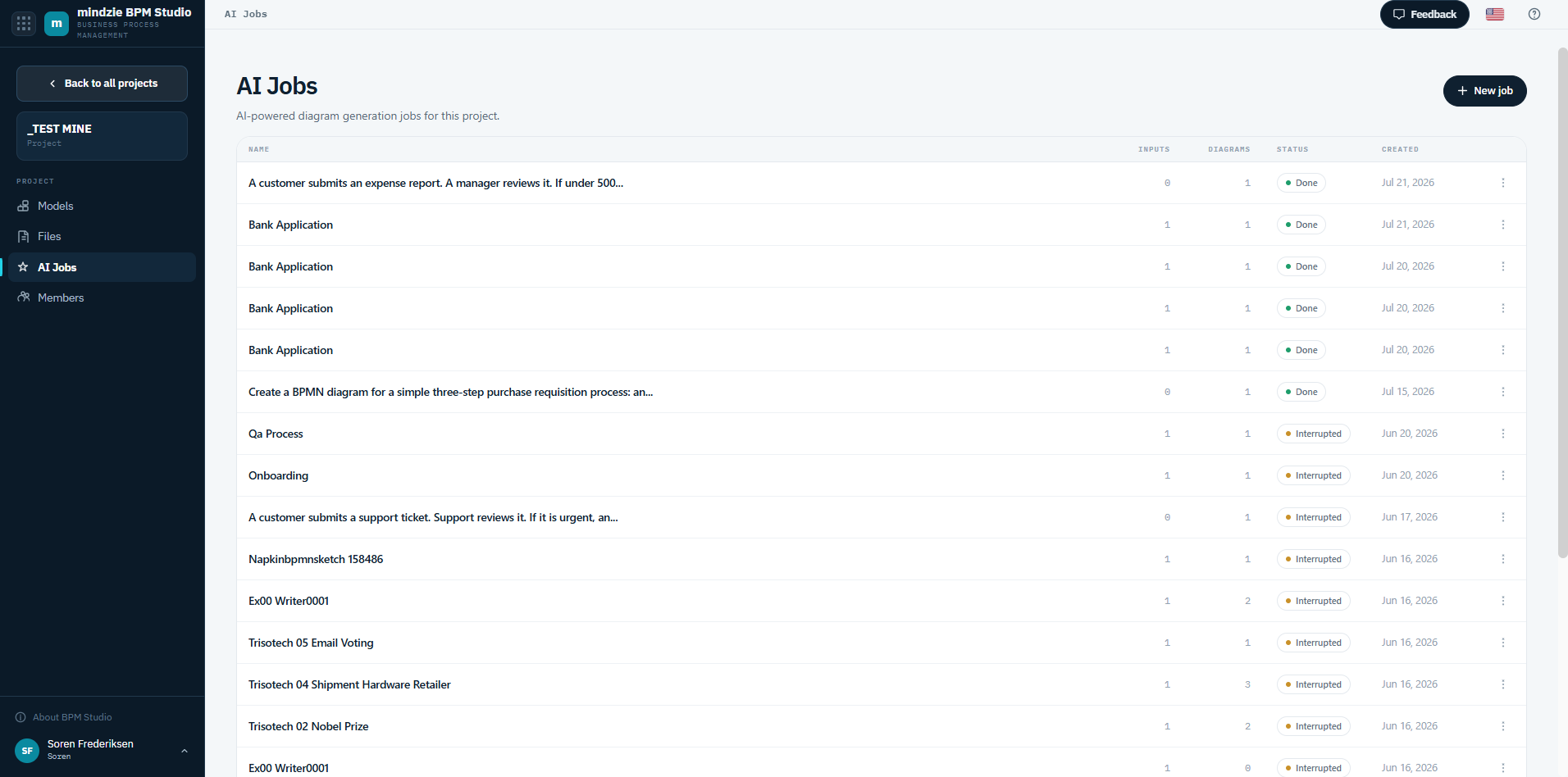
The Job List
| Column | What it shows |
|---|---|
| Name | The name you gave the job. |
| Inputs | The pictures, documents, or Visio drawings the job was given. |
| Diagrams | The models the job produced. |
| Status | Where the job has got to (see below). |
| Created | When the job was started. |
| Actions | Open the job, or delete it. |
Job Status
| Status | What it means |
|---|---|
| New | The job has been created but has not started yet. |
| Running | The agent is working. You can leave the page - it keeps going. |
| Done | The models are ready. |
| Completed with a problem | The job finished, but something did not go cleanly. Open it to see what the agent produced. |
| Failed | The job did not produce a model. Open it to see why, then try again. |
| Stopped | The job was stopped before it finished. |
| Interrupted | The job stopped unexpectedly. Start it again. |
You also receive an email when a job finishes, so you do not have to sit and watch this page.
Starting a Job
Click New job and choose how the agent should work - from a description you type, or from a picture, an SOP, or a Visio drawing. This is the same choice you get from New model on the Models page. See Creating Models with AI.
Opening a Job
Click a job to open its run page. There you can:
- Read the conversation with the agent, and keep refining the process in it.
- Review the input files the job was given, with a preview where the file type allows one.
- Open the BPMN diagrams it produced.
- Add more input files to the job, or remove ones you no longer want.
- Rename the job.
If you have Viewer access to the project you can read a job but not change it.
Deleting a Job
Use the job's actions menu and choose Delete. Deleting a job removes the record of the run; models it created stay in the project.
Where the Models Go
Models an agent produces appear on the project's Models page with an AI-built badge, like any other model - open, edit, version, and publish them normally. See Managing Models.