Predictions
Predictions train a model on your finished cases and use it to warn you about running cases while there is still time to act - for example, which cases are likely to need extra checks, or to end late. Each prediction also tells you, in plain words, how far its answers can be trusted.
How to read it
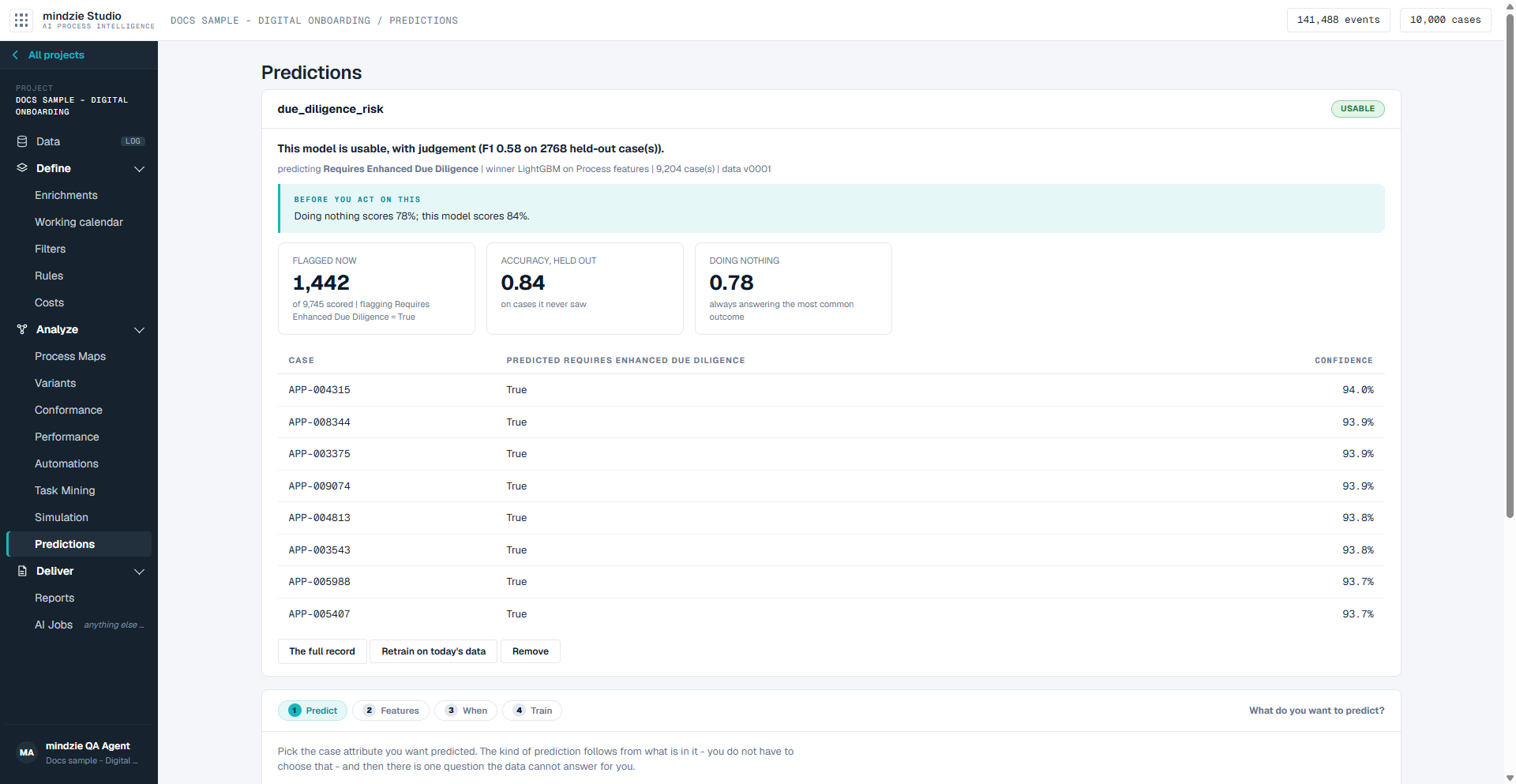
Each prediction is one card, with its name at the left and its verdict at the right:
| Verdict | What it means |
|---|---|
| Strong | Worth acting on. |
| Usable | Usable, with judgement. |
| Weak | Treat its answers as a hint to look, not as a decision. |
| Not usable | It has not found a usable pattern. Do not act on it. |
| Training | It is still being trained. The card says what it is doing and how far it has got. You can leave the page. |
Under the name, one line in bold says how good the model is and on how many held-out cases that was measured. The small line beneath says what it predicts and how many cases it learned from. Then come the notes headed Before you act on this - read them first.
Three figures follow:
- Flagged now - how many running cases the model flags right now, out of how many it scored, and which answer it is flagging.
- The held-out score (for a yes/no prediction, Accuracy, held out) - how the model did on cases it never saw while it was trained.
- Doing nothing - how you would score by always answering the most common outcome.
Below the figures is the list of flagged cases, the surest first: the case, the model's answer, and its Confidence in that answer. A number prediction has no confidence column, because it gives no per-case confidence.
How good is the model? Read this before relying on it
A high score alone does not make a model good. If 95 cases in 100 end on time, a model that always says "on time" is right 95% of the time - and has learned nothing. That is why every prediction sets its score beside Doing nothing.
- Compare the held-out score with Doing nothing. If the model is not clearly better than always answering the most common outcome, it has found nothing, whatever the score looks like, and it is graded Not usable.
- Trust the held-out score. It was measured on cases that played no part in building or choosing the model. The scores under Everything that was tried, in the full record, are only what was used to choose between models.
- Read the bold line and the notes, not just the verdict. For a yes/no prediction, the full record says whether the model is better at catching the cases that go wrong or at being right when it flags one. A model can be right about most of what it flags and still miss half of the cases you care about.
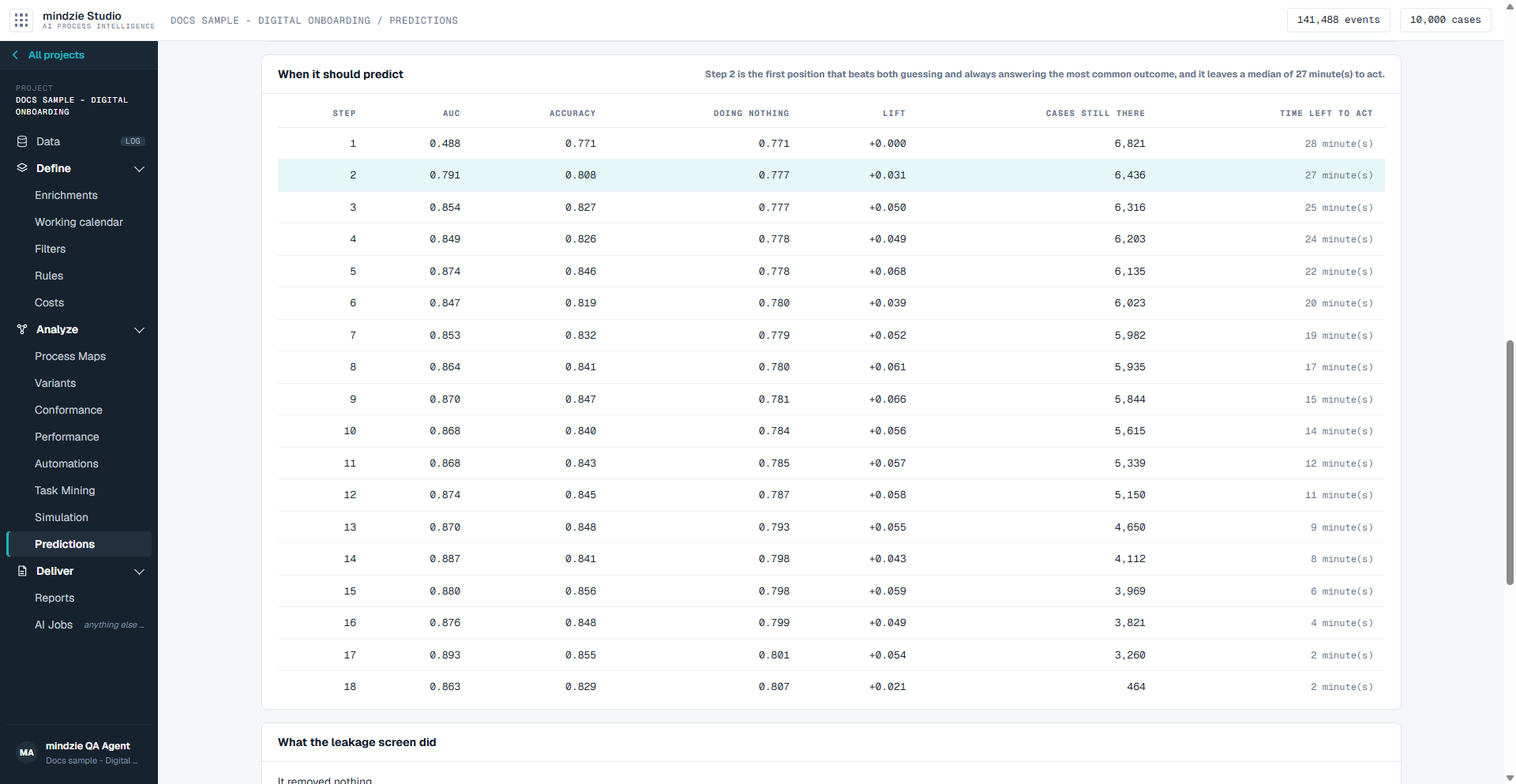
- Check when it can answer. When it should predict, in the full record, shows how good the answer is at each step of a case and how much time is left to act at that step. An answer that only becomes good near the end of a case comes too late to use.
- A model cannot see what the log does not record. If what decides the outcome happens outside the process, no model will foresee it.
An example. The prediction in the screenshots above is right 84% of the time, where always answering the most common outcome is right 78% of the time. That is a real improvement, but a modest one, and it is graded Usable, not Strong. Its full record adds that 73% of the cases it flags really do end that way, but it catches only 49% of them. So it is worth using to decide which cases to look at first - not as a promise that every case it misses is fine.
A Weak or Not usable prediction still tells you something: the outcome cannot be foreseen from this data at this point in the case. Try a different moment, a different target, or more history.
What you can do
Train a prediction
The form under the predictions walks you through four steps: Predict, Features, When and Train. Next and Back move between them, and Next tells you what is missing if a step is not answered yet.
- Predict - pick the case attribute you want predicted. The kind of prediction follows from what is in it - a yes/no prediction, a which-one prediction, or a number - and the screen says which, with how many cases hold each value.
- Still on Predict, say which value means the case went wrong - or, for a number, which end of the number is the bad end. The data cannot tell you this: a column called on_time and a column called late hold the same values and mean opposite things.
- Features - choose what the model may learn from: activity patterns, flow and rework, timing, and resources. Each group shows how many signals your log supports. Raw case attributes are off by default: they are usually identifiers, free text and dates, which either carry no signal or carry the answer itself. Columns you added on Enrichments are included already.
- When - choose when a running case is scored:
- Continuously, as each step arrives (recommended) - the answer moves as the case goes on. This is the one that warns you while there is still time to act.
- Once, after a fixed number of steps - cases that never get that far are not predicted about.
- Once, when the case reaches an activity - you choose the activity; cases that never reach it get nothing.
- Train - give the prediction a short name (lower case letters, digits and underscores, starting with a letter) and a Search budget in seconds. Skip the moment curve is faster, but then nothing measures when in a case the answer can be trusted, and the verdict says so. Check What you asked for, then click Train it.
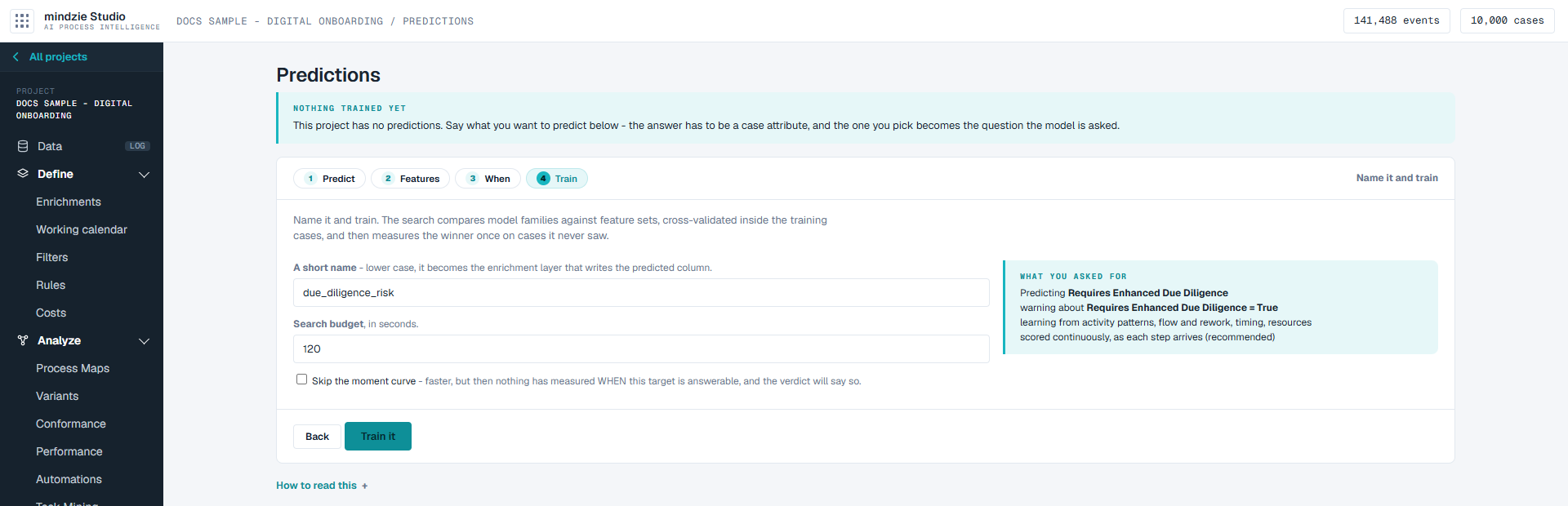
Training takes a few minutes, and you can leave the page. When it is done, the card shows its verdict and the cases it flags.
Read the full record
Click The full record on a prediction's card.
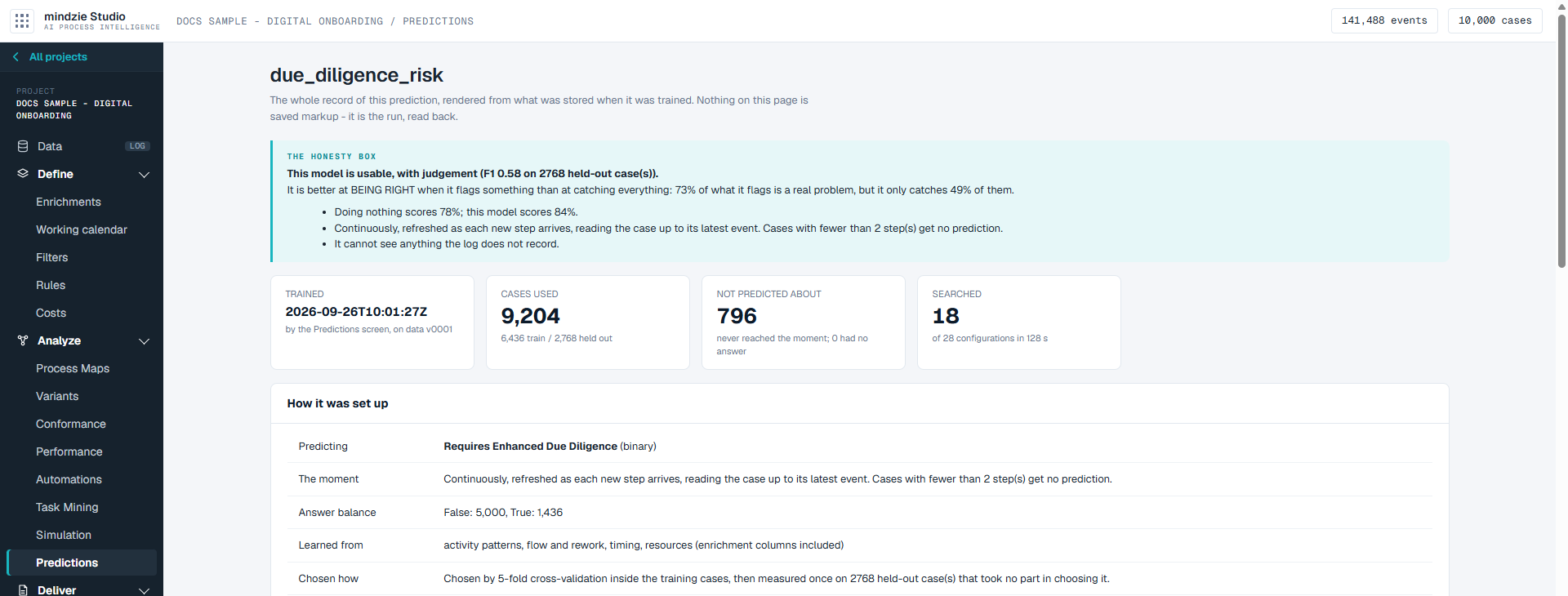
- The honesty box - the verdict, what the model is good and bad at, and its cautions.
- Trained, Cases used (how many trained it and how many were held out), Not predicted about (cases that never reached the moment) and Searched.
- How it was set up - what it predicts, the moment, the balance of answers, what it learned from, and how the winning model was chosen.
- The held-out check - every measure on the held-out cases, with the score for always answering the most common outcome beneath them.
- Everything that was tried - the models compared, and which one won.
- When it should predict - for each step in a case: how good the answer is, how it compares with doing nothing, how many cases are still running, and how much time is left to act. The highlighted row is the first step where predicting beats doing nothing.
- What the leakage screen did - signals taken out because they gave the answer away, and signals kept that decide the outcome for most of the cases they appear on. A kept signal is worth a look if you did not expect it. The screen says what it cannot catch: a run where it removed nothing does not prove the data is clean.
- What it leaned on - the signals that mattered most to the answer.
- Earlier runs of this prediction, once it has been retrained.
Keep a prediction up to date, or remove it
- Retrain on today's data trains the prediction again on the data the project holds now.
- Remove deletes the prediction and its model, and its card leaves the screen. A prediction that is still training cannot be removed: the screen says "... is still training. Remove it once the training finishes."
Good to know
- New data rescores every prediction, so the list of flagged cases is never yesterday's. It does not retrain the model; that only happens when you click Retrain on today's data. A line under the list says the same.
- A prediction needs a case attribute to predict. If the log has none, or none that can be predicted (the same on every case, different on every case, or free text), the screen says so instead of showing the form. Add one on Enrichments - for example whether a case was late - and it will be offered here.
- If a prediction cannot be scored right now, its card says so, and the figures describe the run that trained it rather than your data today.
- If training fails, the card says why. A training that is stopped leaves nothing behind.