Enrichments
An enrichment changes the event log that every screen reads: it adds a column, changes values or activity names, removes cases or events, or adds events. Use one when the log as loaded does not yet say something you want to analyze - for example, whether a case was fast or slow.
How to read it
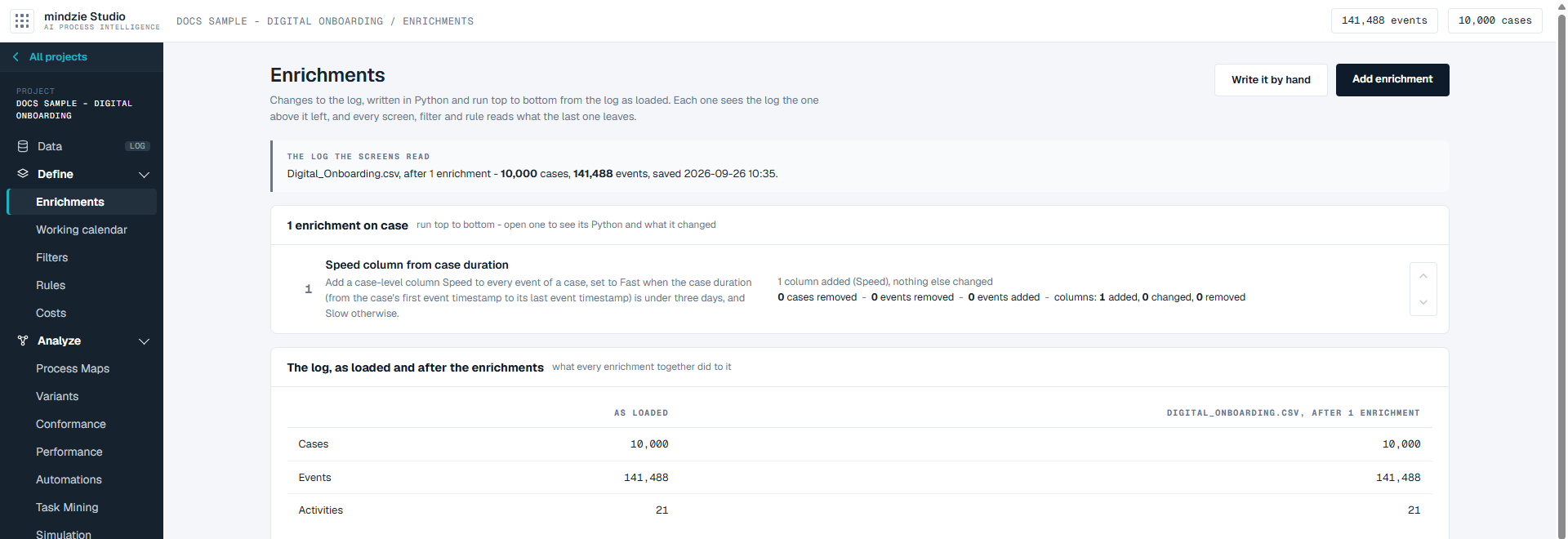
The log the screens read. The box at the top names the event log every screen is reading now, with its number of cases and events. Once an enrichment has run, it says how many enrichments the log has been through and when it was saved.
The list. Every enrichment on the event log, numbered in the order it runs. The first one is handed the log as loaded, and each one after it is handed what the one above it left. Each row shows the enrichment's name, its description, and what it changed on its last run:
- how many cases and events it removed, and how many events it added
- how many columns it added, changed and removed
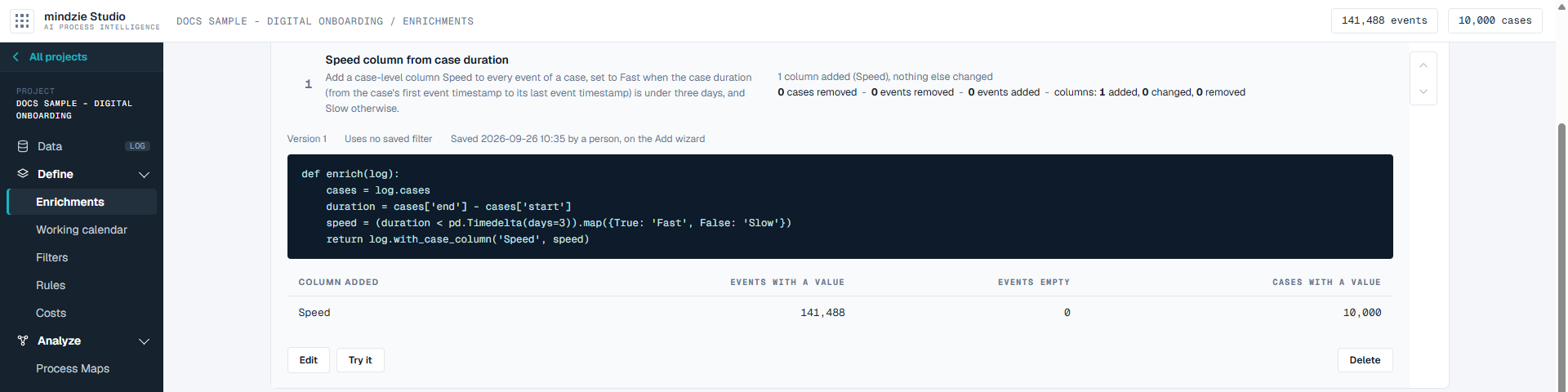
Click a row to open it. You see its version, the saved filters it uses, when it was saved and by whom, the Python it runs, and what it changed in detail - for a column it added, how many events and cases have a value.
The log, as loaded and after the enrichments. At the bottom, the log as it was loaded side by side with the log after every enrichment has run: cases, events and activities, then every column with its type, how much of it is empty, and whether it is a value of the case or of the event. A column an enrichment added, changed or removed is marked added, changed or removed beside its name.
There is no switch to turn an enrichment off. If it is on the list, it runs.
What you can do
Add an enrichment in your own words
Click Add enrichment. The page walks through three steps: Say what you want, Check how we read it and Generate.
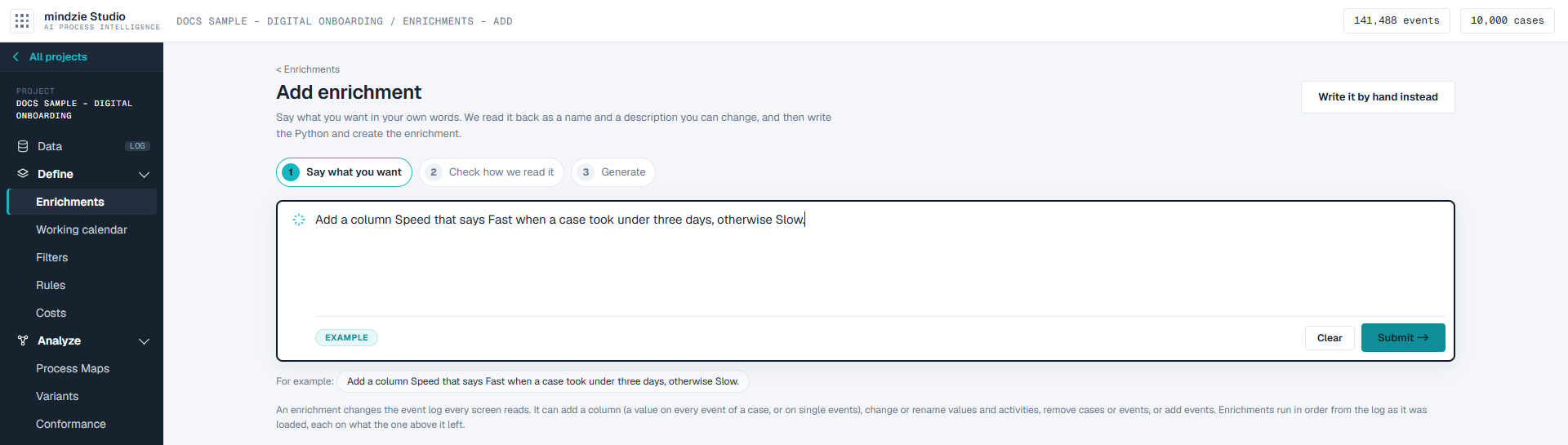
Describe what should be added to or changed in the log. Click the example under the box to try it: "Add a column Speed that says Fast when a case took under three days, otherwise Slow." Click Submit.
Check how your words were read. On the left, What we will make holds a Name and a Description you can change - the Python is written from the description. On the right, How we read what you said lists each part of your request, and Read as says where a choice was made, such as how a case's duration is measured. Anything the log cannot say is listed as left out.
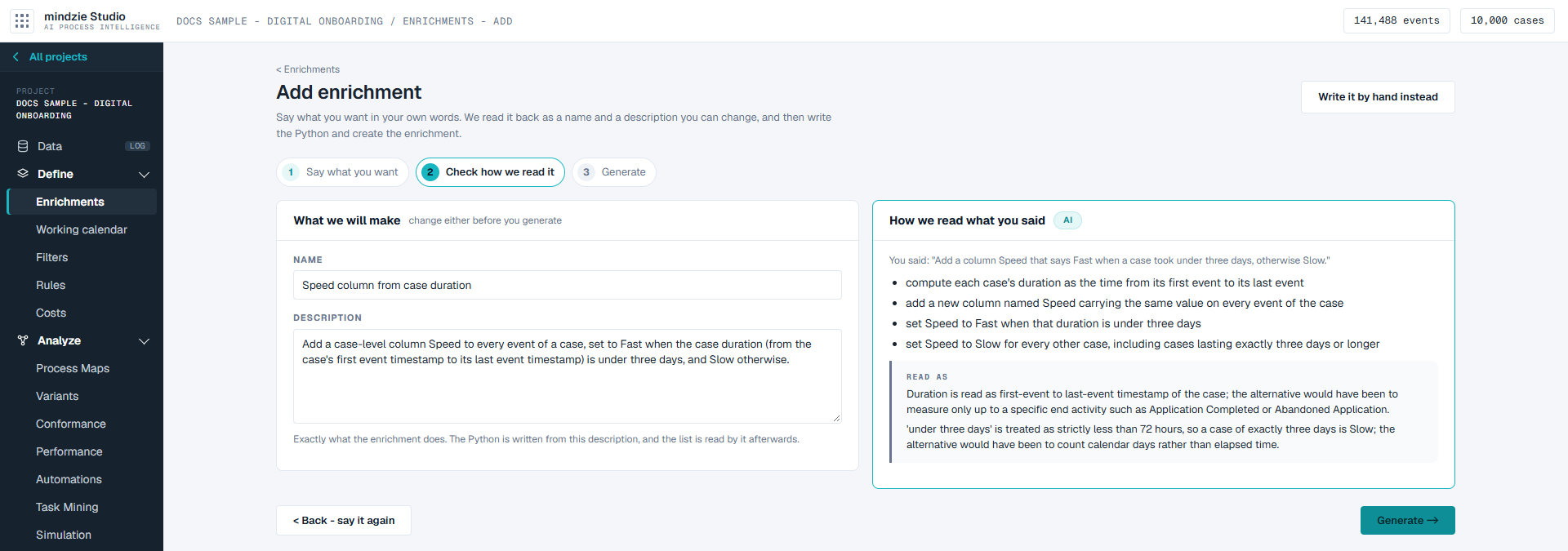
Click Back - say it again to change your words, or Generate to go on.
The Python is written from the description and tried on the log. When it passes, the enrichment is created, and the page says what it did - for example "1 column added (Speed), nothing else changed". Click Done - back to Enrichments, Open it to edit, or Add another.
Creating an enrichment runs every enrichment again from the log as loaded, so every screen reads the new result.
Write one yourself
Click Write it by hand to write the Python yourself. Give it a Name and a Description - the description is the line the list is read by. Runs says where on the list it will run. The panel on the right, This log, lists the log's columns, activities and saved filters; click one to put its name in the code.
- Try it on the log runs every enrichment above this one, then yours, and shows what it would change. Nothing is saved.
- Save enrichment saves it and runs every enrichment again.
- Cancel leaves without saving.
Change, try, move or delete one
Open an enrichment's row, then:
- Edit opens it in the editor.
- Try it runs it on the log and shows what it would change, without saving.
- Delete takes it off the list, after you confirm. Every enrichment left runs again without it.
The arrows at the right of a row move it up or down the list. Because each enrichment is handed what the one above it left, the order can change the result; after a move, every enrichment runs again in the new order.
Good to know
- A run that fails saves nothing. If an enrichment stops with an error, the screen names it, the error and the line, and every screen goes on reading the last log that worked. Fix the enrichment, or move or delete it, and every enrichment runs again.
- Everything reads the result. The Analyze screens, filters and rules all read the log the last enrichment leaves, so a column you add here can be used in a filter or a rule.
- Some event logs cannot be enriched. When the event log in use is read through the objects of an object-centric log, the screen says enrichments are not available on it and links to Data, where you can choose another event log.
- Words need an AI model. If no AI model is available to the project, Add enrichment says so. Write it by hand always works, and the enrichment is the same either way.