BPMN Conformance
Overview
BPMN Conformance checking compares your actual process data against a designed BPMN process model. It analyzes every case in your event log and determines whether each case follows the expected process flow defined in your BPMN model.
This feature is configured during the Dataset Upload wizard when you load your event log into mindzieStudio.
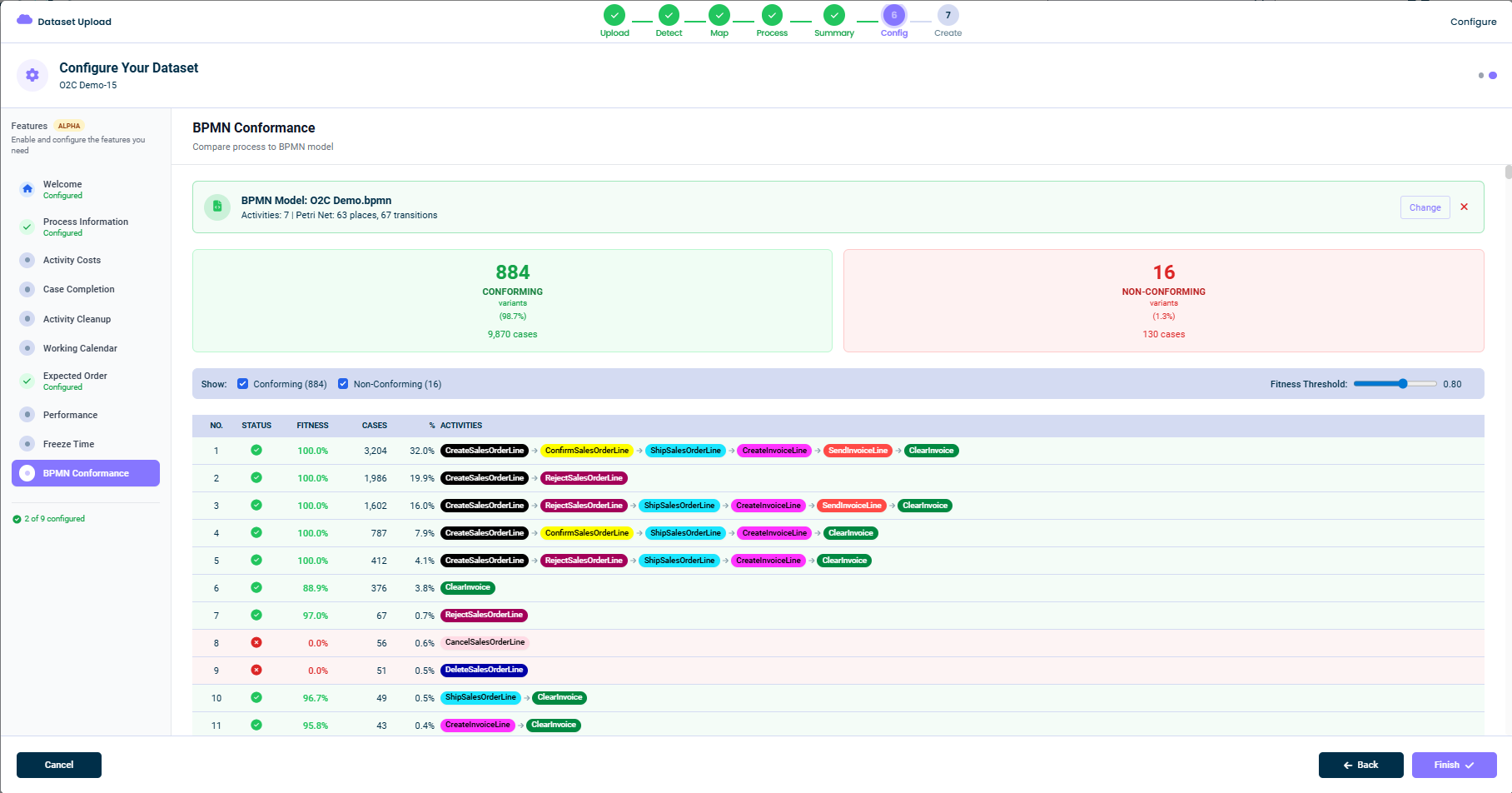
This feature uses Petri Net token replay for accurate conformance checking. Unlike simple sequence matching, token replay correctly handles:
- Parallel gateways (AND): All branches must be executed
- Exclusive gateways (XOR): Only one branch should be taken
- Inclusive gateways (OR): One or more branches can be taken
Common Uses
- Process Compliance: Verify that cases follow the standard operating procedure defined in your BPMN model
- Deviation Analysis: Identify cases that deviate from the expected process flow
- Quality Control: Flag non-conforming cases for review or remediation
- Continuous Improvement: Track conformance rates over time to measure process improvement
- Audit Support: Provide evidence of process compliance for internal or external audits
How to Configure
Step 1: Access Dataset Configuration
During the dataset upload wizard, navigate to the Configure step (step 6 of 7). In the left sidebar, select BPMN Conformance.
Step 2: Upload Your BPMN Model
Click the upload area to select a BPMN 2.0 file from your computer.
Supported formats:
.bpmn- Standard BPMN 2.0 files.xml- XML files containing BPMN 2.0 definitions
File requirements:
- Maximum file size: 10 MB
- Must be valid BPMN 2.0 XML format
Step 3: Review Conformance Results
After uploading, the system immediately analyzes your data against the BPMN model and shows:
- Summary boxes: Count of conforming vs non-conforming variants
- Variant list: Each process variant with its fitness score and conformance status
- Activity sequence: Visual display of activities in each variant
Step 4: Adjust Fitness Threshold (Optional)
Use the Fitness Threshold slider to adjust what counts as "conforming":
- 1.0 (100%): Only perfect matches are conforming
- 0.8 (80%): Cases with fitness 80% or higher are conforming (recommended)
- 0.5 (50%): More lenient - cases with moderate deviations still count as conforming
Step 5: Save Configuration
Click Save Configuration to store the BPMN model. The conformance check will run automatically every time your data is refreshed.
Output Attributes
When this enrichment runs, it adds four new attributes to each case in your event log:
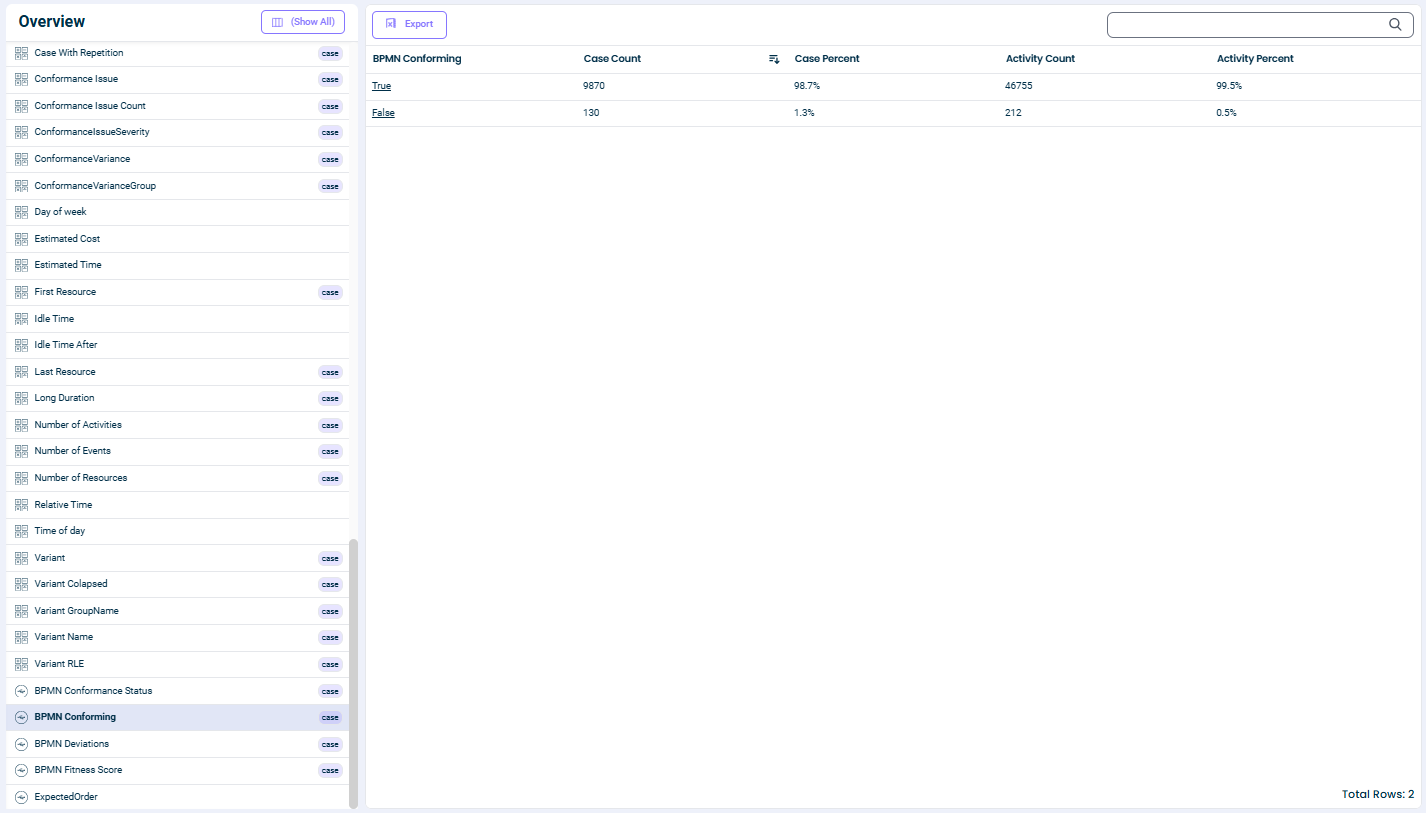
BPMN Conforming (Yes/No)
| Attribute | Details |
|---|---|
| Column Name | ~enrich~BpmnConforming |
| Display Name | BPMN Conforming |
| Data Type | Boolean (Yes/No) |
What it means:
- Yes: This case follows the BPMN model (fitness score meets or exceeds the threshold)
- No: This case deviates from the BPMN model
BPMN Fitness Score (0% - 100%)
| Attribute | Details |
|---|---|
| Column Name | ~enrich~BpmnFitness |
| Display Name | BPMN Fitness Score |
| Data Type | Percentage |
What it means:
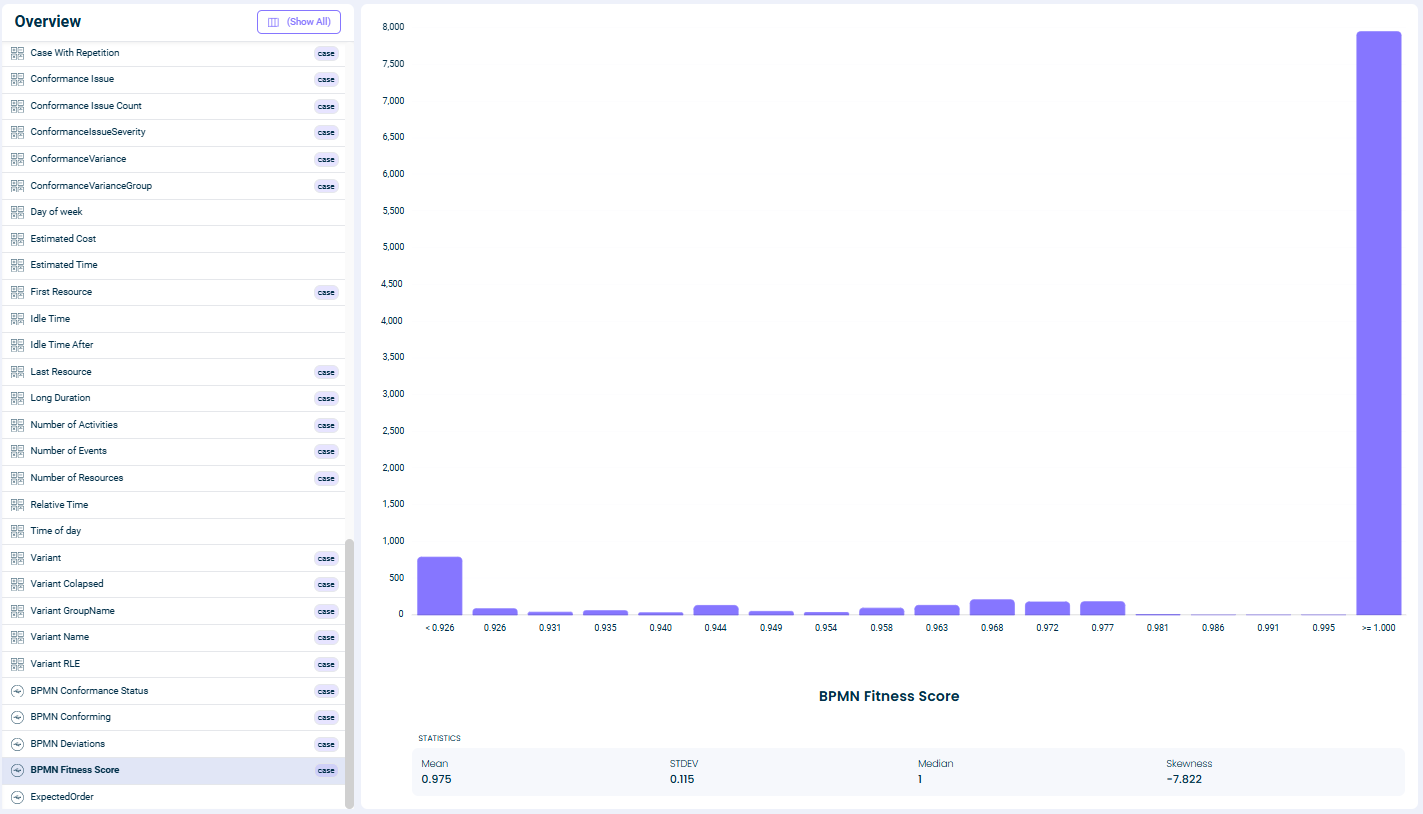
- 100%: Perfect conformance - the case exactly follows the BPMN model
- 90-99%: Minor deviations - the case mostly follows the model
- 70-89%: Moderate deviations - some activities are missing or out of order
- Below 70%: Major deviations - significant differences from the expected flow
BPMN Conformance Status (Text)
| Attribute | Details |
|---|---|
| Column Name | ~enrich~BpmnConformanceStatus |
| Display Name | BPMN Conformance Status |
| Data Type | Text |
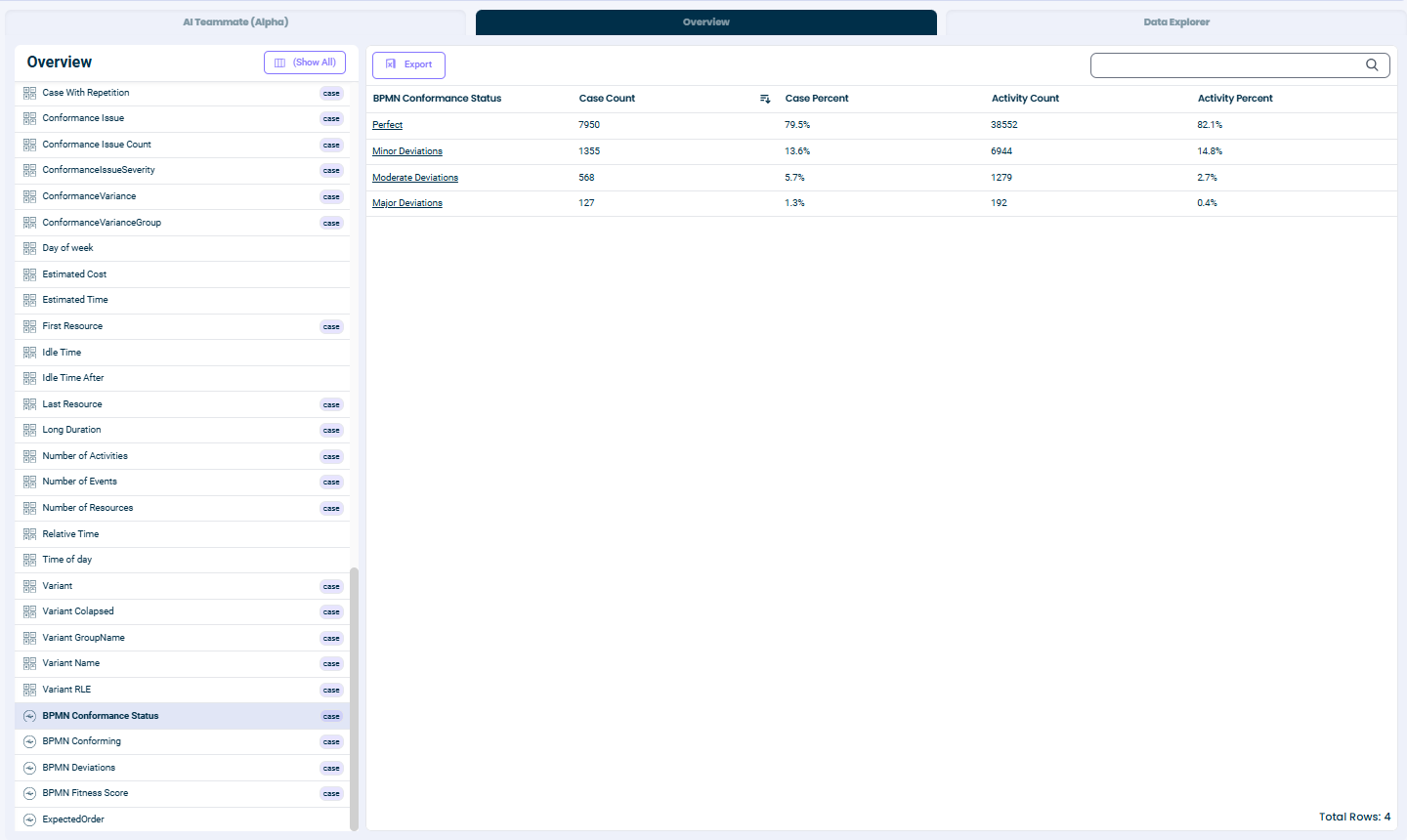
Possible values: | Fitness Score | Status | |---------------|--------| | 100% | Perfect | | 90% - 99% | Minor Deviations | | 70% - 89% | Moderate Deviations | | Below 70% | Major Deviations |
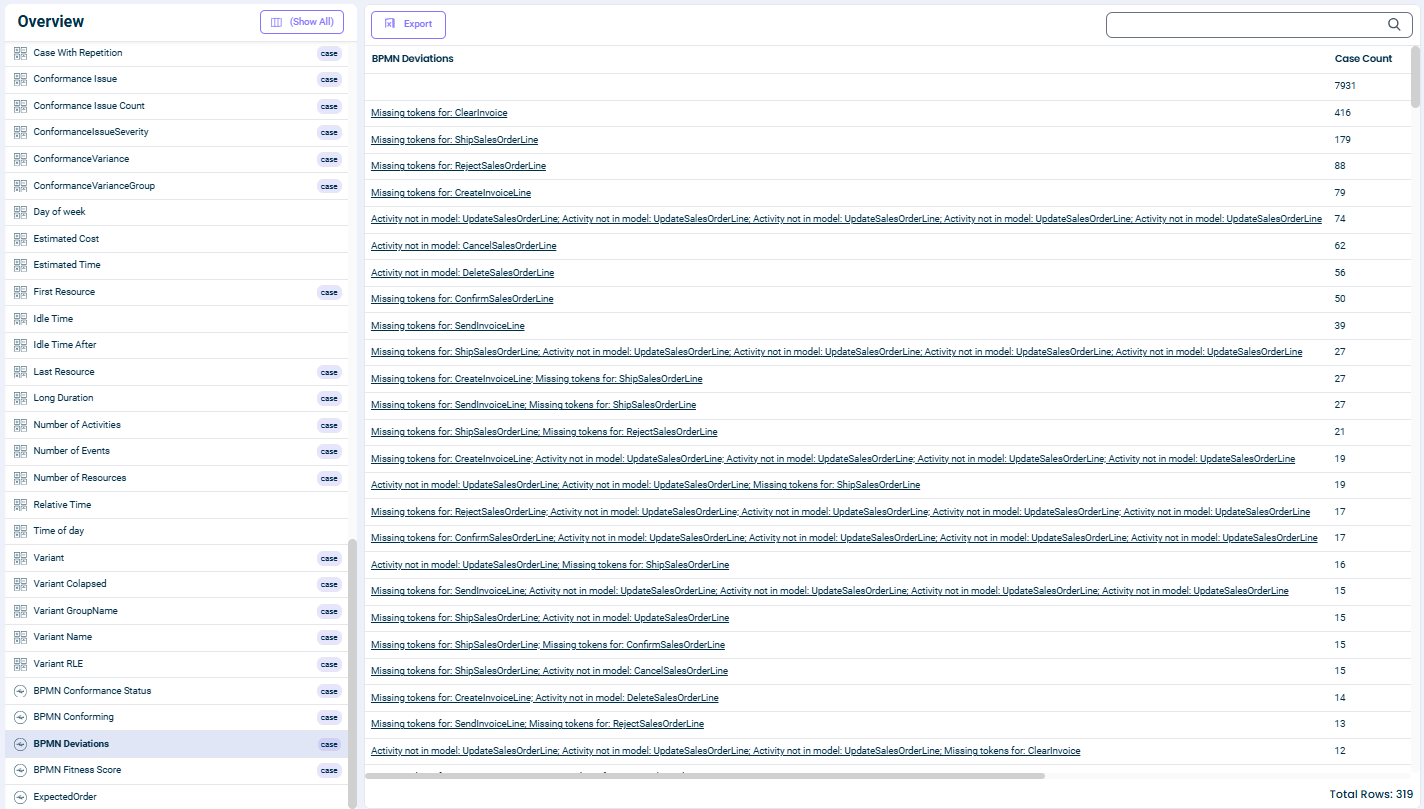
BPMN Deviations (Text)
| Attribute | Details |
|---|---|
| Column Name | ~enrich~BpmnDeviations |
| Display Name | BPMN Deviations |
| Data Type | Text |
What it contains:
- Lists the activity transitions that failed during token replay
- Shows up to 5 problematic transitions, separated by semicolons
- Empty if the case has perfect conformance
Example values:
- (empty) - No deviations
Submit for Approval- One missing activityReceive Goods; Invoice Match; Pay Invoice- Multiple deviations
Example Output
After running BPMN Conformance on an Order-to-Cash process, your case table might look like this:
| Case ID | BPMN Conforming | BPMN Fitness Score | BPMN Conformance Status | BPMN Deviations |
|---|---|---|---|---|
| PO-001 | Yes | 100% | Perfect | |
| PO-002 | No | 65% | Major Deviations | Receive Goods; Invoice Match |
| PO-003 | Yes | 92% | Minor Deviations | Post Invoice |
| PO-004 | Yes | 100% | Perfect | |
| PO-005 | No | 45% | Major Deviations | Submit for Approval; Approve; Receive Goods |
Using Conformance Results
Once the conformance attributes are added to your data, you can:
Filter Cases
- Show only non-conforming cases: Filter where
BPMN Conforming = No - Find severe deviations: Filter where
BPMN Fitness Score < 70%
Create Dashboards
- Add a pie chart showing conforming vs non-conforming case counts
- Track conformance rate over time with a trend chart
- Compare conformance across different vendors, regions, or case types
Analyze Root Causes
- Use the Deviations attribute to identify common problematic activities
- Compare conforming vs non-conforming cases by attribute values
- Identify patterns in which cases tend to deviate
Set Up Alerts
- Create alerts when conformance rate drops below a threshold
- Notify stakeholders when specific cases fail conformance
Understanding Token Replay
Token replay is a conformance checking algorithm that simulates executing each case through your BPMN model:
- A "token" is placed at the start of the process
- For each activity in the case, the algorithm tries to move the token through the corresponding transition in the BPMN model
- If the transition can fire (the token is in the right place), it succeeds
- If the transition cannot fire (the token is missing), it's recorded as a deviation
- At the end, the algorithm checks if the token reached the final state
Fitness is calculated as:
Fitness = 1 - (missing tokens + remaining tokens) / (produced tokens + consumed tokens)
This gives a score from 0.0 (no conformance) to 1.0 (perfect conformance).
See Also
Related Features:
- Expected Order - Define the expected sequence of activities
- Conformance Issue - Flag cases with conformance violations
Related Topics:
- Process Variants - Analyze different paths through your process
- Process Map - Visualize your actual process flow
This documentation is part of the mindzieStudio process mining platform.