Project Files
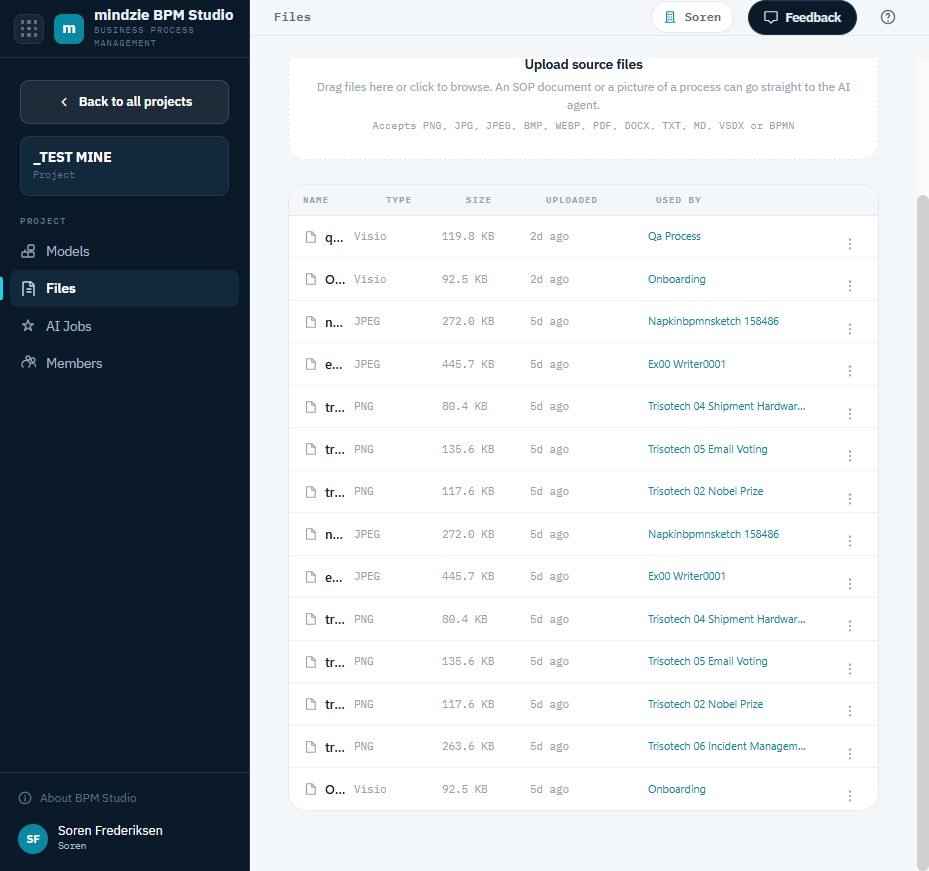
A project's Files page holds the source material the AI agent uses to build models - the photos, procedure documents, and Visio files you want to turn into BPMN. Open it with Files in the sidebar while a project is open.
Uploading Files
Drag files onto the upload area, or click it to browse. The Files page accepts:
- Pictures - PNG, JPG, JPEG, BMP, WEBP
- Documents - PDF, DOCX, TXT, MD
- Visio - VSDX
- BPMN - BPMN
An SOP document or a picture of a process can go straight to the AI agent from here.
The File List
Each file shows its Name, Type, Size, when it was Uploaded, and Used by - the AI job or model that was generated from it, if any.
File Actions
Use the options menu (the three dots) on a file's row:
| Action | What it does |
|---|---|
| Download | Download the original file. |
| Rename | Change the file's name. |
| Generate with AI | Start an AI job that builds a BPMN model from this file. |
| Delete | Remove the file from the project. |
To generate a model from a file you have uploaded, see Creating Models with AI.