SAP Cycle Time Analysis
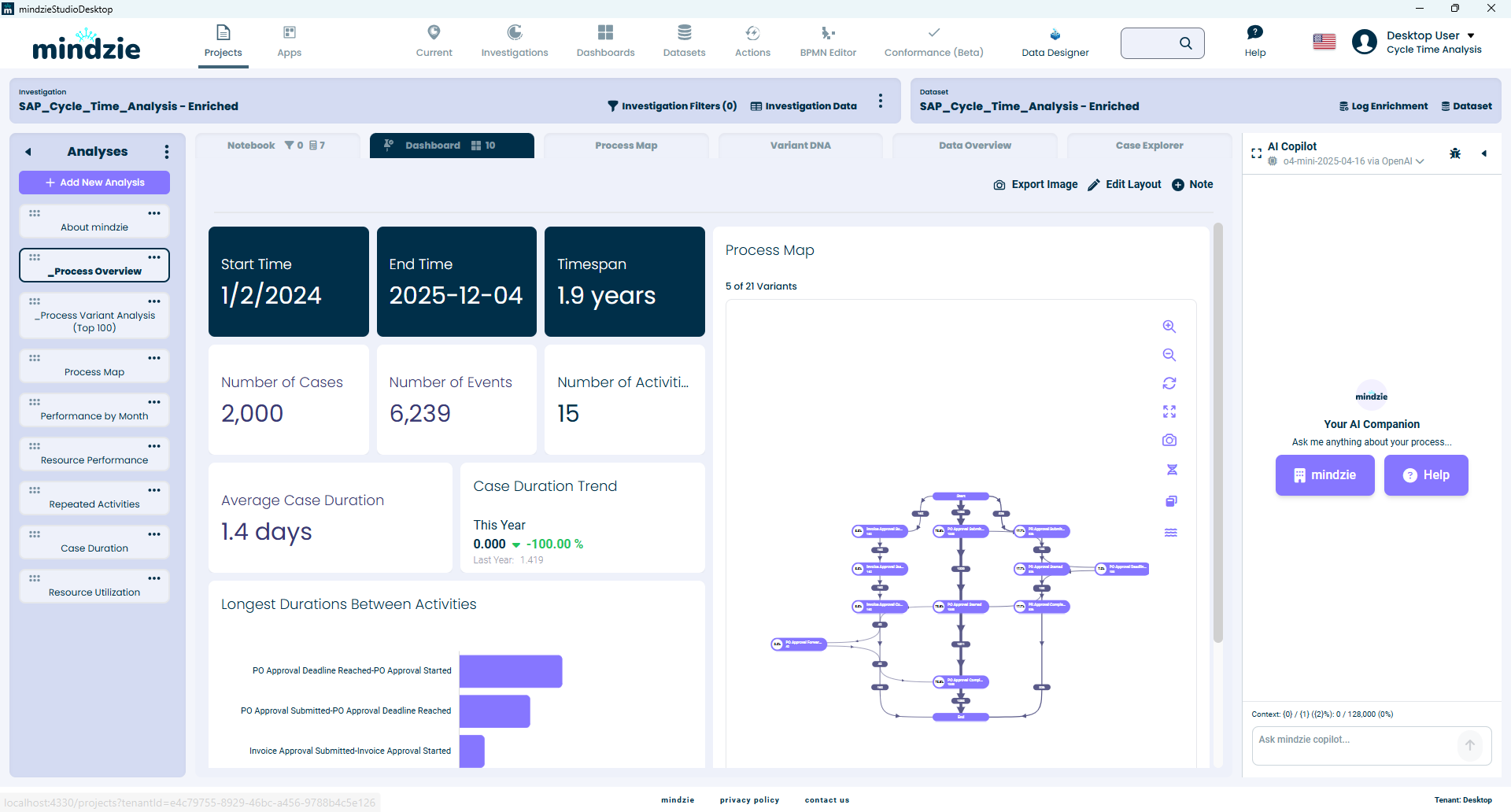
Overview
This sample dataset demonstrates how mindzie Studio can be used for workflow approval cycle time analysis on SAP ERP data. The dataset contains 2,000 synthetic SAP Business Workflow approval items covering purchase orders, purchase requisitions, and invoices with detailed lifecycle events.
Download: SAP_Cycle_Time_Analysis.csv
Dataset Summary
| Metric | Value |
|---|---|
| Cases | 2,000 |
| Events | 6,227 |
| Activity Types | 13 |
| Time Period | January 2024 - December 2025 |
| Completed Approvals | 1,964 (98.2%) |
| Pending Approvals | 36 (1.8%) |
| Deadline Breaches | 199 (10.0%) |
| Forwarded Items | 100 (5.0%) |
What This Dataset Demonstrates
- Approval cycle time analysis: Measure how long documents spend in approval queues vs. active processing
- Deadline breach detection: Identify which approvals exceeded their target completion date
- Approver workload analysis: Compare performance across 40 approvers
- Workflow bottleneck identification: Find where delays occur in the approval process
- Forwarding patterns: Analyze when and why approvals are reassigned
Case Structure
Each case represents a SAP Business Workflow approval item. The case ID includes the document type prefix (PO, PR, or INV) followed by the document number.
Case Attributes
| Attribute | Type | Description |
|---|---|---|
| CaseId | String | Document reference (e.g., PO-4500001234, PR-1000000567) |
| DocumentType | String | Purchase Order, Purchase Requisition, or Incoming Invoice |
| DocumentNumber | String | SAP document number |
| ApprovalStatus | String | Completed, Pending, In Process |
| Requestor | String | User who submitted the document for approval |
| Approver | String | User who processed the approval |
| SubmissionDate | String | Date the approval was requested |
| CompletionDate | String | Date the approval was completed (null if pending) |
| DeadlineDate | String | Target completion date |
| DeadlineBreached | String | Yes or No |
| CalendarDaysToComplete | Integer | Calendar days from submission to completion |
Event Types
| Activity Name | Description |
|---|---|
| PO Approval Submitted | Purchase order entered the approval queue |
| PO Approval Started | Approver began reviewing the PO |
| PO Approval Completed | Approver finished processing the PO |
| PO Approval Deadline Reached | PO approval exceeded target date |
| PO Approval Forwarded | PO forwarded to a different approver |
| PR Approval Submitted | Purchase requisition entered the approval queue |
| PR Approval Started | Approver began reviewing the PR |
| PR Approval Completed | Approver finished processing the PR |
| PR Approval Deadline Reached | PR approval exceeded target date |
| PR Approval Forwarded | PR forwarded to a different approver |
| Invoice Approval Submitted | Invoice entered the approval queue |
| Invoice Approval Started | Approver began reviewing the invoice |
| Invoice Approval Completed | Approver finished processing the invoice |
Event Attributes
| Attribute | Type | Description |
|---|---|---|
| ActivityName | String | Workflow step name |
| ActivityTime | DateTime | Timestamp of the event |
| Resource | String | User who performed the action (or SYSTEM) |
| WorkItemId | String | SAP workflow work item ID |
| ObjectType | String | Purchase Order, Purchase Requisition, or Incoming Invoice |
| ObjectId | String | Document number |
| RequestedBy | String | User who submitted the approval request |
| ApprovedBy | String | User who completed the approval |
| EventType | String | CREATED, STARTED, COMPLETED, DEADLINE, or FORWARDED |
Document Type Breakdown
| Document Type | Cases | Percentage |
|---|---|---|
| Purchase Orders | 1,400 | 70% |
| Purchase Requisitions | 400 | 20% |
| Incoming Invoices | 200 | 10% |
Workflow Process Flow
The standard approval workflow follows this path:
Submitted -> Started -> Completed
With optional events:
- Forwarded: The approval is reassigned to a different approver
- Deadline Reached: The target completion date has passed before completion
Participants
| Role | Count | Description |
|---|---|---|
| PO Approvers | 20 | Users who approve purchase orders |
| PR Approvers | 10 | Users who approve purchase requisitions |
| Invoice Approvers | 10 | Users who approve incoming invoices |
| PO Requestors | 100 | Buyers submitting POs |
| PR Requestors | 80 | Employees submitting PRs |
| Invoice Requestors | 40 | AP clerks submitting invoices |
Suggested Analyses
Once loaded in mindzie Studio, try these analyses:
- Process Map: View the approval workflow with duration annotations between steps
- Cycle Time Dashboard: Measure average approval time by document type
- Filter by DeadlineBreached = Yes: Focus on SLA violations
- Resource Analysis: Compare approver performance (processing time, breach rate)
- Filter by ApprovalStatus = Pending: Identify open items requiring attention
- Variant Analysis: See how forwarded and breached cases differ from the standard flow
- Timeline View: Identify seasonal patterns in approval volumes and delays
Source
This dataset was generated from synthetic SAP Business Workflow tables (SWWWIHEAD, SWW_WI2OBJ, SWWLOGHIST) using the mindzie SAP Cycle Time Analysis extraction package.
This documentation is part of the mindzie Studio process mining platform.