Costs
A cost says what one counted thing costs - a late day, a case broken by a rule, a repeat of a step. You record costs here so a costing report can use them later; no analysis screen ever turns time or counts into money.
How to read it
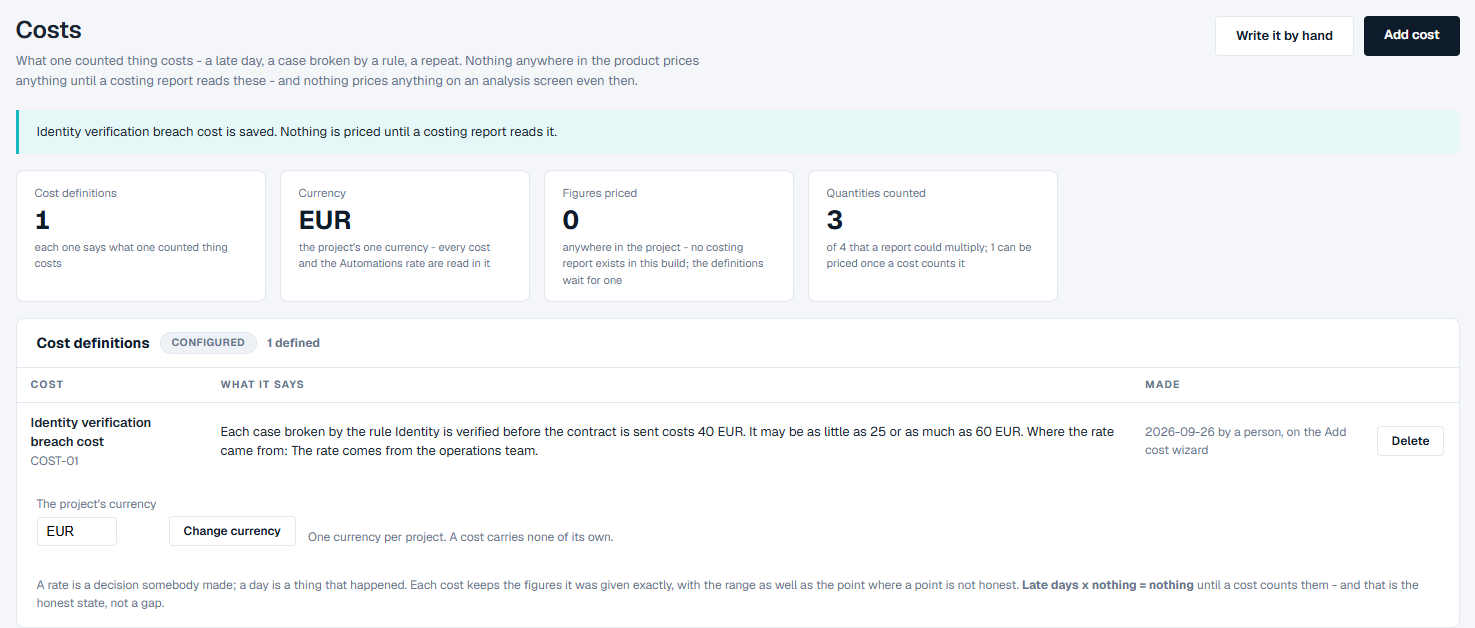
The four tiles at the top:
- Cost definitions - how many costs are defined.
- Currency - the project's one currency. Every cost, and the rate on Automations, is read in it. Until it is set, the tile reads "not set - the first cost sets it".
- Figures priced - how many figures anywhere in the project are priced from your costs.
- Quantities counted - how many of the quantities listed further down are counted on this log, and how many of them can be priced once a cost counts them.
Below the tiles:
- Cost definitions - one row per cost: its name, What it says (the cost read back as a sentence: what it counts, what one costs, the range if you gave one, and where the rate came from), when and how it was Made, and Delete. Under the table is the project's currency.
- What a costing report could multiply today - the quantities that can be counted on this log, measured now. From says which screen counts each one, and Can be priced whether a cost can price it: When a cost counts it, Not yet (with the reason, for example "no target is set on this project"), Not by time or Not directly.
- The rule that governs every money figure - money is never worked out on an analysis screen. The screens count; a costing report multiplies, with its assumptions written next to the answer.
The quantities:
| Quantity | What it is |
|---|---|
| Late days | Days that completed cases ran past a target. Nothing is counted until a target is set. |
| Cases broken by any rule | Cases that broke at least one of your rules on Rules. |
| Repeat instances | Extra times a step happened within the same case. |
| Observed wait on the top handoff | How long cases waited at the top handoff between two steps, as counted on Performance. |
What you can do
Add a cost in your own words
- Click Add cost.
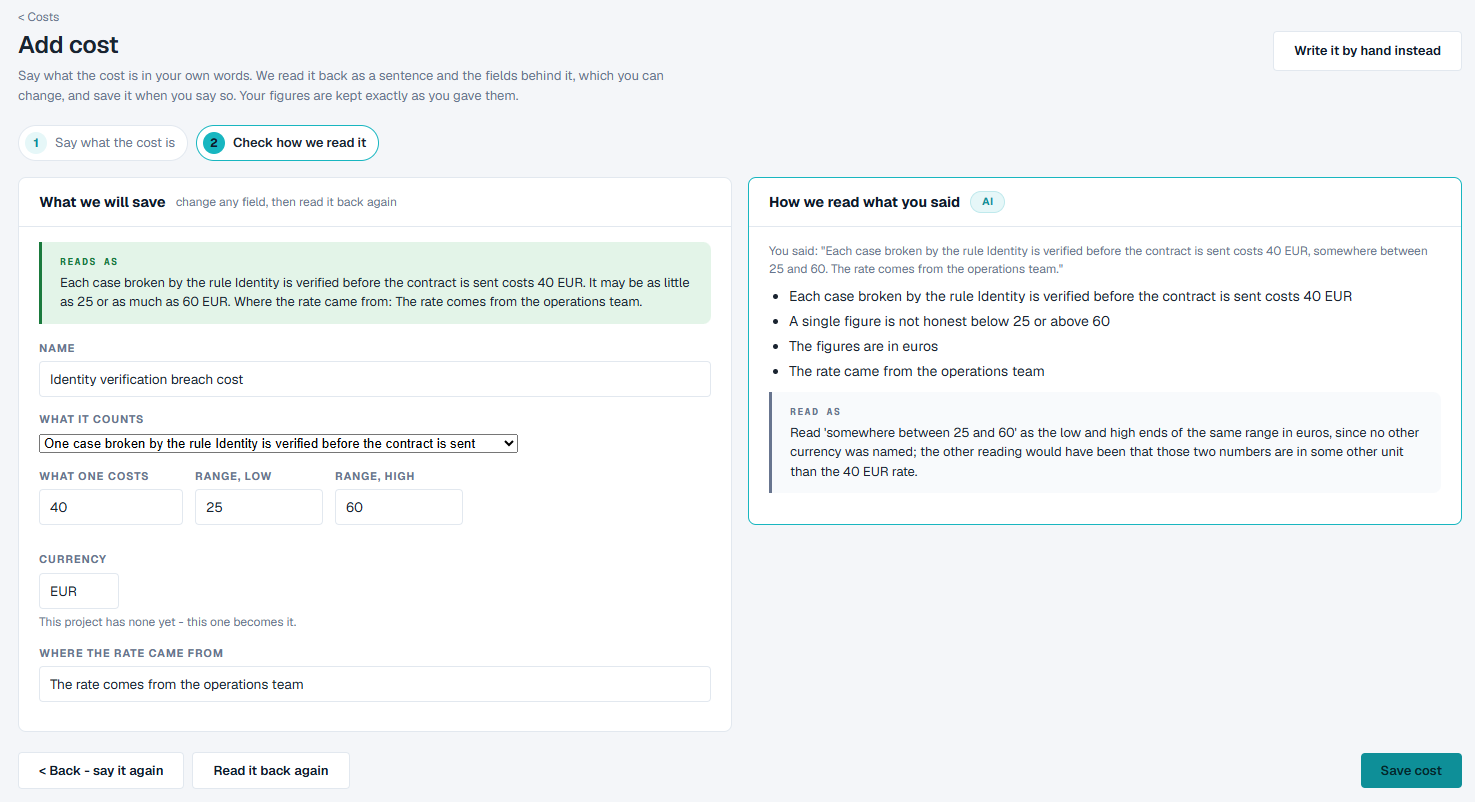
- In the box, say what the cost is - for example "Each case broken by the rule Identity is verified before the contract is sent costs 40 EUR, somewhere between 25 and 60. The rate comes from the operations team." - and click Submit.
- The page moves to Check how we read it. Under What we will save, Reads as gives the cost back as one sentence, with the fields it was read into (see the table below). On the right, How we read what you said lists what was understood and, under Read as, any choice it made. Check each field.
- After changing a field, click Read it back again to see the new sentence. Click Back - say it again to start over.
- Click Save cost.
| Field | What to enter |
|---|---|
| Name | A name for the list. |
| What it counts | One late day, one case broken by any rule, one repeat instance of a step, or one case broken by a rule you pick by name. |
| What one costs | The rate for one. |
| Range, low and Range, high | Optional. The range, when a single figure would not be honest. |
| Currency | A three-letter code, such as EUR. |
| Where the rate came from | Who or what the figure comes from. |
Write a cost by hand
Click Write it by hand and fill in the same fields yourself. Click Read it back again to check the sentence, then Save cost.
Set or change the currency
The first cost you save sets the project's currency, unless you set it first: type a three-letter code under the Cost definitions table and click Set currency. To change it later, type the new code and click Change currency. The figures are not converted - every cost and the Automations rate are simply read in the new currency - so the page asks you to confirm.
Good to know
- A project has one currency, and a cost carries none of its own. A cost said in another currency is refused; change the project's currency instead.
- Your figures are kept exactly as you gave them, with the range as well as the single figure.
- There is no costing report yet, so Figures priced reads 0. Your costs are kept until a report uses them. That is the honest state, not a fault.
- Adding a cost in your own words needs an AI model in the project. Without one, the page says so; write the cost by hand instead - it is the same cost either way.