Choosing What a Case Is
A case is the thing whose journey you follow through the process - an order, an invoice, a patient. When your data holds only one kind of object, the case is already settled. When it holds several, you choose which one a case follows, and every screen that counts by case - process maps, variants, performance, conformance, reports - reads the log through that choice.
When you need to choose
- A flat event log carries its own cases: the column you mapped as Case id is the case. There is nothing to choose, and the Data screen shows no case notion card.
- An object-centric log or raw tables usually hold several kinds of objects. Nothing is guessed for you: until you choose, the project shows the log's events and objects, but no case figures.
Two ways to choose, and the difference
| Keep an event log | Change the case notion | |
|---|---|---|
| Where | Data, Event logs tab | Change the case notion on the Data screen's Case notion card, or the Changing the case notion link on the Event logs tab |
| What it does | Saves an answer under a name. Selecting it with Use switches every screen at once. | Rebuilds the log from its source so the case is written into the log itself. |
| How long it takes | Instant. | As long as loading the data took. |
| Where it works | Every project. | Only a project whose Files tab holds a single file. A project with more than one file - the tables of a raw load, or a file kept beside the one loaded - refuses it. |
| Undo | Click Use on the previous event log. | Rebuild again on the previous choice. |
| Use it to | Look at the same data another way. | Build the log itself differently. |
Most of the time, keeping an event log is what you want - and it is the only way when the project holds more than one file.
How to read the choice
Both screens show a table headed Every object type, measured, with one row per kind of object a case could follow. They measure the same things, under slightly different column names:
- Cases - how many cases that choice gives. The Event logs tab also shows Objects, how many objects of that kind the data holds.
- Events in a case and Coverage on the Case notion screen, Events it holds and Cannot place on the Event logs tab - how much of the log ends up inside a case, and how much is left out.
- Distinct paths and Cases on a repeated path on the Case notion screen, Paths with the number of cases that repeat one beneath it on the Event logs tab - whether the cases have anything in common.
Read coverage and repetition together. A kind of object can cover almost the whole log and still give cases that each take their own path - which is no process at all. That is why neither column is shown without the other, and why no row is marked as recommended. The choice is yours.
What you can do
Keep an event log and use it
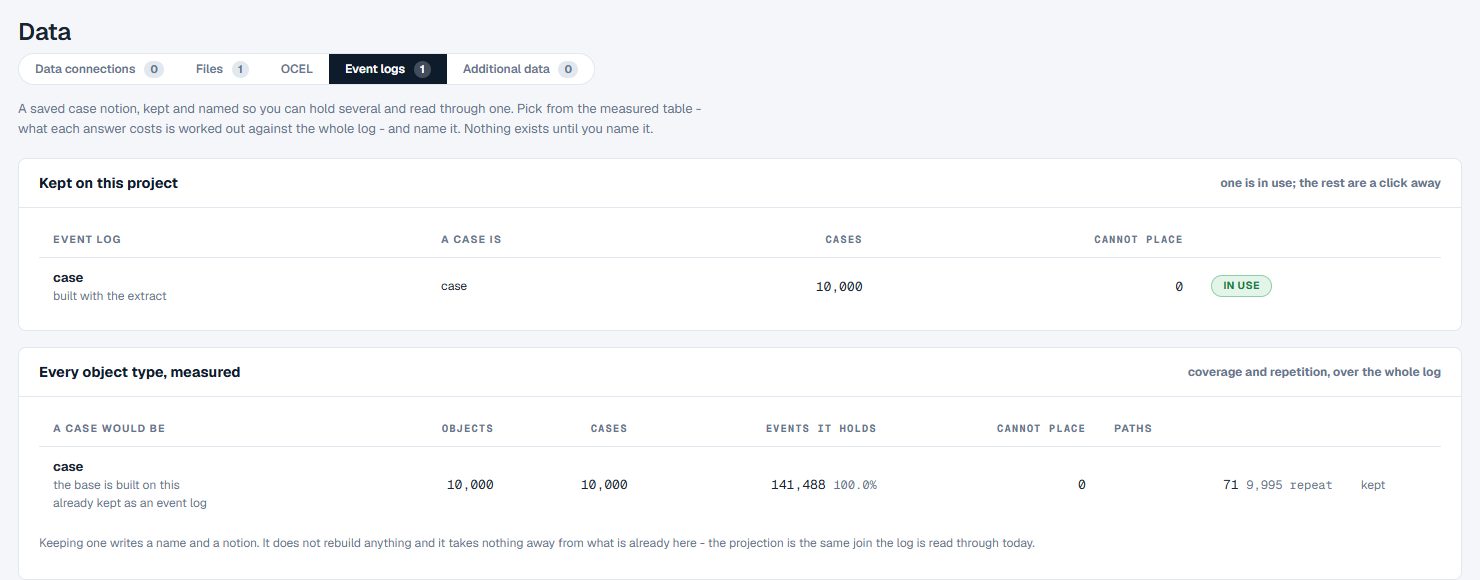
- Click Data in the menu, then the Event logs tab.
- In Every object type, measured, find the kind of object a case should follow.
- Check the proposed name, or type another. A name is lower case letters, digits and underscores, starting with a letter.
- Optionally, write a note on how it was set up, then click Keep as an event log.
- In Kept on this project, click Use on the new event log.
Every screen now reads the log through it. The bar across the top of the project names the event log in use, and when the project keeps more than one, it offers a drop-down to switch between them from any screen.
To change your mind, click Use on another event log. To tidy up, click Delete on one you no longer need; the event log in use and the one made when the data was loaded cannot be deleted. Edit note changes a log's note without anything else.
Change the case notion
- On the Data screen's Case notion card, click Change the case notion. Or, on the Event logs tab, click the Changing the case notion link.
- Case notion opens. The figures at the top say what a case is Now, how many Events in a case there are, and how many Object types the log has.
- In Every object type, measured, choose the kind of object. The one in force is marked current.
- Click Rebuild the log on this case notion. Back to Data leaves without changing anything.
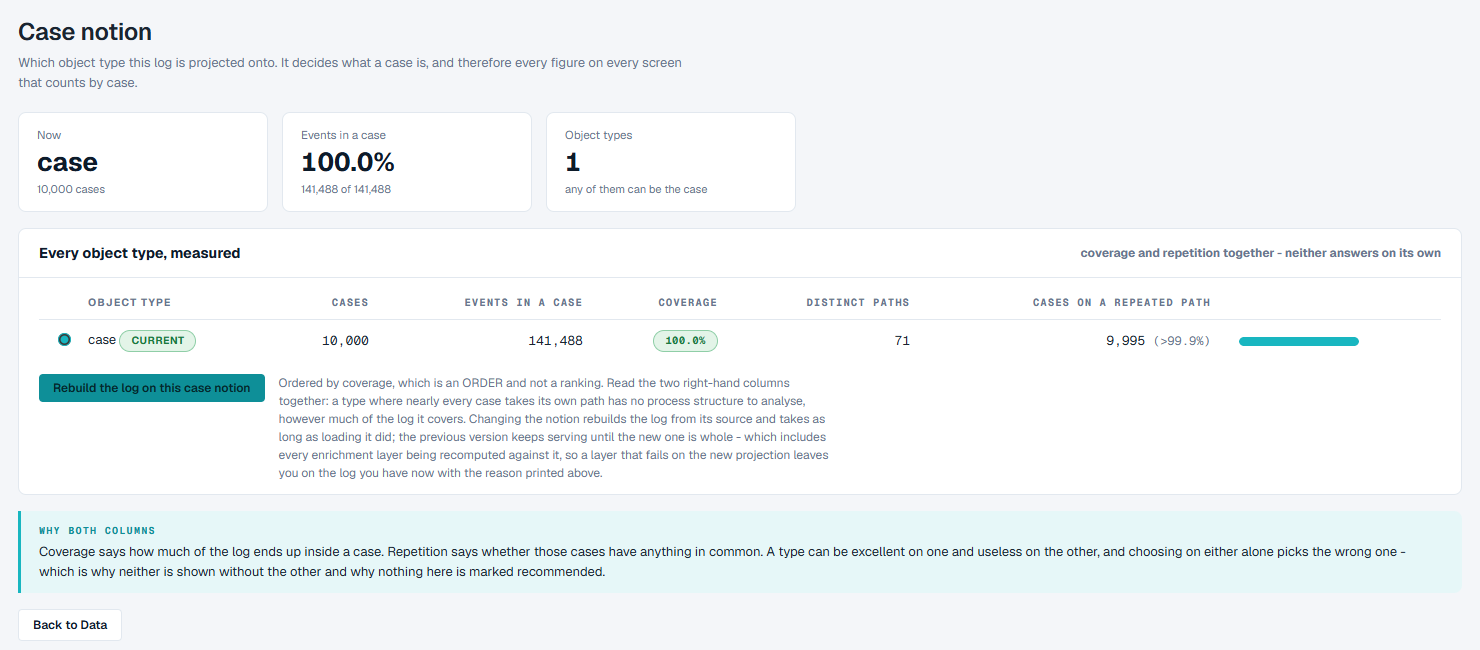
The rebuild needs a single file to rebuild from. When the project's Files tab holds more than one - the several tables of a raw load (a .zip counts as the tables inside it), or a file you kept beside the one you loaded - clicking Rebuild the log on this case notion is refused: the screen says how many sources the project has and that there is no single source to rebuild from. The case stays as it was chosen when the log was built. To look at the data through another kind of object, keep an event log instead, as described above.
The log is rebuilt from its source. The current log keeps serving until the new one is complete, including every enrichment recalculated on it. If an enrichment fails on the new choice, you stay on the log you had, and the reason is shown.
Answer "Needs an answer" on the projects page
A project can wait on the projects page in the state Needs an answer, with the number of object types to choose from. Its data holds several kinds of objects and it cannot tell which one a case should follow, so it stops and asks.
- Click Choose on the project.
- The dialog Which object should cases follow? lists every object type in the data, in the data's own words, under Build cases from. None is selected for you.
- Choose one and click Continue building. Cancel leaves the question open.
The project then finishes building.
Good to know
- Cannot place is the number to read first. An answer that leaves half the log out of every case still gives a case count that looks healthy.
- Events that belong to no case are counted in the Events figure on the Data screen, and in nothing that counts by case.
- A kind of object added by an enrichment cannot be the case; it can still be explored on the Data screen.
- A case can follow two kinds of objects at once - a requisition and the work order it became - only where a table you supply says which goes with which. The product does not work the pairing out for itself.