Scheduled Restart
Why Schedule a Nightly Restart
Long-running application pools can accumulate memory, hold stale database connections, and retain cached state that may slow the server down over time. Restarting the mindzieStudio application pool once a day during off-hours clears these issues and ensures the server starts each business day in a clean, predictable state.
We recommend configuring IIS to recycle the mindzieStudio application pool every night at a time when no users are active (typically between 02:00 and 05:00 local time). Because IIS handles this automatically, no scripts or scheduled tasks are required.
Recycling is graceful:
- Active requests are allowed to finish on the old worker process.
- A new worker process starts to handle new requests.
- There is no visible downtime for users who connect after the recycle completes.
Configure the Recycle Time in IIS
Follow these steps on the server hosting mindzieStudio.
Step 1: Open IIS Manager
- Press Windows Key + R, type
inetmgr, and press Enter. - In the Connections pane on the left, expand the server node and select Application Pools.
Step 2: Open Advanced Settings for the mindziestudio Pool
- In the Application Pools list, locate and select mindziestudio.
- In the Actions pane on the right, click Advanced Settings....
Step 3: Configure Specific Recycle Times
- In the Advanced Settings dialog, scroll down to the Recycling section.
- Find the Specific Times property and click the ... button next to
TimeSpan[] Array. - In the TimeSpan Collection Editor, click Add to create a new entry.
- Set the Value to the time you want the pool to recycle, using 24-hour format:
04:00:00= 4:00 AM02:30:00= 2:30 AM23:00:00= 11:00 PM
- Click OK to close the TimeSpan Collection Editor.
- Click OK to close the Advanced Settings dialog.
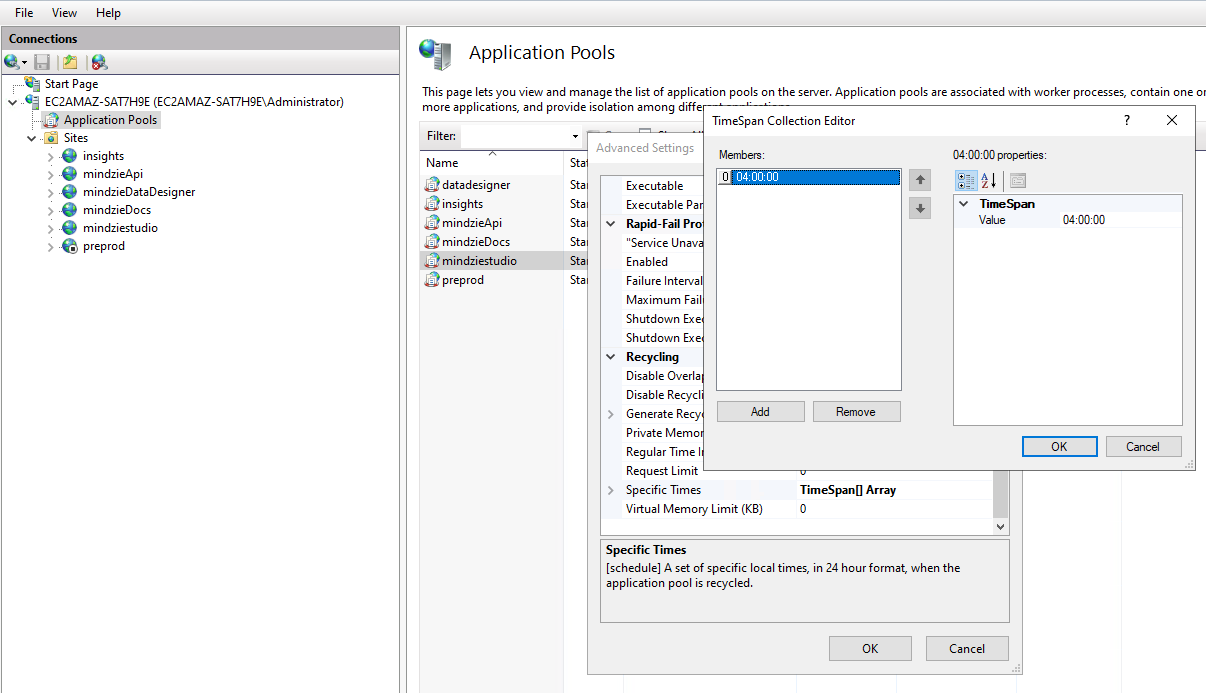
The screenshot above shows the mindziestudio application pool configured to recycle at 04:00:00 (4:00 AM) each day.
Recommended Settings
| Setting | Recommended Value | Notes |
|---|---|---|
| Specific Times | 04:00:00 |
Choose a time when no users are active |
| Regular Time Interval | 0 |
Disable fixed-interval recycling to avoid mid-day restarts |
| Disable Overlapped Recycle | False |
Allow graceful handoff between worker processes |
Setting Regular Time Interval to 0 ensures the pool only recycles at the specific time you configured, rather than every 29 hours (the IIS default).
Support
If you need assistance configuring scheduled restarts, contact us at support@mindzie.com.