Backup Strategy
A proper backup strategy is essential for protecting your mindzieStudio data and ensuring business continuity. This guide explains the two critical components that need to be backed up and how to configure your backup procedures.
Overview
mindzieStudio stores data in two separate locations that both require regular backups:
- Storage Location - File-based storage containing encrypted event logs and enriched data
- SQL Server Database - The MINDZIE database containing configuration, metadata, and analysis results
Both components must be backed up to ensure complete data recovery in case of hardware failure, data corruption, or disaster scenarios.
Configuration Application
The mindzieStudio Configuration application is installed on the server and provides access to important settings including your storage location and database configuration. You can use this application to verify your current settings before implementing your backup strategy.
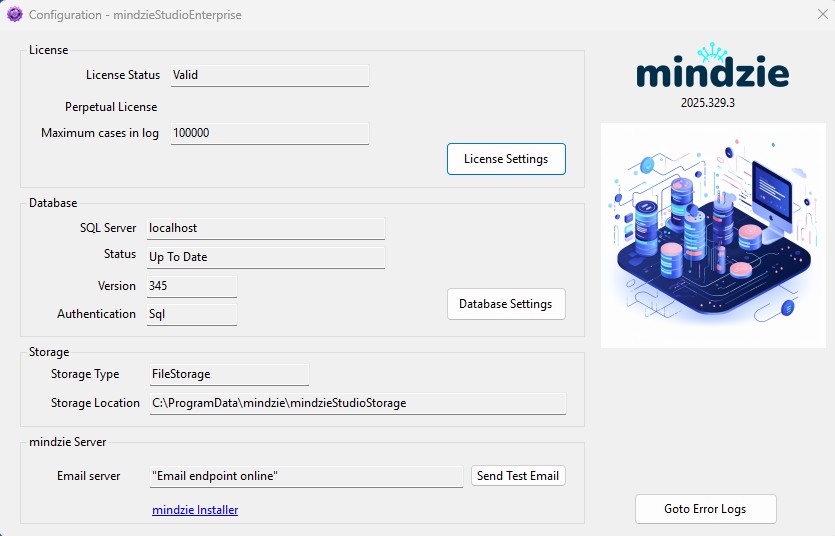
The Configuration application displays:
- License - Your license status, type, and maximum cases allowed
- Database - SQL Server connection details, status, and version
- Storage - Storage type and file location path
- mindzie Server - Email server settings and error log access
Component 1: Storage Location Backup
What is Stored
The storage location contains all uploaded event logs and calculated/enriched data in encrypted format. This is the primary data store for all process mining datasets analyzed in mindzieStudio.
Default Location
The default storage path is:
C:\ProgramData\mindzie\mindzieStudioStorage
You can verify your actual storage location in the Configuration application under the Storage section.
Backup Recommendations
- Frequency: Daily backups recommended, or more frequently based on data change volume
- Method: Use any standard Windows backup technology:
- Windows Server Backup
- Third-party backup solutions (Veeam, Acronis, etc.)
- File replication to network storage
- Cloud backup services
- Retention: Maintain multiple backup versions based on your organization's data retention policy
Important Considerations
- Ensure the backup process captures all files in the storage directory
- Consider scheduling backups during off-peak hours to minimize performance impact
- Test restore procedures periodically to verify backup integrity
- If you relocate the storage directory, update your backup configuration accordingly
Component 2: SQL Server Database Backup
Database Details
The mindzieStudio database contains:
- User accounts and permissions
- Project configurations and settings
- Dashboard definitions
- Analysis metadata and results
- Audit logs and system configuration
Database Information
- Server: As configured during installation (e.g., localhost or dedicated SQL Server)
- Database Name: MINDZIE
You can verify your database connection details in the Configuration application under the Database section.
Backup Recommendations
- Frequency: Daily full backups with transaction log backups throughout the day
- Method: Use standard SQL Server backup procedures:
- SQL Server Management Studio (SSMS)
- SQL Server Agent scheduled jobs
- Maintenance plans
- Third-party SQL backup tools
- Log shipping for high availability
SQL Server Backup Options
Your organization may already have SQL Server backup procedures in place. Common approaches include:
- Full Database Backups - Complete backup of the entire database
- Differential Backups - Backup of changes since the last full backup
- Transaction Log Backups - Backup of transaction logs for point-in-time recovery
- Log Shipping - Automated backup and restore to a secondary server
Example Backup Script
-- Full database backup
BACKUP DATABASE [MINDZIE]
TO DISK = 'D:\Backups\MINDZIE_Full.bak'
WITH FORMAT, COMPRESSION, STATS = 10;

-- Transaction log backup
BACKUP LOG [MINDZIE]
TO DISK = 'D:\Backups\MINDZIE_Log.trn'
WITH FORMAT, COMPRESSION, STATS = 10;
Recovery Planning
Testing Your Backups
Regularly test your backup and restore procedures to ensure:
- Backup files are complete and not corrupted
- Restore procedures are documented and understood
- Recovery time meets your organization's requirements
- All data can be successfully recovered
Disaster Recovery Checklist
- Document your current storage location and database server details
- Maintain off-site copies of critical backups
- Document the restore procedure for both storage files and database
- Test recovery procedures at least quarterly
- Keep a copy of the mindzieStudio installer for server rebuilds
Best Practices
- Coordinate Backups - Schedule storage and database backups to run at similar times to ensure data consistency
- Monitor Backup Jobs - Set up alerts for backup failures
- Secure Backup Files - Encrypt backup files and restrict access
- Document Everything - Maintain written procedures for backup and restore operations
- Offsite Storage - Keep copies of backups in a separate physical location or cloud storage
Support
If you need assistance configuring your backup strategy or have questions about data recovery:
- Email: support@mindzie.com
- Contact your IT department for organization-specific backup policies
- Refer to Microsoft SQL Server documentation for advanced database backup configurations