mindzie Platform Overview
mindzie is a comprehensive process intelligence platform designed for organizations seeking to understand, analyze, and optimize their business processes. Built specifically for process analytics, mindzie combines powerful data transformation capabilities with intuitive analysis tools to deliver actionable insights.
Why Organizations Choose mindzie
Organizations select mindzie for five key reasons that differentiate the platform in the process intelligence market:
1. Affordability
mindzie's pricing is designed to make process intelligence accessible to organizations of all sizes. The platform offers competitive pricing that allows organizations to deploy process analytics across multiple departments and use cases without prohibitive costs.
2. Deployment Flexibility
mindzie is truly deployment agnostic, offering multiple deployment options to meet your organization's specific requirements:
- Cloud: Fully managed cloud deployment with automatic updates
- On-Premise: Complete installed version for organizations requiring full data control
- Hybrid: Flexible architecture where data transformation can run locally while analytics run in the cloud
- Desktop: Standalone client for individual analysts and smaller deployments
This flexibility makes mindzie particularly attractive to data-sensitive industries such as banking, insurance, healthcare, government, and telecommunications.
3. Continuous Process Monitoring
Beyond one-time analysis, mindzie enables continuous process monitoring with:
- Real-time data synchronization
- Automated alerts and notifications
- SLA monitoring and escalation
- Command center-style operational views
Processes are never static, and mindzie helps organizations track process performance over time to ensure improvements are sustained.
4. AI Integration
mindzie incorporates AI throughout the platform with configurable options:
- Built-in AI models trained for process analysis
- Option to bring your own AI model (BYOM)
- Support for local LLM deployments for on-premise installations
- AI copilot assistance for analysis and Python code generation
Organizations can enable or disable AI features based on their comfort level and compliance requirements.
5. Purpose-Built for Process Analytics
Unlike general business intelligence tools, mindzie is specifically designed for process analysis. Every filter, calculator, and visualization is built around process mining concepts such as:
- Process variants and conformance
- Bottleneck identification
- Cycle time analysis
- Resource utilization
- Rework detection
Platform Architecture
The mindzie platform follows a structured data flow from source systems through analysis to actionable insights.
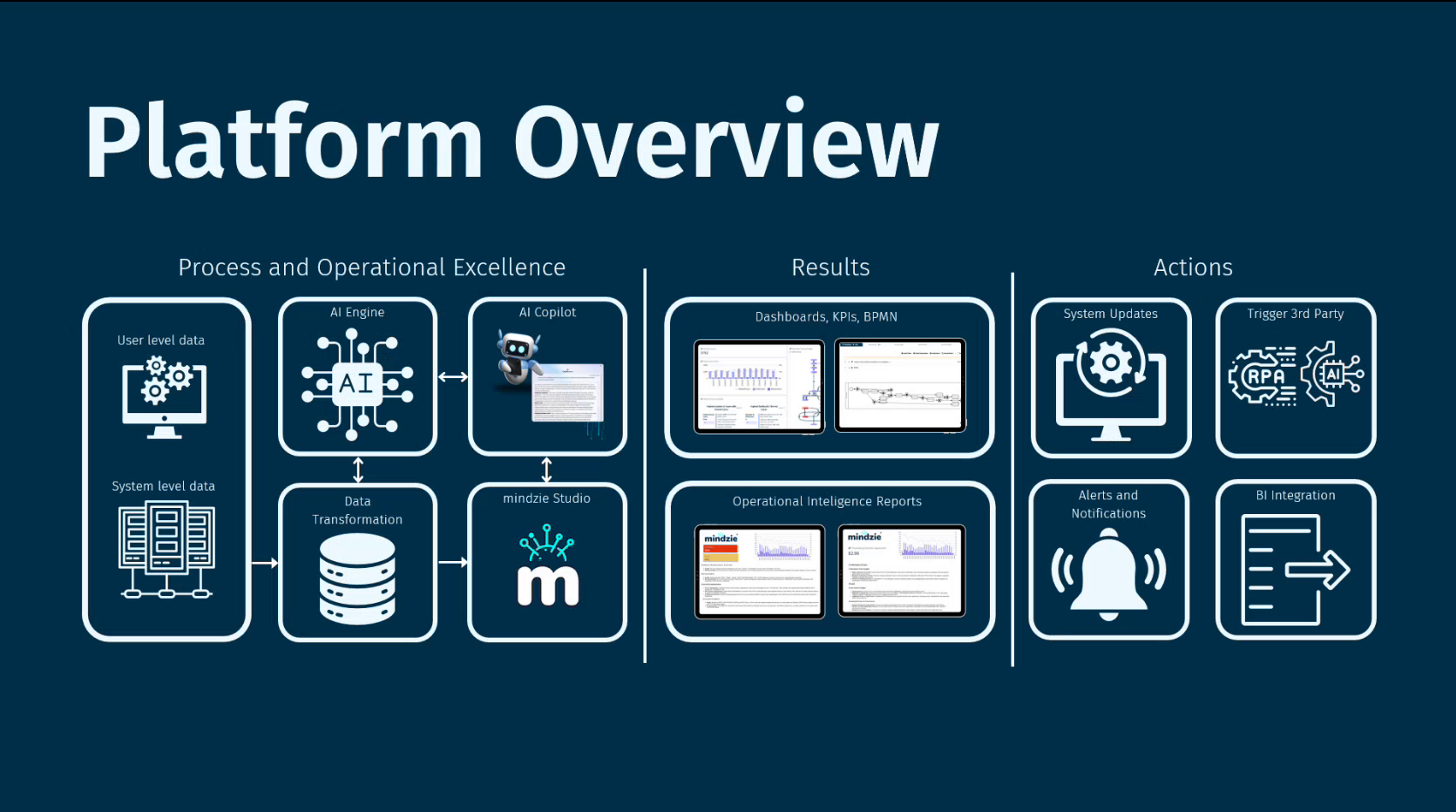
The architecture consists of three main phases:
Process and Operational Excellence: Data flows from source systems through AI-powered transformation into mindzieStudio for analysis.
Results: Analysis outputs are published as dashboards, KPIs, BPMN diagrams, and operational intelligence reports.
Actions: Insights trigger system updates, third-party integrations, alerts, notifications, and BI tool connections.
Data Integration Options
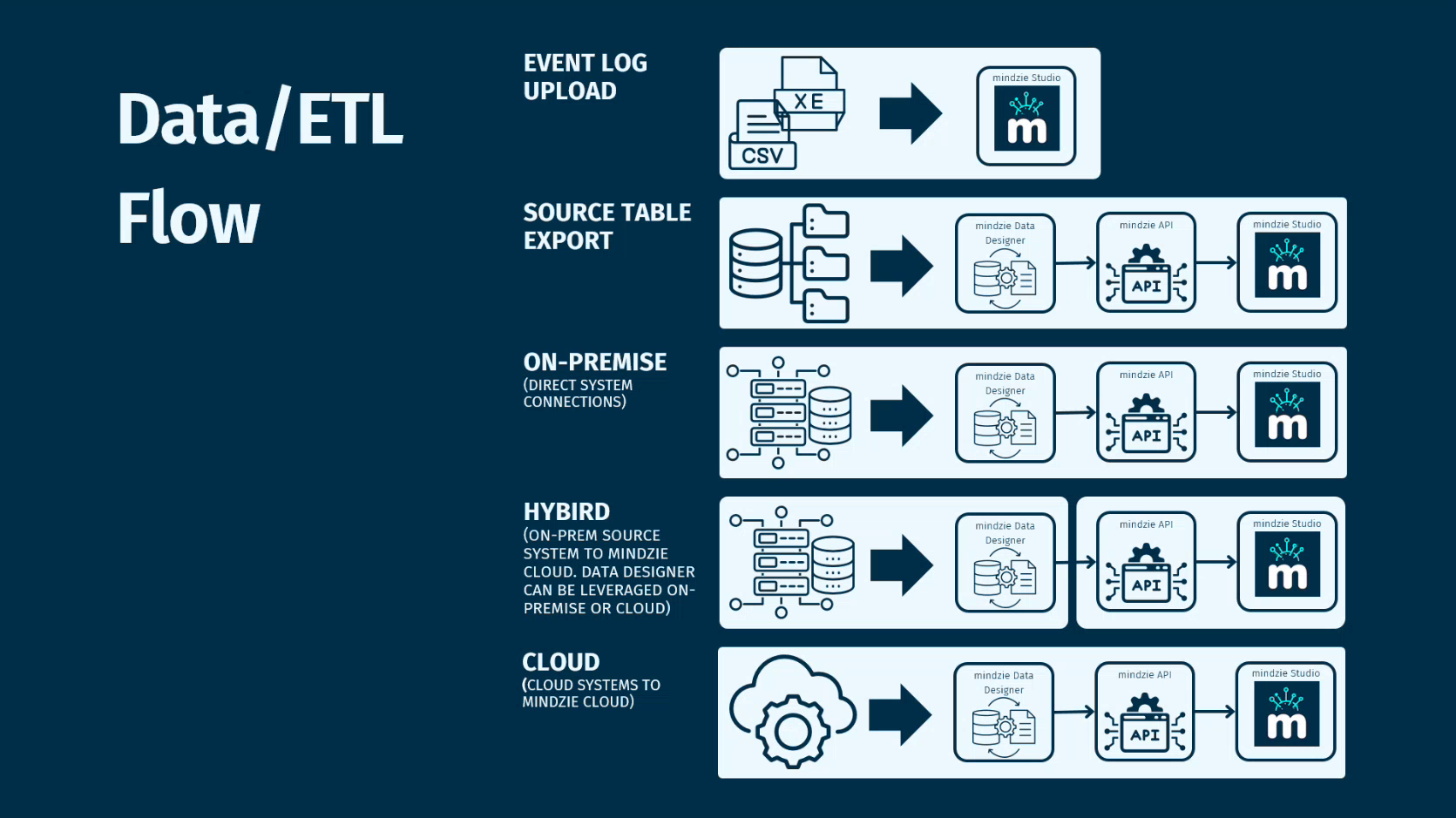
mindzie supports multiple data integration scenarios to accommodate different organizational requirements and security policies.
Event Log Upload
The simplest approach - upload CSV or XES event log files directly to the platform for immediate analysis. Ideal for quick analysis projects and proof-of-concept work.
Source Table Export
Export source tables from your systems (Oracle, SAP, SQL Server, etc.) as files. mindzie Data Designer transforms these tables into event logs. This approach works well when direct system connections are not permitted.
On-Premise Direct Connection
For organizations with on-premise deployments, mindzie Data Designer connects directly to source systems for automated data extraction and transformation.
Hybrid Deployment
Organizations can deploy mindzie Data Designer locally while using cloud-based mindzieStudio for analysis. Data Designer creates an encrypted connection to the cloud, keeping sensitive data processing on-premise while leveraging cloud analytics capabilities.
Cloud-to-Cloud
Connect cloud-based source systems directly to mindzie's cloud platform for fully managed data pipelines.
Third-Party ETL Integration
Organizations using existing ETL tools can push data directly into mindzie via API. Connectors are available for platforms like MuleSoft.
mindzieStudio Architecture
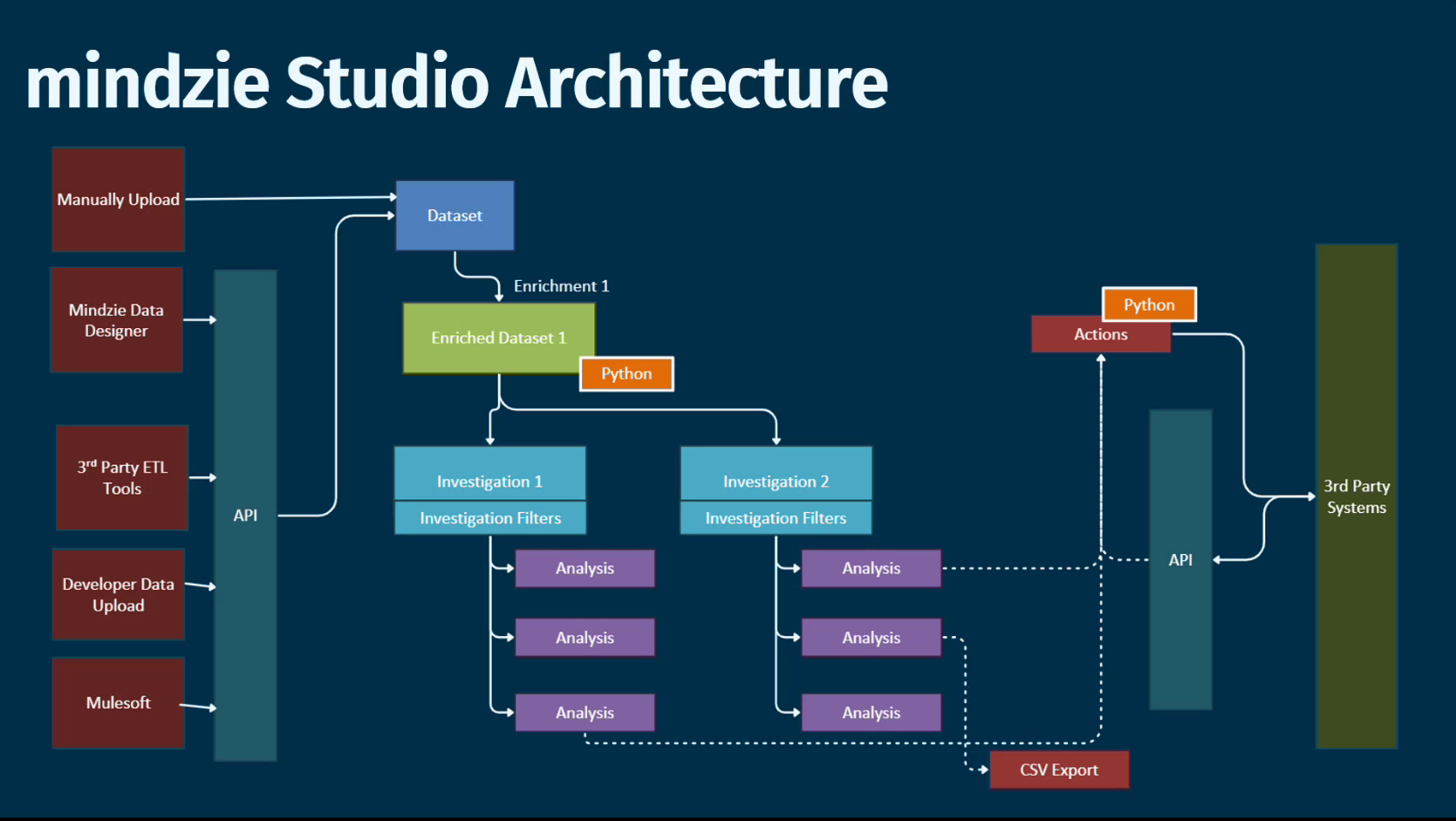
mindzieStudio is the analysis environment where process intelligence work happens.
Data Flow
Dataset: Raw data arrives from manual upload, mindzie Data Designer, third-party ETL tools, developer upload, or API integration
Enriched Dataset: The log enrichment engine automatically enhances your data with calculated attributes, timing metrics, conformance flags, and more
Investigations: Organize your analysis work into logical folders (by process, department, or project)
Analysis: Create multiple analysis within each investigation using filters and calculators
Actions: Configure automated responses based on analysis results, including API calls to third-party systems
Projects
Projects provide organization and portability for your process intelligence work.
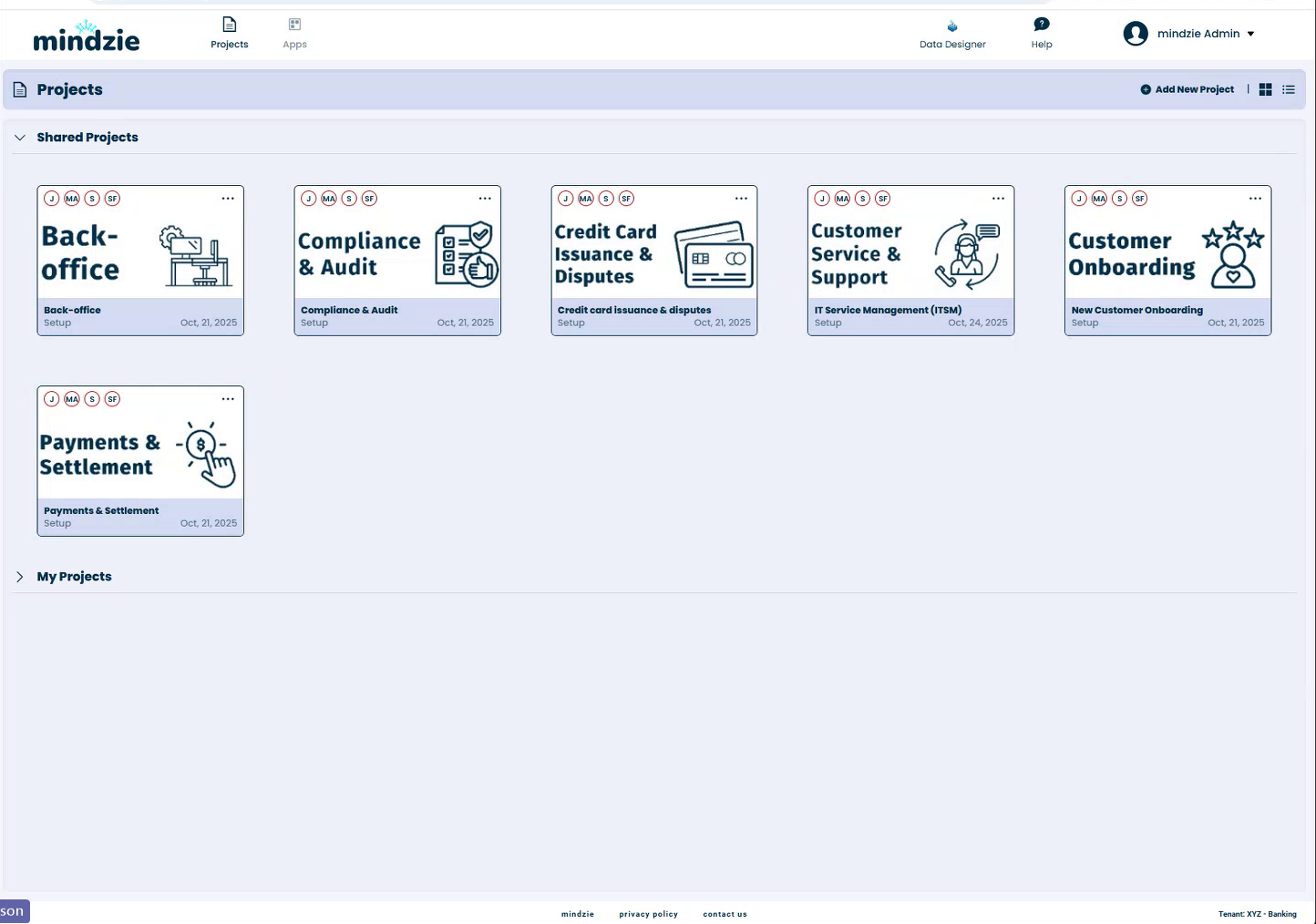
Key project capabilities:
- Organization: Group related work by business process, department, or customer
- Sharing: Share projects with team members and set permissions
- Templates: Save project configurations as packages for reuse
- Portability: Export project packages and import them into other mindzie environments (useful for on-premise deployments where consultants can build configurations offline)
Log Enrichment Engine
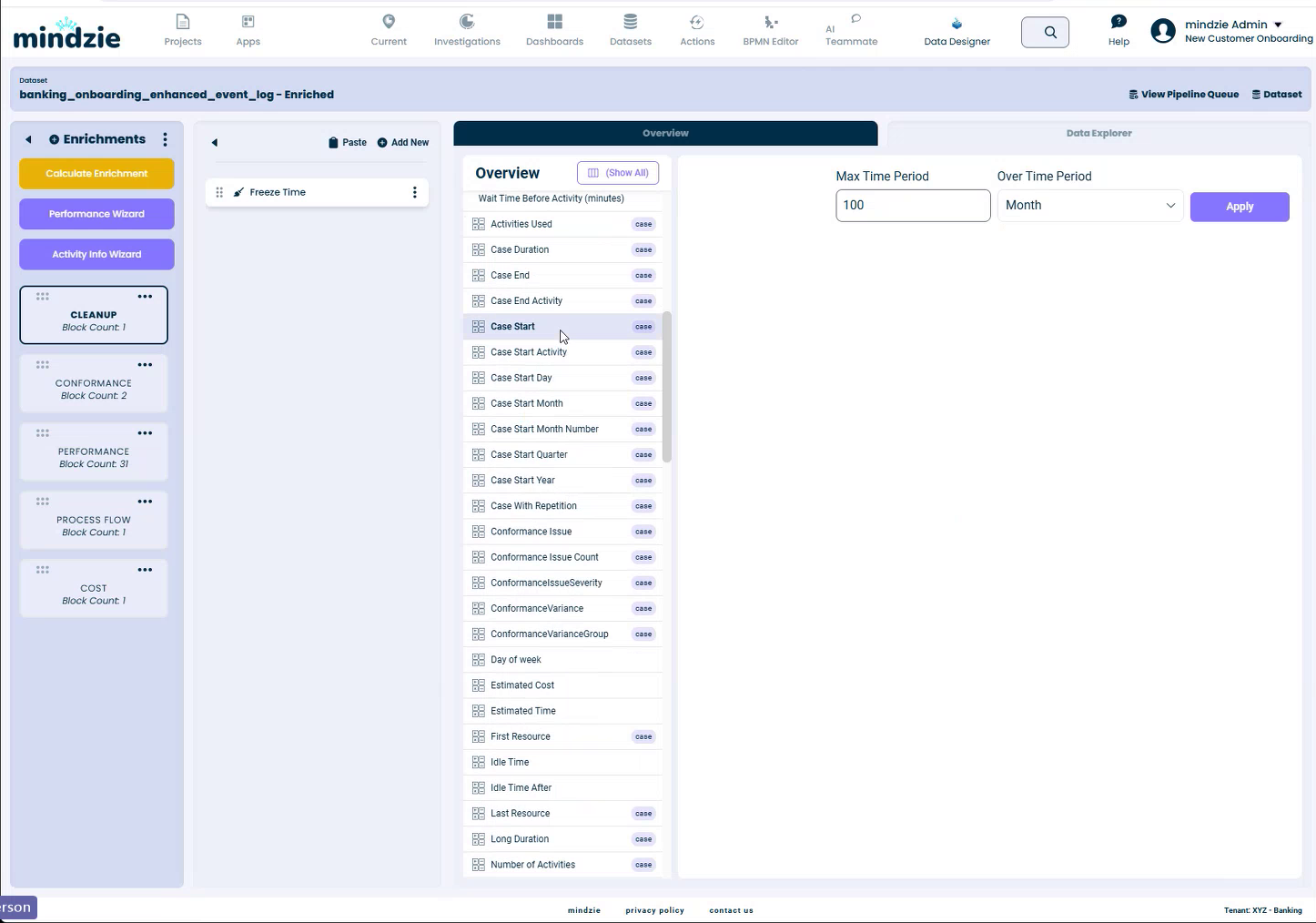
The log enrichment engine is a powerful feature that transforms your raw event data into analysis-ready datasets.
Automatic Enrichments
mindzie automatically calculates and adds attributes including:
- Timing: Case duration, activity duration, idle times
- Temporal: Case start day, month, quarter, year, day of week
- Resources: First resource, last resource per case
- Counts: Number of activities, activities used
- Conformance: Conformance issues, variance indicators
Custom Enrichments
Beyond automatic enrichments, you can add:
- Performance Labels: Automatically categorize cases as fast, normal, or slow based on configurable thresholds
- Activity Pairings: Calculate time between specific activity combinations
- Cost Calculations: Add activity costs and calculate total process costs
- Conformance Rules: Define what should or should not happen in your process
- Python Extensions: Write custom Python code for complex calculations with AI copilot assistance
The enrichment engine enables business users to work with simplified concepts (like "show me slow cases") rather than remembering specific numeric thresholds.
Analysis Interface
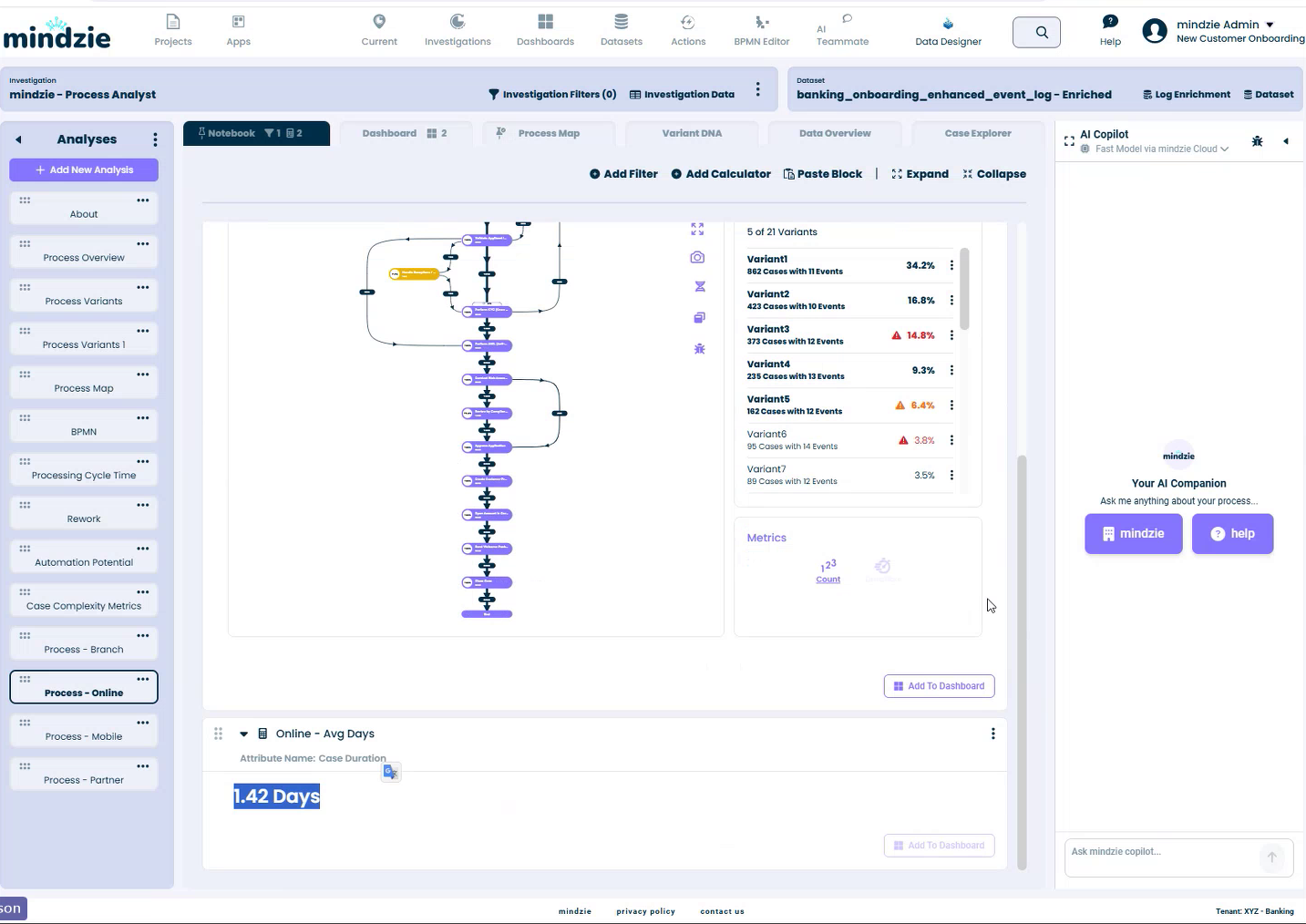
mindzie uses a Jupyter notebook-style interface where analysis is built using blocks that flow data from top to bottom.
Block-Based Analysis
Each analysis consists of blocks that can be:
- Filters: Narrow down data by attributes, variants, time periods, or custom criteria
- Calculators: Generate visualizations, metrics, and insights
- Notes: Document findings and add context
Blocks are chained together - the output of one block becomes the input for the next. This allows for progressive filtering and analysis refinement.
Key Capabilities
- Drag and drop block reordering
- Duplicate blocks to create comparison analysis
- Save analysis as templates for reuse
- Push metrics to dashboards
- Export visualizations and data
Analysis Templates
A library of pre-built analysis templates helps you get started quickly:
- Process overview
- Variant analysis
- Bottleneck identification
- Conformance checking
- Resource analysis
- Automation potential assessment
Dashboards and Apps
Analysis results can be published to dashboards and apps for broader organizational consumption.
Dashboards
Dashboards aggregate metrics and visualizations from multiple analysis into executive-ready views. Features include:
- Drag and drop layout
- Shareable links
- Drill-through to underlying analysis
- Text annotations and insights
- Export capabilities
Apps
Apps provide simplified interfaces for specific user groups. They combine dashboards, analysis views, and interactive elements into focused experiences without exposing the full analysis complexity.
Real-Time Process Flow Monitor
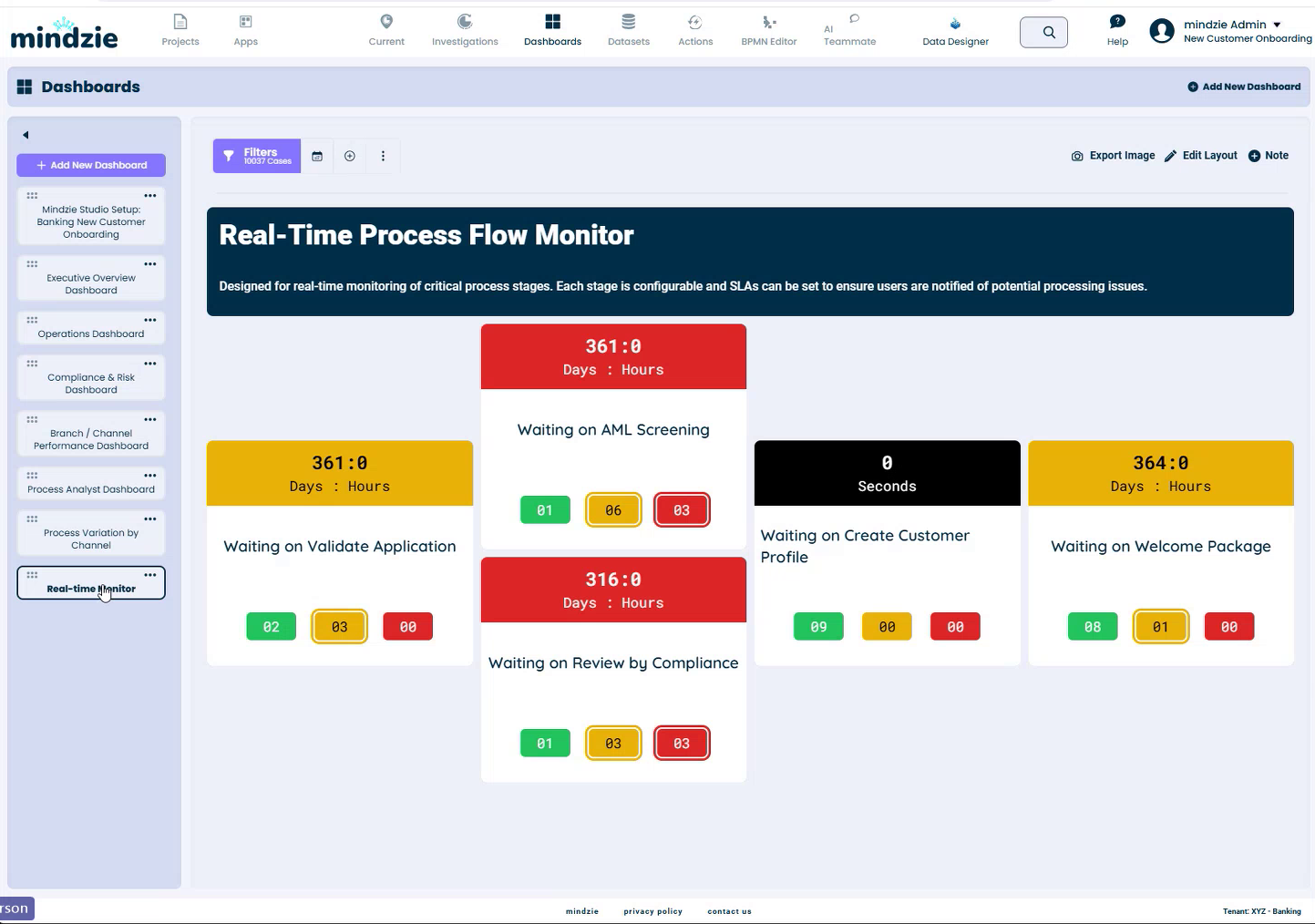
For organizations doing continuous process monitoring, the Real-Time Process Flow Monitor provides command center-style visibility.
Features
- Visual Pipeline: See cases flowing through critical process stages
- SLA Indicators: Color-coded status (green/yellow/red) based on configurable thresholds
- Case Counts: Real-time counts at each stage
- Drill-Down: Click any stage to see individual cases
- Actions: Take action directly from the monitor (email, Teams, text messages)
This feature was originally designed for healthcare patient flow monitoring and is now used across industries including insurance claims processing, customer onboarding, and order fulfillment.
Actions Engine
The Actions Engine automates responses based on process insights.
Trigger Types
- Metric thresholds (e.g., when average cycle time exceeds X)
- Schedule-based (daily, weekly, monthly reports)
- Event-based (new cases meeting specific criteria)
Action Types
- Email notifications
- Microsoft Teams messages
- Text messages (SMS)
- Webhook calls to third-party systems
- Report generation and distribution
BPMN Editor
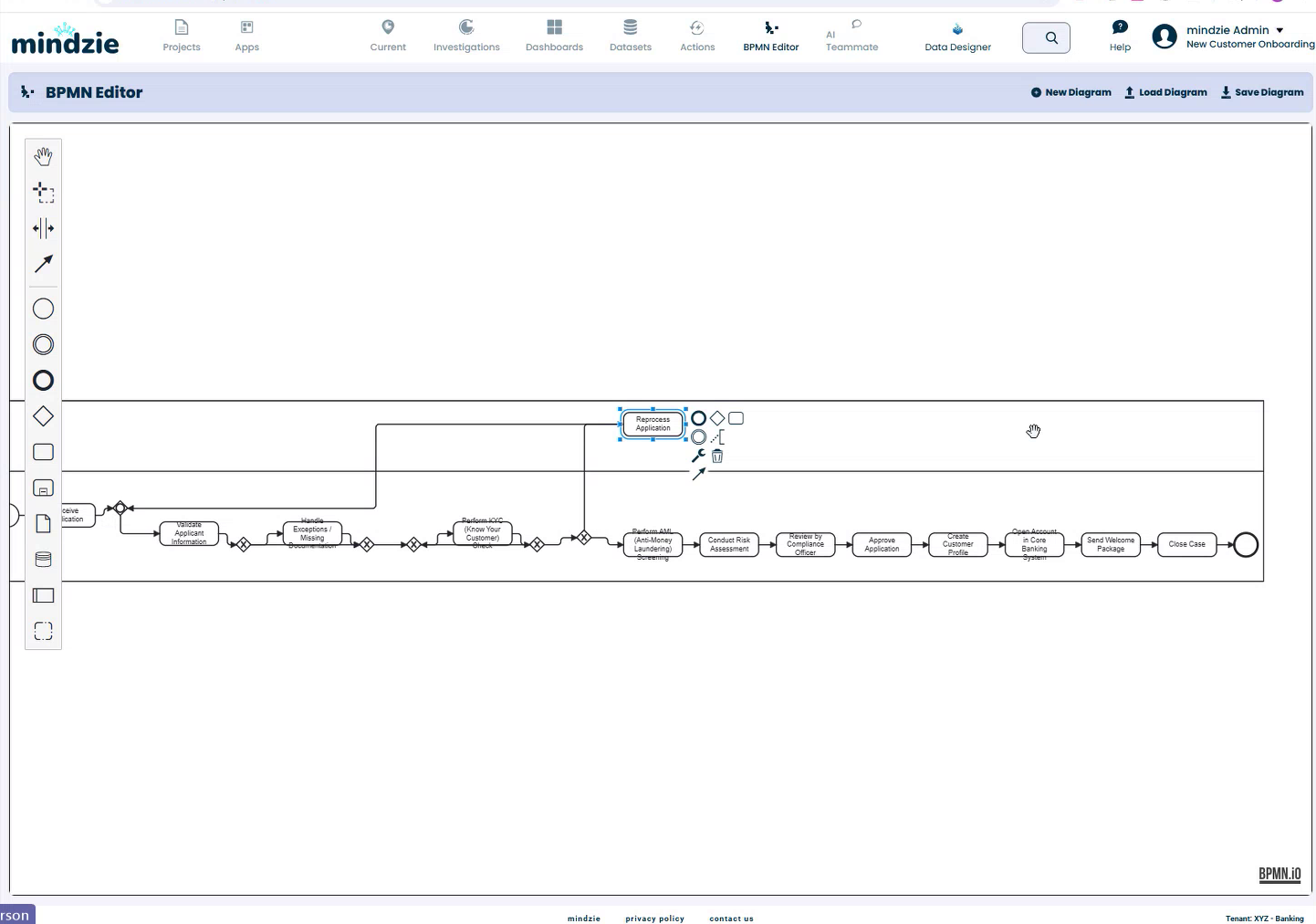
mindzie includes a full BPMN 2.0 editor for process modeling and documentation.
Capabilities
- Generate BPMN diagrams automatically from process data
- Edit and annotate generated diagrams
- Create new diagrams from scratch
- Export BPMN 2.0 compatible files
- Integrate with enterprise architecture tools
Some organizations use this feature to automatically refresh process diagrams in their enterprise architecture repositories, ensuring documentation stays current with actual process execution.
Security and Compliance
mindzie is built for data-sensitive industries with comprehensive security features:
Data Security
- Multi-tenant architecture with per-tenant encryption keys
- Data anonymization tools for obfuscating sensitive fields
- Role-based access control
- Audit logging
Compliance
- Annual penetration testing
- Third-party security auditing
- Security documentation and guides available
- Support for air-gapped on-premise deployments
AI Privacy
AI features can be:
- Disabled entirely for organizations not permitted to use AI
- Configured to use organization-provided AI models
- Pointed to local LLM servers for fully on-premise AI
Getting Started
Now that you understand the mindzie platform, here are recommended next steps:
- User Login: Learn how to access your mindzie environment
- Projects: Understand how to organize your work
- Data Overview: Learn about working with datasets
- Log Enrichment: Explore data enrichment capabilities
- Filters: Master data filtering techniques
- Calculators: Discover visualization and analysis options
Support
If you have questions about mindzie:
- Email: support@mindzie.com
- Visit: mindzie.com