Process Information
Why Use Process Information?
Process Information is how you tell mindzieStudio what kind of business process this dataset represents. A 30-second investment here unlocks features across the entire platform - and skipping it leaves a generic, context-free dataset that is harder for everyone to use.
By configuring Process Information you gain:
- Industry benchmarks - calculators and dashboards can compare your numbers (cycle time, cost, conformance) to published benchmarks for your process type
- Better AI suggestions in every other tab - costs, expected order, and performance targets all use the process type and industry to make smarter recommendations
- Meaningful labels throughout the application - dashboards, dataset listings, and reports show your process by its real business name, not the source filename
- Faster onboarding for teammates - other users in your tenant can immediately tell what the dataset is about
- Stronger searchability - process type and industry tags make the dataset easier to find later
It is the single highest-value field-fill in the wizard: small effort, broad payoff.
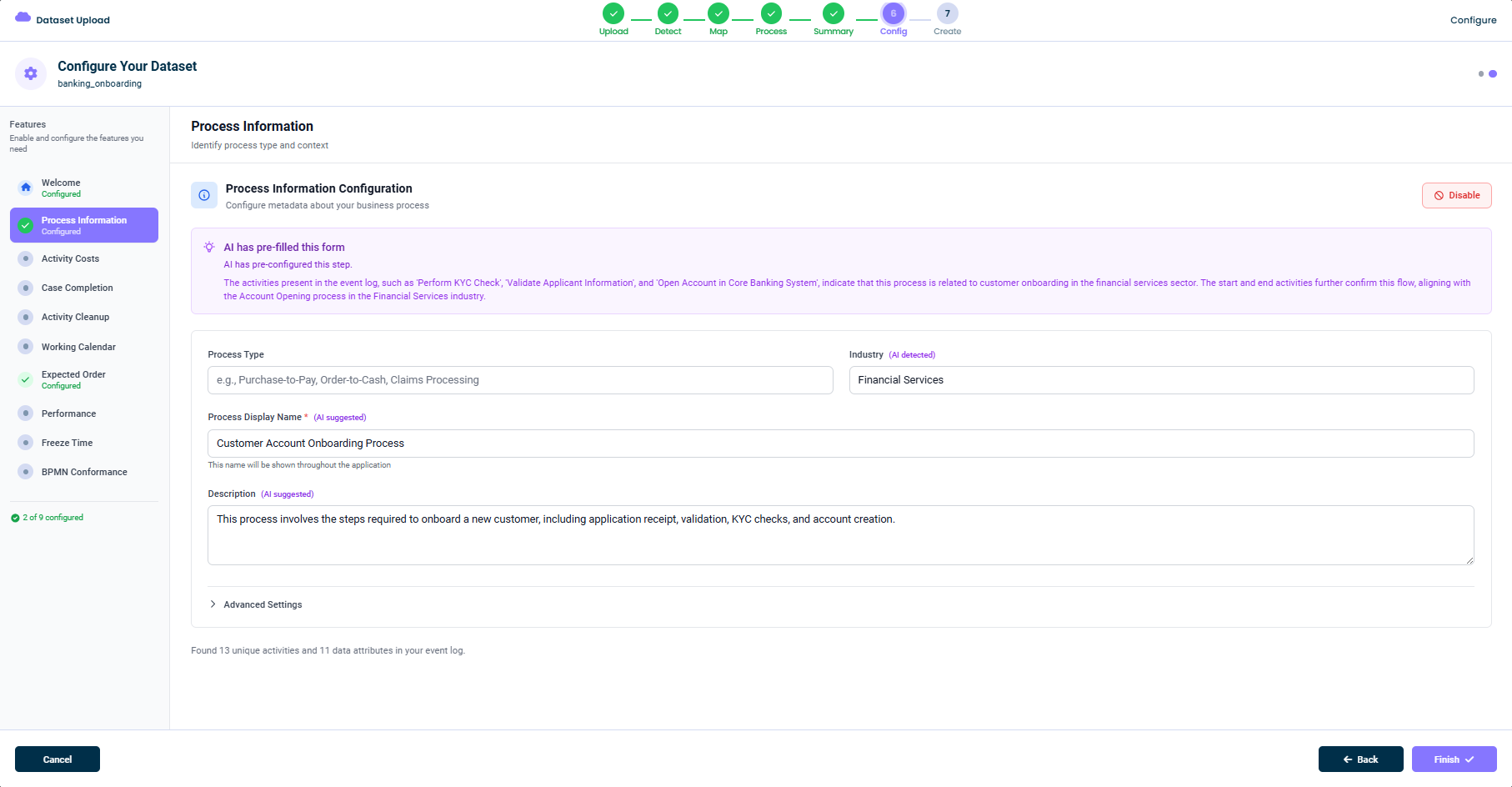
What This Tab Does
In this tab you provide:
- Process Type - The kind of business process this dataset represents (Purchase-to-Pay, Order-to-Cash, Claims Processing, KYC, etc.)
- Industry - The industry your organization operates in (Financial Services, Manufacturing, Healthcare, etc.)
- Process Display Name - A human-friendly name shown throughout mindzieStudio
- Description - A short narrative description of what this process does
This information turns a generic event log into something specific to your business.
AI Pre-fill
mindzie AI inspects your activity names and event patterns to pre-fill this form for you. The purple "AI has pre-filled this form" banner explains what AI detected. For example:
The activities present in the event log, such as 'Perform KYC Check', 'Validate Applicant Information', and 'Open Account in Core Banking System', indicate that this process is related to customer onboarding in the financial services sector.
Each AI-suggested field is labeled with (AI suggested) or (AI detected) so you can tell which values came from AI and adjust them if needed.
The Fields
Process Type
A short label describing the kind of process. Examples include:
Purchase-to-PayOrder-to-CashClaims ProcessingCustomer OnboardingService Request Management
You can either pick from common process types or type your own.
Industry
The industry your organization operates in. mindzie AI uses this to apply industry-specific benchmarks (for example, average invoice cycle times in Financial Services).
Process Display Name
The user-facing name for this process. It appears in dashboards, dataset listings, and reports. Pick something clear and descriptive - e.g. Customer Account Onboarding Process.
Description
A short narrative description of the process. This helps other users in your tenant understand what the dataset is about. The AI suggestion is usually a great starting point.
Advanced Settings
The Advanced Settings section (collapsed by default) lets you fine-tune additional process metadata. Open it only if you need to override the defaults.
Disabling This Feature
If you don't want to set process information, click Disable in the top-right of the configuration card. The dataset will be created without process metadata, and you can add it later from the dataset settings.
Tips
- Trust the AI suggestion if your activity names are descriptive
- Use plain English for the display name - it's user-facing
- Don't worry about getting it perfect - it's easy to edit later
This documentation is part of the mindzieStudio process mining platform.