Performance
Why Use Performance Targets?
Performance Targets are how you turn a process map into a management tool. By defining target durations for the activity-to-activity transitions that matter most, you let mindzieStudio automatically flag bottlenecks, slow handoffs, and SLA violations - and benchmark your numbers against industry medians. Without targets, "slow" is subjective; with targets, "slow" is a number you can act on.
Configure Performance Targets to gain:
- Automatic bottleneck detection - mindzieStudio flags activity pairs whose duration exceeds your target
- SLA dashboards - on-time vs. late reporting on the handoffs that matter
- Industry benchmark comparisons - your average vs. median and best-in-class for your process type
- Improvement prioritization - focus on the pairs with the biggest gap between actual and target
- What-If simulations - estimate the impact of speeding up a specific handoff
- Stakeholder-aligned metrics - the targets reflect business expectations, not arbitrary statistics
This is where process mining starts driving operational decisions, not just descriptive insights.
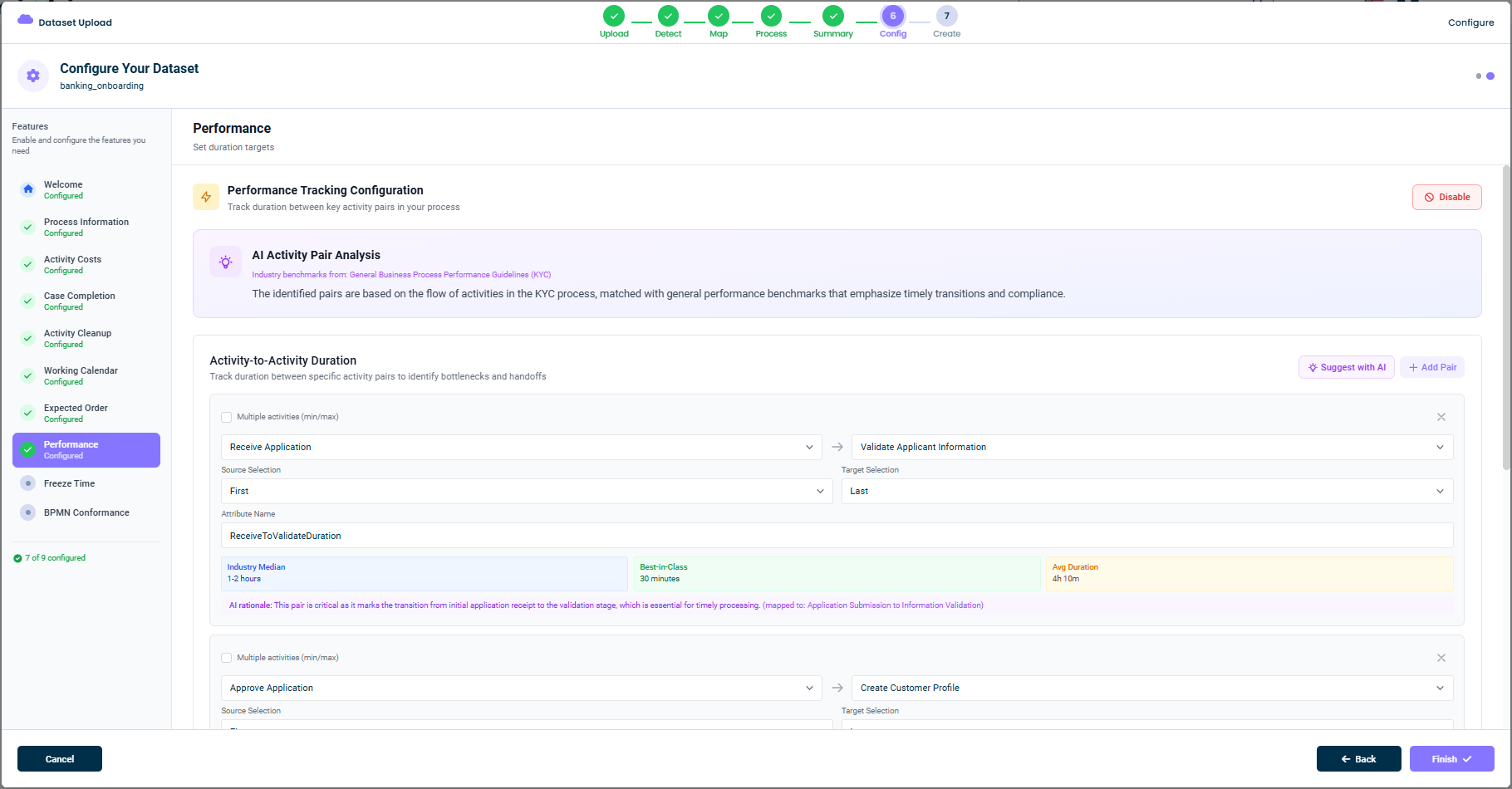
What This Tab Does
In the Performance tab you define activity pairs with target durations. For each pair you specify:
- The source activity and which event to use (first or last occurrence in the case)
- The target activity and which event to use
- A target duration (with min/max values)
- A descriptive attribute name for the resulting metric
- An AI rationale explaining why this pair matters
mindzieStudio then computes the duration between the two activities for every case, compares it to the target, and flags cases that exceed the threshold.
AI Activity Pair Analysis
When you open the tab, mindzie AI analyzes your activity flow and proposes activity pairs based on industry benchmarks. A purple panel explains the source. For example:
Industry benchmarks from: General Business Process Performance Guidelines (KYC)
The identified pairs are based on the flow of activities in the KYC process, matched with general performance benchmarks that emphasize timely transitions and compliance.
Each suggestion comes with:
- A best-in-class benchmark (e.g.
30 minutes) - An industry median range (e.g.
1-2 hours) - An average duration observed in your event log (e.g.
4h 10m) - A short AI rationale explaining the business importance of the pair
Activity-to-Activity Duration
The main panel shows one card per activity pair. Each card has:
- A source activity dropdown - the activity that starts the timer
- A source selection (
First/Last/ etc.) - which occurrence of the source to use - A target activity dropdown - the activity that stops the timer
- A target selection (
First/Last/ etc.) - which occurrence of the target to use - An attribute name field - the name used for the resulting metric
- A multiple activities (min/max) option - for advanced cases where the source or target is a set of activities
- The AI benchmark panel showing industry median, best-in-class, and your actual average
You can:
- Edit any field to override AI suggestions
- Suggest with AI (top-right) to ask mindzie AI for additional pairs
- Add Pair (top-right) to manually create a new activity pair
- Remove a pair by clicking the X icon
Configuring a Pair
To set up an activity pair manually:
- Choose the source activity (e.g.
Receive Application) - Choose First or Last for the source
- Choose the target activity (e.g.
Validate Applicant Information) - Choose First or Last for the target
- Give the metric a clear attribute name (e.g.
ReceiveToValidateDuration) - Save the pair
Once saved, mindzieStudio will compute the duration for every case and make it available as an event/case attribute that you can use in calculators, filters, and dashboards.
Disabling This Feature
If you don't need performance tracking, click Disable in the top-right. The dataset will be created without performance targets, and bottleneck detection won't be available.
Tips
- Trust the AI's suggested pairs - they are based on the industry benchmarks for your process type
- Pick handoffs that matter to the business - the most valuable pairs are the ones with clear ownership and SLAs
- Use descriptive attribute names - they show up everywhere in mindzieStudio
- Add pairs over time - you don't need them all at once
This documentation is part of the mindzieStudio process mining platform.