Expected Order
Why Use Expected Order?
Expected Order is what lets mindzieStudio answer the question every business actually wants answered: "How often does this process run the way it's supposed to?" By defining the ideal sequence of activities once, you unlock a whole class of conformance, deviation, and rework analysis that simply isn't possible without it.
Configure Expected Order to gain:
- Deviation detection - find cases where activities happened in the wrong order
- Rework and loop-back analysis - identify activities being repeated when they shouldn't be
- Compliance reporting - measure how often the process actually follows the playbook
- Conformance scores per case and per variant - rank execution paths by how well they match the design
- Targeted improvement priorities - focus on the deviations that hurt the most cases
- Audit-ready evidence - documented adherence numbers for regulators and reviewers
This is one of the highest-value optional features for any business that has a defined "standard process" it wants to enforce or improve. Without it, conformance analysis falls back to descriptive ("here's what happens") instead of prescriptive ("here's where reality breaks the rules").
What This Tab Does
You provide the order in which activities are supposed to happen in a perfect-path execution of your process. mindzieStudio then compares actual cases to that ideal order to identify:
- Deviations - activities that happened in the wrong order
- Skips - activities that should have happened but didn't
- Rework and loop-backs - activities that occurred multiple times when they shouldn't have
- Insertions - unexpected activities that shouldn't be in the path
- Conformance issues - any pattern that doesn't match the ideal flow
Expected Order powers calculators and enrichments such as Wrong Activity Order, Conformance Issue, and the broader conformance analysis tools.
Enabling Expected Order
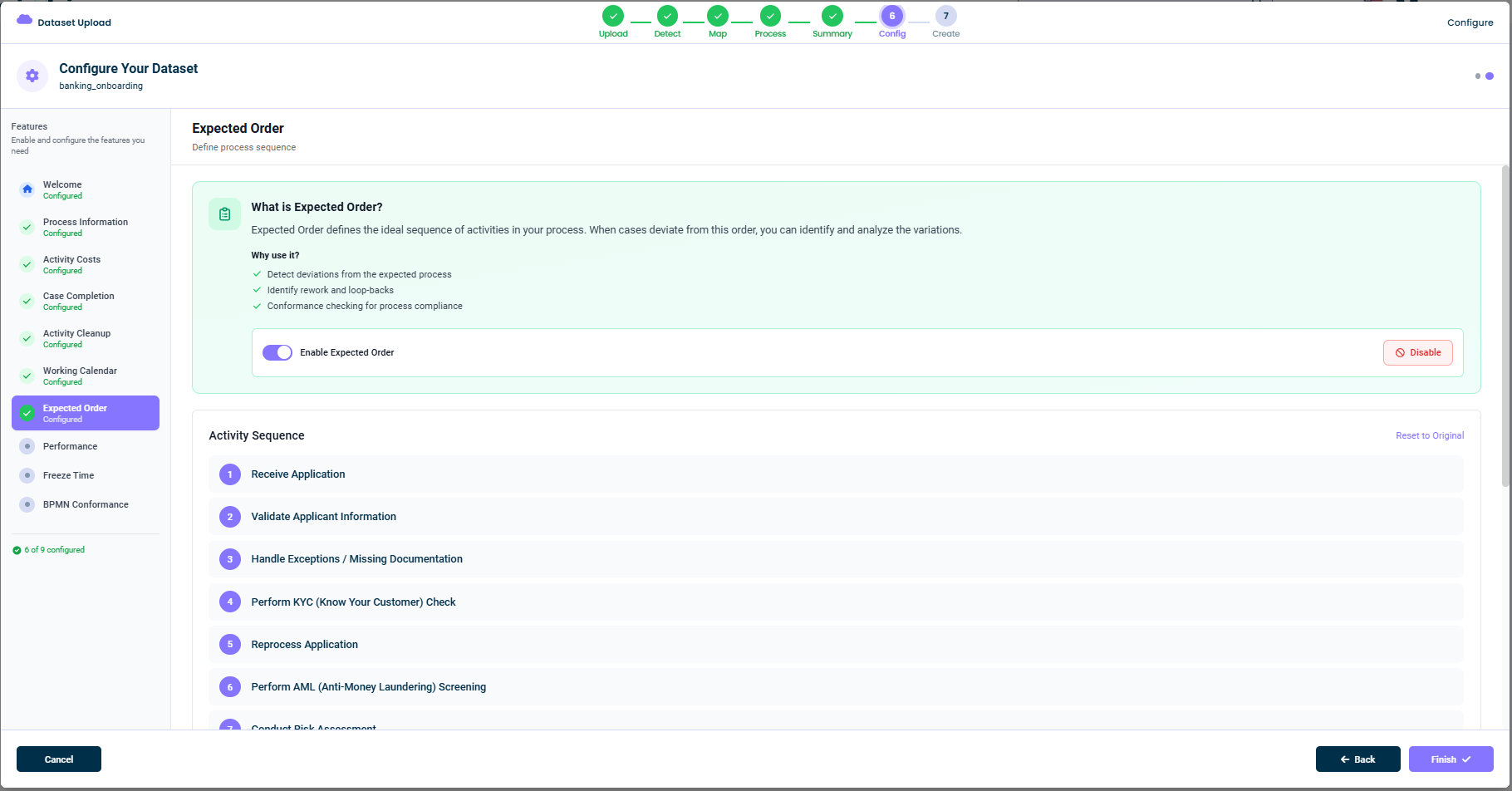
Toggle Enable Expected Order on at the top of the tab. The Activity Sequence editor appears once it is enabled.
Activity Sequence
The Activity Sequence panel lists all the activities found in your event log, numbered in the suggested order. For example:
- Receive Application
- Validate Applicant Information
- Handle Exceptions / Missing Documentation
- Perform KYC (Know Your Customer) Check
- Reprocess Application
- Perform AML (Anti-Money Laundering) Screening
- Conduct Risk Assessment
- ...
You can:
- Drag rows to rearrange them
- Reset to Original (in the top-right) to go back to the AI suggestion
- Skip activities that should not be part of the expected order
AI Suggestions
When you open the tab, mindzie AI proposes an order based on:
- The most common sequence across cases
- Activity names that suggest natural ordering (e.g.
ReceivebeforeValidatebeforeApprove) - The known patterns of the identified process type
Use the suggestion as a starting point and tweak as needed.
Disabling This Feature
If conformance is not relevant for your dataset, click Disable in the top-right. The dataset will be created without an expected order, and conformance-based metrics will not be available.
Examples
Procure-to-Pay
- Create Purchase Requisition
- Approve Requisition
- Create Purchase Order
- Receive Goods
- Receive Invoice
- Match Invoice
- Approve Invoice
- Pay Invoice
Customer Onboarding
- Receive Application
- Validate Applicant Information
- Perform KYC Check
- Conduct Risk Assessment
- Approve Application
- Open Account in Core Banking System
- Close Case
IT Service Management
- Open Ticket
- Categorize Ticket
- Assign Owner
- Investigate
- Resolve Ticket
- Close Ticket
Tips
- Use the AI suggestion as a starting point - it usually nails the broad order
- Be realistic, not aspirational - the order should reflect how the process should run, not how you wish it ran
- Skip activities that aren't always present - they will be treated as optional
- Re-check the order periodically - business processes change
This documentation is part of the mindzieStudio process mining platform.