Case Completion
Why Use Case Completion?
Case Completion is the highest-leverage configuration in the wizard. It tells mindzieStudio which activities mark the end of a case - and that single decision determines whether your cycle time, SLA, and case-status numbers are trustworthy or misleading. If you only configure one optional feature, this is the one to pick.
Configure Case Completion to gain:
- Accurate cycle times - duration measured from start to actual completion, not from start to "now"
- Open vs. closed reporting - know exactly how many cases are still in flight versus done
- Working SLA dashboards - on-time vs. late metrics that only count completed cases
- Trustworthy bottleneck analysis - long open cases stop being mistaken for slow processes
- Meaningful Case Closed and Case Duration calculators
- Realistic forecasting - use closed-case durations to predict how long open cases will take
Without case completion, every long-running case looks broken - because mindzieStudio treats it as still in progress and keeps the duration counter running. Case Completion separates "stuck" from "still open and on track."
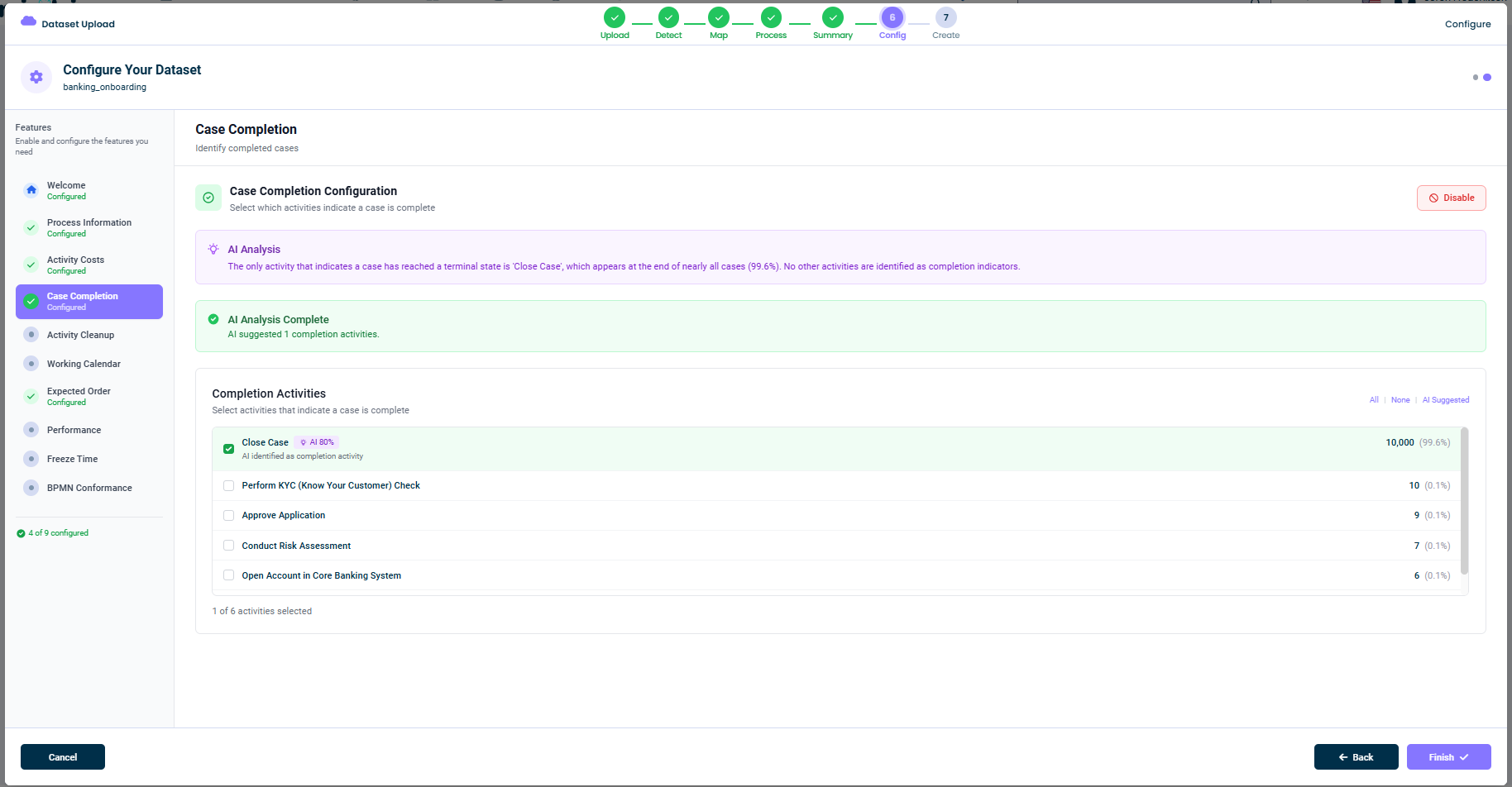
What This Tab Does
A case is "complete" when it reaches a terminal activity that means the work is done. For example, in an onboarding process, the case is complete when the activity Close Case happens. mindzieStudio uses your selected completion activities to:
- Distinguish between open and closed cases
- Calculate accurate cycle times (only for closed cases)
- Track SLA compliance for completed work
- Drive case status dashboards
- Power calculators like Case Closed, Case Duration, and Days of Sales Outstanding
AI Analysis
When you open this tab, mindzie AI examines your event log and suggests completion activities. A purple banner explains the analysis. For example:
The only activity that indicates a case has reached a terminal state is 'Close Case', which appears at the end of nearly all cases (99.6%). No other activities are identified as completion indicators.
mindzie AI looks at:
- Activity names that suggest finality (
Close,Complete,Finalize,Resolve,Archive, etc.) - Position in the case - activities that frequently appear at the end
- Frequency at the end - how often a given activity is the last activity in its case
A green AI Analysis Complete confirmation tells you how many activities mindzie AI suggested.
The Completion Activities List
The main panel shows every activity in your event log along with how often each one appears as the last activity in its case. For each row you see:
- The activity name
- An AI badge (e.g.
AI 80%) on AI-suggested activities, with a confidence score - The end count - how many cases end with this activity (e.g.
10,000) - The end percentage - what fraction of cases end with this activity (e.g.
99.6%)
You select the activities that mark completion by checking the box next to each one. Multiple selections are allowed - many processes have several "happy path" terminal activities.
Quick Selection Helpers
In the top-right of the list you have three quick selectors:
- All - Select every activity (rarely useful)
- None - Clear all selections
- AI Suggested - Select only the AI-suggested activities
Examples
Here are some common patterns:
- Order-to-Cash:
Order Delivered,Invoice Paid - Procure-to-Pay:
Payment Issued,Invoice Closed - Customer Onboarding:
Account Activated,Close Case - IT Service Management:
Ticket Resolved,Ticket Closed - Insurance Claims:
Claim Paid,Claim Denied,Claim Closed
Disabling This Feature
If completion activities don't make sense for your data (for example, if every case is open-ended), click Disable in the top-right. mindzieStudio will treat every case as still in progress, and cycle time metrics will be unavailable.
Tips
- Trust the AI suggestion when confidence is high (>80%)
- Add multiple completion activities if your process has several "happy path" endings
- Don't include activities that are sometimes terminal - only those that always mean completion
- Re-check after major data changes - new activities may need to be added
This documentation is part of the mindzieStudio process mining platform.