Activity Cleanup
Why Use Activity Cleanup?
Activity Cleanup is what makes the difference between a process map you can actually read and a "spaghetti map" that nobody trusts. Real-world event logs are full of system noise, naming inconsistencies, and near-duplicates - and every one of those issues compounds across the rest of your analysis. A few minutes of cleanup pays back every time someone opens a process map, runs a variant analysis, or builds a conformance report.
Configure Activity Cleanup to gain:
- Readable process maps - fewer junk nodes, clearer flow, less visual clutter
- Meaningful variant analysis - similar paths collapse into the same variant instead of fragmenting into hundreds
- Trustworthy conformance scores - the model lines up with real activities instead of being defeated by typos
- Stable performance metrics - counts and durations are not split across naming variants
- Better AI suggestions everywhere else - cleaner activity names lead to better suggestions in every other tab
- Less analyst confusion - one canonical name for each business action, instead of three near-duplicates
Without cleanup, the noise stays in every chart you build forever - so this is one of the few configuration choices that gets harder to fix the longer you wait.
What This Tab Does
Activity cleanup gives you two complementary tools:
- Remove Activities - Drop activities that are noise (system pings, notifications, audit log entries, etc.) before any analysis runs.
- Rename Activities - Standardize naming so similar activities collapse into one (e.g., merging
ApproveandApprovedinto a single canonical name).
Both operations happen during dataset creation, so the cleaned-up version is what mindzieStudio analyzes from then on.
AI Analysis
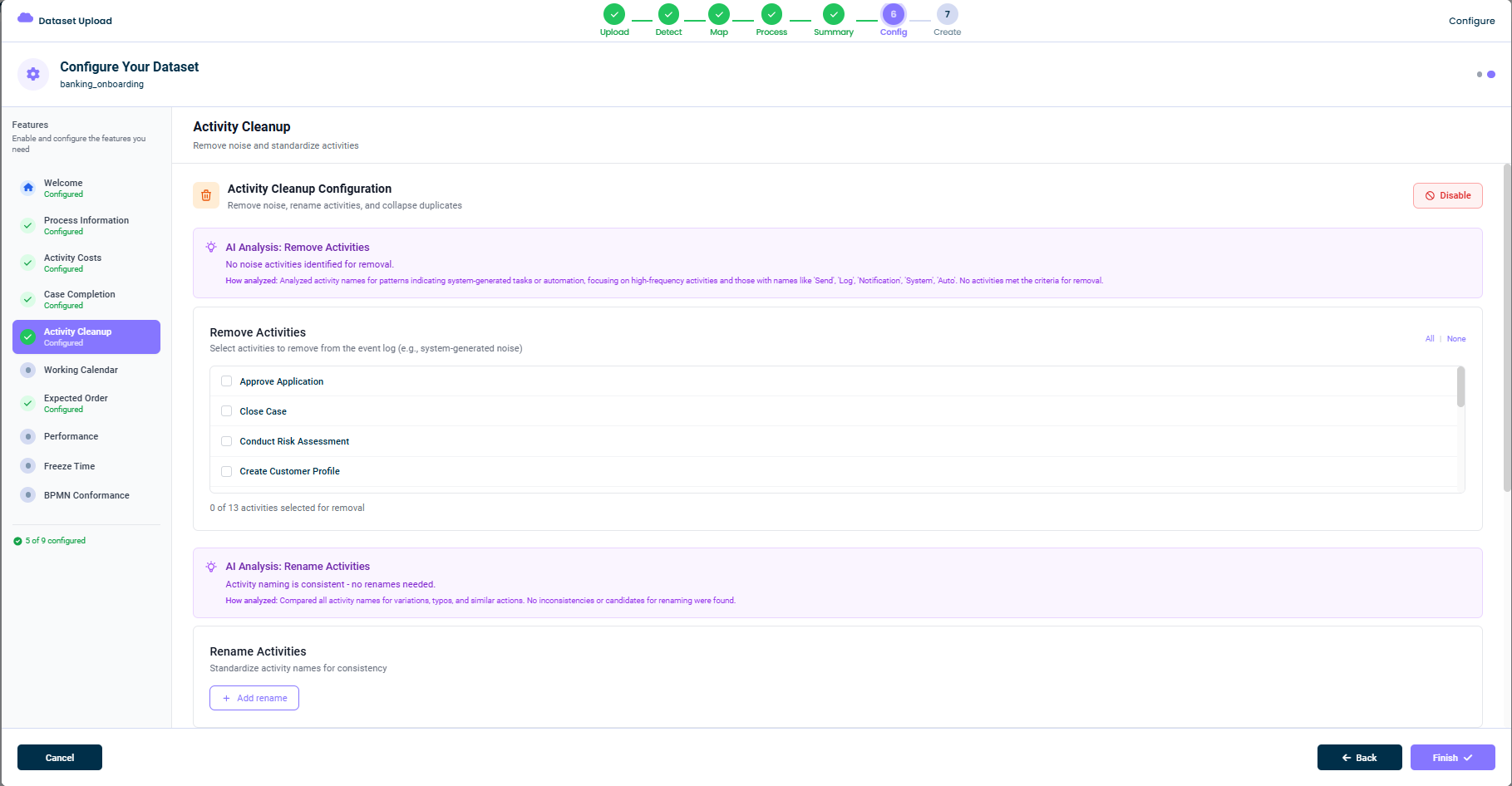
When you open this tab, mindzie AI analyzes your activity names to suggest cleanups. You will see two purple banners:
AI Analysis: Remove Activities
mindzie AI scans for activities whose names look like noise:
Analyzed activity names for patterns indicating system-generated tasks or automation, focusing on high-frequency activities and those with names like 'Send', 'Log', 'Notification', 'System', 'Auto'. No activities met the criteria for removal.
If mindzie AI finds nothing to remove, the banner says so. If it does find candidates, they are flagged for your review.
AI Analysis: Rename Activities
mindzie AI also looks for naming inconsistencies:
Compared all activity names for variations, typos, and similar actions. No inconsistencies or candidates for renaming were found.
Activities that appear to be the same action with slightly different names (Approve vs Approved, Send Email vs Send Notification, etc.) are suggested for merging.
Remove Activities
The Remove Activities panel lists every activity in your event log with a checkbox next to each one.
To remove an activity:
- Find the activity in the list (use scroll or search)
- Check the box to mark it for removal
- Continue selecting more if needed
In the top-right, you have All / None quick selectors. The bottom of the panel shows a count: 0 of 13 activities selected for removal.
What Gets Removed
When you select activities for removal, every event with that activity name is dropped from the dataset. This means:
- The activity will not appear on process maps
- The activity will not appear in variant analysis
- Cases that previously contained only the removed activity may shrink to zero events (and effectively disappear)
Common Removal Candidates
- System notifications (
Send Email,Log Event,Audit Trail) - Internal pings (
Heartbeat,Status Check) - Auto-generated noise (
Auto Save,Background Sync) - Unrelated activities that leaked in from upstream systems
Rename Activities
The Rename Activities panel lets you standardize naming. You start by clicking + Add rename, then specify:
- The original name (the activity as it appears in the data)
- The new name (the canonical version you want)
You can add as many renames as you need. Renames apply during dataset creation, so the canonical names are what shows up in every chart and calculator.
Common Rename Patterns
- Past vs. present tense:
ApproveandApproved->Approve - Casing differences:
submit invoiceandSubmit Invoice->Submit Invoice - Vendor-specific labels:
SAP ApproveandManual Approve->Approve - Localization:
ApprouverandApprove->Approve(if you want a single language)
Disabling This Feature
If you don't need any cleanup, click Disable in the top-right. The dataset will be created with all activities exactly as they appear in the source data.
Tips
- Start with AI suggestions - mindzie AI is good at flagging obvious noise
- Be conservative when removing - it's easier to add back than to discover hidden patterns later
- Standardize names before deep analysis - it pays off across every calculator
- Document your renames - so future analysts understand what was canonicalized
This documentation is part of the mindzieStudio process mining platform.