Generate Synthetic Data
The Generate Synthetic Data feature creates entirely new, fabricated datasets that preserve the statistical properties of your original data without containing any actual values from your source. This is useful for:
- Demos - Create realistic-looking data to showcase your process mining capabilities
- Testing - Generate test datasets with known properties
- Sharing - Share data patterns externally without exposing sensitive information
- Training - Create training datasets for machine learning models
Important: This is NOT anonymization. Synthetic data is completely fabricated - no original data values exist in the output. The synthetic dataset is safe to share externally.
How to Access
- Navigate to the Datasets page
- Click the three-dot menu on any dataset
- Select Generate Synthetic Data
Configuration Options
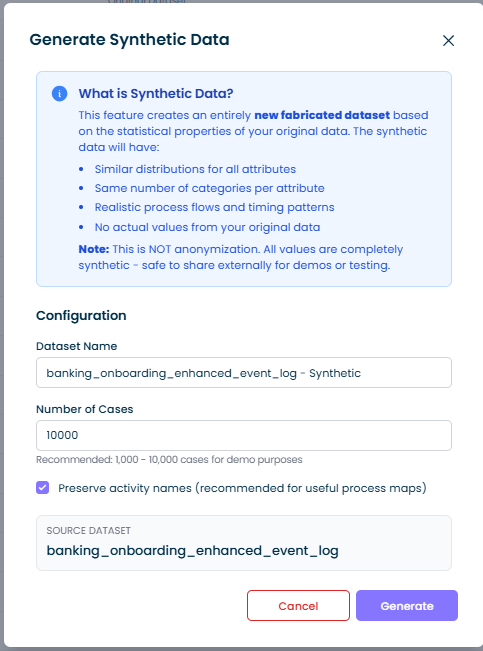
Dataset Name
The name for your synthetic dataset. By default, this is set to your source dataset name with " - Synthetic" appended.
Number of Cases
Specify how many cases to generate in the synthetic dataset:
- Minimum: 100 cases
- Maximum: 100,000 cases
- Recommended: 1,000 - 10,000 cases for demo purposes
Larger datasets take longer to generate and result in bigger file downloads.
Preserve Activity Names
When enabled (recommended), the synthetic dataset keeps your original activity names like "Submit Order", "Review Application", etc. This produces useful process maps that reflect your actual process flow.
When disabled, activity names are replaced with generic labels like "Activity_1", "Activity_2", etc. Use this option if even your activity names contain sensitive information.
What Gets Generated
The synthetic data generator analyzes your source dataset and creates new data with:
| Element | How It's Generated |
|---|---|
| Case IDs | New sequential IDs: Case_1, Case_2, etc. |
| Activity Names | Preserved from source (or anonymized if option disabled) |
| Timestamps | Realistic dates with similar duration patterns between activities |
| Text Attributes | Replaced with generic values like Customer_1, Region_2, etc. while preserving the distribution (if 60% of cases were "High Priority", approximately 60% of synthetic cases will have Priority_1) |
| Numeric Attributes | Generated with similar statistical properties (mean, spread, min/max range) |
| Process Flow | Activity sequences sampled from your actual process variants |
What's NOT Included
Calculated columns are excluded from the synthetic output since they would be recalculated when you import the data into mindzieStudio.
Output
When you click Generate, mindzieStudio will:
- Analyze your source data to extract statistical patterns
- Generate the specified number of synthetic cases
- Automatically download the result as a CSV file
The download filename matches your Dataset Name with a .csv extension.
Example
Source data:
CaseId,Activity,Timestamp,Customer,Amount
C001,Submit,2024-01-01 09:00,Acme Corp,1500.00
C001,Review,2024-01-01 11:00,Acme Corp,1500.00
C002,Submit,2024-01-02 10:00,Beta Inc,2300.00
Synthetic output (with Preserve Activity Names enabled):
CaseId,Activity,Timestamp,Customer,Amount
Case_1,Submit,2020-03-15 14:23,Customer_1,1842.37
Case_1,Review,2020-03-15 16:45,Customer_1,1842.37
Case_2,Submit,2020-07-22 09:12,Customer_2,1523.89
Notice:
- Activity names are preserved
- Customer names are replaced with generic
Customer_1,Customer_2 - Amounts are similar in range but fabricated
- Timestamps are realistic but entirely new
Use Cases
Creating Demo Datasets
Generate synthetic data from your production process to create safe demo datasets that showcase real process patterns without exposing actual business data.
Sharing with External Consultants
When working with external process mining consultants or vendors, share synthetic datasets that preserve your process characteristics without revealing sensitive information.
Performance Testing
Generate large synthetic datasets (50,000+ cases) to test how your notebooks and dashboards perform with bigger data volumes.
Training and Education
Create synthetic datasets for training new team members on process mining concepts using realistic but safe data.