Data Architecture
The data architecture shows how process data flows into mindzieStudio, gets transformed through enrichment, and can be exported or used to trigger automated actions. Understanding these data pathways helps you design effective data integration strategies.
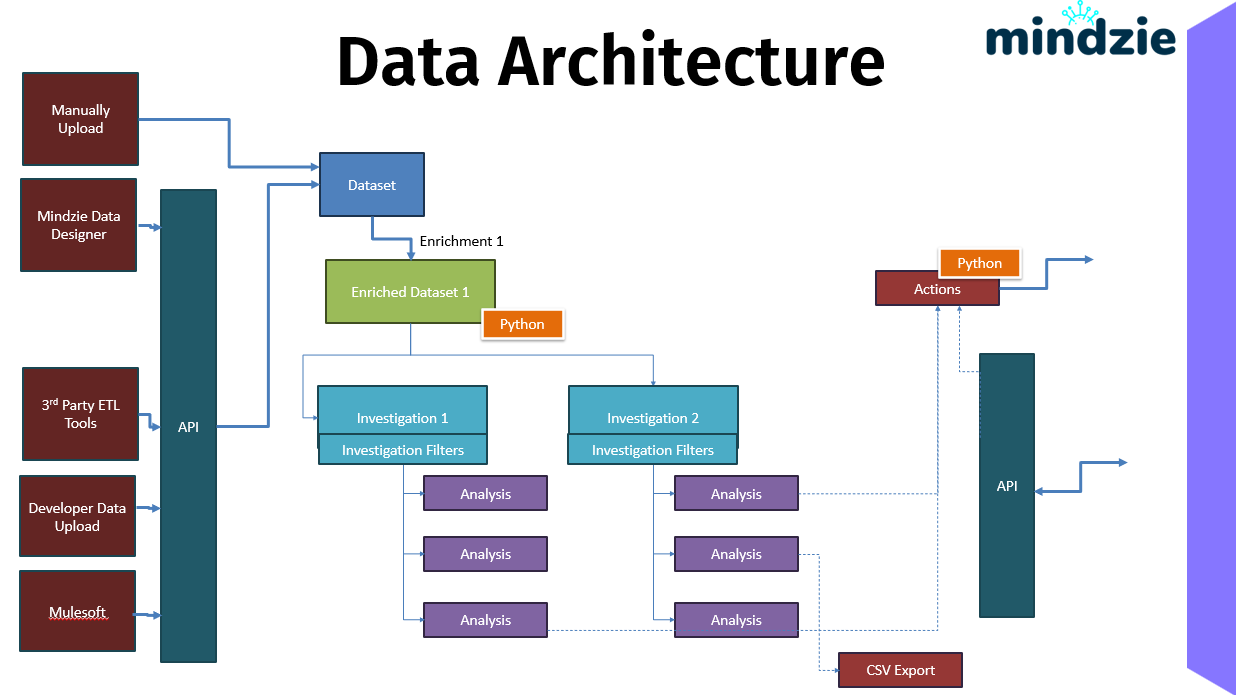
Overview
mindzieStudio supports multiple data input methods, a centralized API layer, and various output options. This flexible architecture allows you to integrate process mining into your existing data ecosystem.
Data Input Sources
There are several ways to bring process data into mindzieStudio:
Manual Upload
The simplest approach is to upload files directly through the mindzieStudio interface. Supported formats include:
- CSV files: Standard comma-separated values
- Excel files: .xlsx spreadsheets
- Parquet files: Columnar storage format for large datasets
- ZIP archives: Compressed packages containing multiple files
Manual upload is ideal for ad-hoc analysis, proof-of-concept projects, or when data is already exported from source systems.
mindzie Data Designer
mindzie Data Designer is a visual tool that connects directly to your source databases and systems. It allows you to:
- Define data schemas visually
- Map source columns to event log format
- Schedule automated data refreshes
- Transform data during extraction
Data Designer supports connections to major databases including SQL Server, Oracle, PostgreSQL, MySQL, SAP HANA, and many others.
3rd Party ETL Tools
If your organization already has ETL (Extract, Transform, Load) infrastructure, you can integrate with mindzieStudio through standard data pipelines. This approach leverages your existing data engineering capabilities and governance processes.
Developer Data Upload
For programmatic access, the mindzieStudio API allows developers to:
- Upload datasets via HTTP endpoints
- Automate data refresh from custom applications
- Integrate with CI/CD pipelines
- Build custom data connectors
This is ideal for organizations building automated data pipelines or integrating process mining into larger systems.
Mulesoft Integration
Enterprise organizations using Mulesoft for integration can connect mindzieStudio as an API endpoint in their integration flows. This enables process data to flow as part of your broader enterprise integration strategy.
API
The API serves as the central gateway for all data movement in mindzieStudio. All data - whether uploaded manually or via automation - flows through the API layer.
The API provides:
- Authentication: Secure access through bearer tokens
- Validation: Data format and schema validation
- Routing: Directing data to the appropriate processing components
- Access Control: Tenant and project-level permissions
The API is available in Enterprise Server and SaaS editions of mindzieStudio.
Dataset
Once data enters mindzieStudio, it is stored as a Dataset. Datasets are:
- Compressed: Efficient binary storage format
- Validated: Checked for required columns and data types
- Versioned: Previous uploads can be retained for comparison
Every dataset must include the three core event log columns:
- Case ID (identifier for each process instance)
- Activity (name of each step)
- Timestamp (when each step occurred)
Additional attribute columns can include any business-relevant data.
Enrichment with Python
The enrichment layer transforms raw datasets into analysis-ready data. Enrichments can include:
- Built-in transformation operators
- Custom Python scripts for advanced logic
- Business rule calculations
- Data quality corrections
Python Integration allows you to:
- Write custom transformation logic
- Leverage Python data science libraries
- Create reusable transformation scripts
- Handle complex data manipulation scenarios
Enrichments run in the background and cache their results for fast access during analysis.
Investigation and Analysis
The Investigation layer is where analysis happens. Within investigations, you:
- Apply investigation filters to focus on specific data subsets
- Create analysis notebooks with ordered blocks
- Generate insights through calculators
- Build visualizations
Analysis results are cached and can be refreshed when source data updates.
Output and Integration
mindzieStudio provides multiple ways to export data and integrate with external systems:
Actions
Actions are automated workflows that execute based on schedules or triggers. Actions can:
- Run Python scripts for custom processing
- Call external HTTP APIs
- Export data to external systems
- Chain multiple steps together
- Handle errors with fallback actions
Actions enable operational integration, where process insights trigger real-world responses.
API Export
External systems can query mindzieStudio via API to:
- Retrieve analysis results programmatically
- Pull dashboard data into other applications
- Integrate process metrics into reporting systems
- Power operational dashboards in external tools
CSV Export
For simple data export, you can download analysis results as CSV files. This is useful for:
- Sharing data with stakeholders who don't have mindzieStudio access
- Loading data into spreadsheet tools
- Creating backup copies of analysis results
Data Flow Summary
The complete data flow through mindzieStudio:
- Input: Data enters via Manual Upload, Data Designer, ETL tools, API, or Mulesoft
- Gateway: The API validates, authenticates, and routes the data
- Storage: Data is stored as compressed Datasets
- Transformation: Enrichments (with optional Python) prepare the data
- Analysis: Investigations and notebooks generate insights
- Output: Results flow to Actions, API consumers, or CSV exports
This architecture supports both interactive analysis and automated operational workflows, making mindzieStudio suitable for both ad-hoc exploration and production process monitoring.