BPMN Elements
The palette on the left side of the editor contains the BPMN 2.0 shapes you can add to a model. Use the toggle at the top of the palette to switch between the compact icon-only view and the wide view that shows labels. A shape with a chevron opens a flyout with more specific variants.
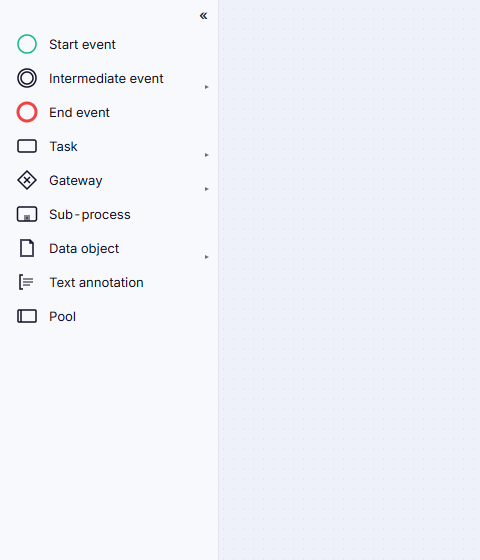
Events
Events mark things that happen during a process.
| Element | Use it for |
|---|---|
| Start event | Where the process begins. |
| Intermediate event | Something that happens mid-process. Choose between the throw variant (the process produces the event) and the catch variant (the process waits for it). |
| End event | Where a path of the process finishes. |
| Boundary event | Something that can interrupt or branch off an activity while it is running. Boundary events are not placed from the palette - select a task, sub-process, or call activity and use Attach boundary event on its context pad. |
Boundary events come in seven kinds: Message, Timer, Error, Escalation, Signal, Conditional, and Compensation.
Tasks
Tasks are the work steps of the process. The Task flyout offers the standard BPMN 2.0 task types:
| Element | Use it for |
|---|---|
| Task | A generic unit of work. |
| User task | Work a person performs in an application. |
| Service task | Work performed automatically by a system. |
| Send task | Sending a message to an outside participant. |
| Receive task | Waiting for a message from an outside participant. |
| Manual task | Work done outside any system. |
| Business rule task | Evaluating a business rule or decision. |
| Script task | An automated script step. |
| Call activity | Invoking another, separately defined process. |
Gateways
Gateways split and join the flow.
| Element | Use it for |
|---|---|
| Exclusive gateway | Exactly one outgoing path is taken. |
| Parallel gateway | All outgoing paths run at the same time. |
| Inclusive gateway | One or more outgoing paths are taken. |
| Event-based gateway | The path is decided by whichever event happens first. |
| Complex gateway | A branching condition that doesn't fit the other types. |
Containers
| Element | Use it for |
|---|---|
| Sub-process | A group of steps that form a process of their own. |
| Ad-hoc sub-process | A group of steps with no fixed order - performers decide what to do and when. |
| Transaction | A sub-process that either completes as a whole or is compensated back out. |
| Group | A visual box drawn around related elements. It has no effect on the flow. |
| Text annotation | A free-text note attached to the diagram. |
Structure
| Element | Use it for |
|---|---|
| Pool | A participant in the process - a company, department, or system. |
| Lane | A role or team inside a pool. Add lanes from the pool's context pad, and use Distribute lanes evenly to even them out. |
Data
| Element | Use it for |
|---|---|
| Data object | Information a step reads or produces. |
| Data object reference | A reference to a data object used in more than one place. |
| Data store | A place where data is kept beyond the life of the process. |
Connections
Connections are drawn on the canvas rather than picked from the palette - drag from a selected shape's connect handle onto the target.
| Connection | Use it for |
|---|---|
| Sequence flow | The order of steps inside one pool. |
| Message flow | A message passing between two pools. |
| Association | Linking an annotation or data object to the element it describes. |
Choosing the Right Element
If you place a shape and then decide it should be a different type, you do not have to delete it. Select it and press R to open Change type to..., which converts it in place and keeps its name and connections.
The Lint panel flags element choices that tend to cause trouble - an inclusive or complex gateway where a simpler one would do, a gateway that both splits and joins, or an activity that has no explicit start upstream. See Checking Your Model.